
Zscaler AI Security
Zscaler AI Security (AI Security Posture Management) discovers the AI agents running across an organization's cloud environments and source code repositories, and reports their risk level, sanction status, discovered tools and sensitive data exposure.
Use Cases the Adapter Solves
- AI agent inventory: Identify AI agents across cloud environments and source code repositories.
- Risk and governance monitoring: Review AI agent risk levels and sanction status to support governance decisions.
- Sensitive-data exposure review: Identify agents associated with sensitive data exposure and the tools they use.
Asset Types Fetched
- Agents
Data Retrieved through the Adapter
Agents - fields such as: Name, Provider Resource ID, Risk Level, Sanction Status
Before You Begin
Required Ports
- TCP port 443 (HTTPS)
Authentication Methods
OAuth 2.0 client credentials authentication: The adapter sends the Client ID and Client Secret to the ZIdentity token endpoint and uses the returned bearer token to access the AI Security API.
APIs
Axonius uses the Zscaler AI Security API. The following endpoints are called:
POST /oauth2/v1/token- Obtain an OAuth 2.0 access token from ZIdentity.GET /aisecurity/aispm/v1/assets/agents- Retrieve AI agents.GET /aisecurity/aispm/v1/assets/agents/{agent_id}- Retrieve details for each AI agent.
Required Permissions
Confirm the exact permissions required to retrieve AI-agent data with your Zscaler administrator.
Supported From Version
Supported from Axonius version [To Verify]
Setting Up Zscaler AI Security to Work with Axonius
- Create or identify OAuth 2.0 client credentials for the Zscaler AI Security API.
- Record the ZIdentity vanity domain, Client ID, and Client Secret for the API client.
- For a multi-cloud tenant, obtain the cloud name and tenant ID from the ZIdentity Admin Portal.
- Confirm that the API client has the permissions required to retrieve AI-agent data.
Connecting the Adapter in Axonius
- Navigate to the Adapter Catalog, search for Zscaler AI Security, and select the adapter.
- Click Add Connection.
- Provide the following parameters.
Required Parameters
- Zscaler OneAPI Domain - The OneAPI gateway that serves the AI Security API, including the
https://prefix. Example:https://api.zsapi.net - Vanity Domain - The ZIdentity vanity domain of your organization, used to request the OAuth 2.0 token. Example:
acmeforacme.zslogin.net - Client ID - The OAuth 2.0 Client ID for the API client.
- Client Secret - The OAuth 2.0 Client Secret for the API client.
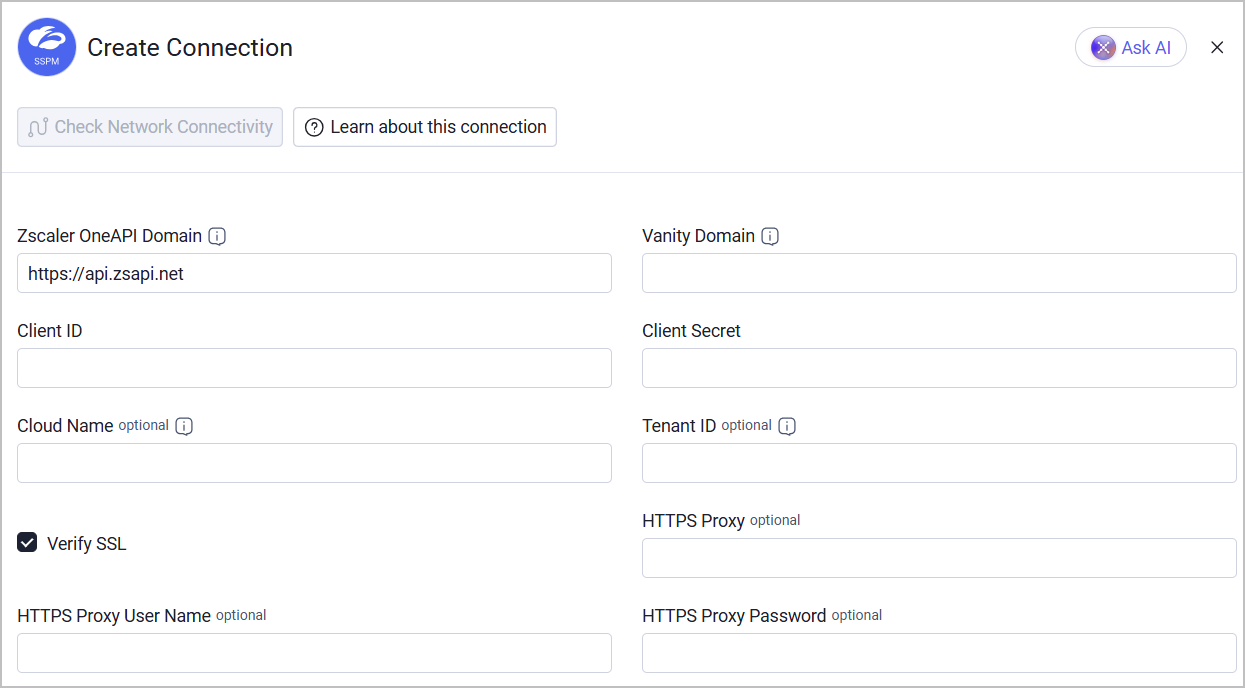
Optional Parameters
- Verify SSL (default: enabled) - Selects whether to verify the SSL certificate of the server against the CA database inside of Axonius. For more details, see SSL Trust & CA Settings.
- Cloud Name - For multi-cloud tenants, specify the Zscaler cloud where the tenant resides. Example:
zscalertwo - Tenant ID - For multi-cloud tenants, specify the tenant ID from the ZIdentity Admin Portal under Integration > API Resources.
- HTTPS Proxy - Connect the adapter to a proxy instead of directly connecting to the Zscaler OneAPI Domain.
- HTTPS Proxy User Name - The user name to use when connecting to the Zscaler OneAPI Domain through the HTTPS Proxy.
- HTTPS Proxy Password - The password to use when connecting to the Zscaler OneAPI Domain through the HTTPS Proxy.
To learn more about common adapter connection parameters and buttons, see Adding a New Adapter Connection.
Updated 8 days ago