
Rapid7 Insight AppSec
;Rapid7 Insight AppSec performs black-box security testing to identify vulnerabilities, triage vulnerabilities, prioritize actions, and remediate application risk.
Asset Types Fetched
- Devices, Aggregated Security Findings, Business Applications, SaaS Applications
APIs
Axonius uses the InsightAppSec API (v1).
Supported From Version
Supported from Axonius version 6.1
Connection Parameters
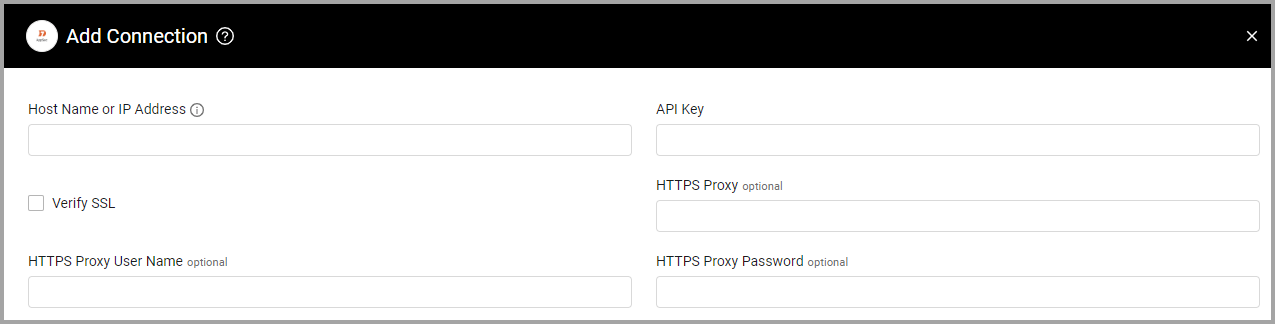
- Host Name or IP Address (required) - This is the URL of the Rapid7 Insight AppSec server. The format of the URL contains the region your Rapid7 Insight instance is hosted, followed by the Rapid7 Insight domain. Lastly, a suffix containing the product abbreviation and API version is required to fetch data. For example, where the Rapid7 Insight instance is hosted in the US-1 region, the URL would be https://us.api.insight.rapid7.com/ias/v1.
- More information about the Rapid7 Supported Regions is available here:https://docs.rapid7.com/insight/product-apis/#supported-regions
- API Key (required) - An API Key associated with a user account that has permissions to fetch assets. For information about how to create an API Key, see Managing Platform API Keys.
- Verify SSL - Select whether to verify the SSL certificate of the server against the CA database inside of Axonius. For more details, see SSL Trust & CA Settings.
- HTTPS Proxy (optional) - Connect the adapter to a proxy instead of directly connecting it to the domain.
- HTTPS Proxy User Name (optional) - The user name to use when connecting to the value supplied in Host Name or IP Address via the value supplied in HTTPS Proxy.
- HTTPS Proxy Password (optional) - The password to use when connecting to the server using the HTTPS Proxy.
To learn more about common adapter connection parameters and buttons, see Adding a New Adapter Connection.
Advanced Settings
Note
Advanced settings can either apply to all connections for this adapter, or to a specific connection. Refer to Advanced Configuration for Adapters.
Endpoints Config
Enable or disable the toggles in this section to fetch different asset types from the Apps endpoint and enrich them with additional data.
- Fetch BusinessApplications from Apps - Enable this to fetch Business Applications from the Apps endpoint. When enabled, the following settings become available
- Enrich Vulnerabilities with Modules - Enable to enrich vulnerability variances found on Business Applications with Modules information, parsed into the following fields:
- Variances - List of vulnerability variances
- Proof - Technical proof of the vulnerability
- Proof Description - Human-readable description of the proof
- Module Name - Name of the attack module that detected this variance
- Method
- Enrich Vulnerabilities with Attacks - Enable to enrich vulnerability variances found on Business Applications with Attacks information, parsed into the following fields:
- Attack Type
- Attack Description
- Enrich Apps with Scans - Enable this to fetch the asset’s Last Scan information, parsed into the following fields:
- Last Scan: Submit time
- Last Scan: Completion time
- Last Scan: Duration (Completion Time - Submit Time)
- Last Scan: Status
- Enrich Apps with Tags - Enable this to enrich the asset with tags from
ias/v1/apps/{app-id}/tags. Each tag name is added as the Key under the Adapter Tags aggregated list field.
- Enrich Vulnerabilities with Modules - Enable to enrich vulnerability variances found on Business Applications with Modules information, parsed into the following fields:
- Fetch Devices from Apps - Enable this to fetch Devices from the Apps endpoint. When enabled, the same enrichment options under Fetch BusinessApplications from Apps become available.
- Fetch URLs from Apps - Enable this to fetch URLs from the Apps endpoint. When enabled, the same enrichment options under Fetch BusinessApplications from Apps become available.
Updated 12 days ago
Did this page help you?