
Akamai CDN Cloud
Akamai CDN Cloud is a content delivery network that accelerates web and video content delivery globally.
Use Cases the Adapter Solves
- CDN Property Access Auditing: Identify which users have access to specific Akamai CDN properties and verify that access is scoped appropriately across your organization.
- Origin Server Visibility: Monitor origin server hostnames and origin types configured across all CDN properties to detect misconfigured or unauthorized origin destinations.
- Correlate CDN Assets with Network Inventory: Map Akamai CDN hostnames and properties to known network assets in Axonius for comprehensive coverage of internet-facing infrastructure.
Asset Types Fetched
This adapter fetches the following types of assets:
- Devices, Users, Load Balancers, Network Services
Data Retrieved through the Adapter
Network Services (DNS zones managed in Akamai Edge DNS)
- Name, Status, Zone Type
- IPs (master DNS servers), DNSSEC Enabled, SOA Serial Number
- DNS Records (name, type, TTL, record data)
Load Balancers (GTM domains used for global traffic management)
- Device Name, Domain Type, Status Message
- LB Properties (name, balancing method)
- Datacenters (ID, name, city)
Before You Begin
Required Ports
- TCP port 443 (HTTPS)
Authentication Methods
EdgeGrid Authentication - requires a Client Token, Client Secret, and Access Token generated from the Akamai Control Center. For details on creating these credentials, see Create authentication credentials.
APIs
Axonius uses the Akamai Identity and Access Management API v3 and the Akamai Property Manager API (PAPI). The following endpoints are called:
GET /identity-management/v3/user-admin/ui-identities- Fetch all IAM usersGET /identity-management/v3/user-admin/properties- Fetch CDN propertiesGET /identity-management/v3/user-admin/properties/{propertyId}/users- Fetch users associated with a propertyGET /papi/v1/hostnames- Fetch CDN hostnames- `Get/papi/v1/properties{propertyId}` - Fetch devices' property IDs
GET /papi/v1/properties/{propertyId}/versions/{propertyVersion}/rules- Fetch property rule tree for devices; used to retrieve Origin Server Hostname and Origin Type fieldsGET /config-dns/v2/zones- Fetch DNS zones as Network Services- `GET /config-dns/v2/zones/{zone}` - Fetch DNS zone services (under Network Services)
`GET /config-dns/v2/zones/{zone}/recordset` - Fetch DNS zone recordsets (under Network Services)GET /config-gtm/v1/domains- Fetch GTM domains as Load Balancers- `GET /config-gtm/v1/domains/{domain}` - Fetch GTM domain details (under Load Balancers)
Required Permissions
The EdgeGrid credentials must have the following permissions in Akamai Identity and Access Management:
- Identity Management (IAM) - Read access
- Property Manager API (PAPI) - Read access
To fetch Network Services or Load balancers, the following permissions are required:
- DNS Zone Record Management - Required to fetch DNS zones, zone settings, and DNS records
- GTM API - Required to fetch GTM domains and domain details
Note
Please confirm the exact permission names and scopes with your Akamai administrator or refer to your Akamai API documentation, as the publicly available API documentation does not include detailed permission information.
Setting Up Akamai CDN Cloud to Work with Axonius
- Log in to the Akamai Control Center.
- Navigate to Identity & Access > API Users & Keys.
- Click New API Client and complete the setup wizard.
- Under APIs, grant the following access:
- Identity Management - READ
- Property Manager (PAPI) - READ
- Copy the Client Token, Client Secret, and Access Token for use in Axonius.
For full instructions, see Create authentication credentials.
Connecting the Adapter in Axonius
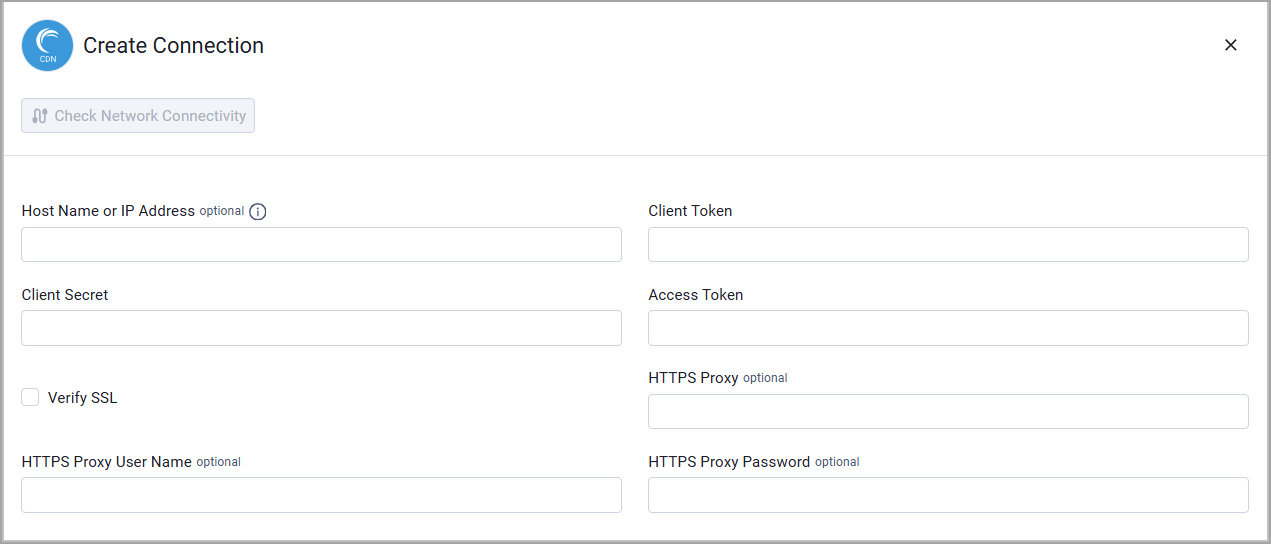
Required Parameters
-
Host Name or IP Address - The hostname or IP address of the Akamai CDN Cloud server.
-
Client Token and Client Secret - The credentials for a user account that has permission to fetch assets. For information about how to create these credentials, see Create authentication credentials.
Optional Parameters
-
Access Token - An Access Token associated with a user account that has permissions to fetch assets.
-
Verify SSL - Select whether to verify the SSL certificate of the server against the CA database inside of Axonius. For more details, see SSL Trust & CA Settings.
-
HTTPS Proxy - Connect the adapter to a proxy instead of directly connecting it to the domain.
-
HTTPS Proxy User Name - The user name to use when connecting to the value supplied in Host Name or IP Address via the value supplied in HTTPS Proxy.
-
HTTPS Proxy Password - The password to use when connecting to the server using the HTTPS Proxy.
To learn more about common adapter connection parameters and buttons, see Adding a New Adapter Connection.
Advanced Settings
Note:
Advanced settings can either apply to all connections for this adapter, or to a specific connection. Refer to Advanced Configuration for Adapters.
To learn more about Adapter Configuration tab advanced settings, see Adapter Advanced Settings.
Global Endpoints Config
DNS Zones Page Size - Enter the number of DNS zones to request per page. Set a lower value if your Akamai environment returns fewer zones per page than requested.
Endpoints Config
- Fetch Devices from Hostnames - Enable to fetch devices from the
GET /papi/v1/hostnamesendpoint. When this is enabled, the following options become available to fetch additional property details and property rules from the Akamai Property Manager API, including origin server hostnames and origin types:- Enrich Hostnames with Property Details - Enable to enrich hostname with properties available for the current contract and group.
- Enrich Hostnames with Property Rules - Enable to get the entire rule tree for a property version. Refer to the Akamai documentation on rule trees for more information.
- Fetch NetworkServices from DNS Zones - Enable to fetch network services from the ... endpoint. When this is enabled, you can also configure enrichment of DNS Zones with settings and recordsets.
- Fetch LoadBalancers from GTM Domains - Enable to fetch load balancers from the ... endpoint. When this is enabled, you can also configure enrichment of GTM Domains with domain details.
Supported From Version
Supported from Axonius version 6.1
Updated 22 days ago