
Stellar Cyber
Stellar Cyber is a security platform that provides visibility and protection against cyber threats.
Use Cases the Adapter Solves
This adapter correlates device and user data from Stellar Cyber to detect unmanaged or rogue assets within your security environment. IT aggregates incident (case) data into Axonius to enhance threat investigation and incident response and monitors the overall coverage of your network monitoring and endpoint detection solutions using up-to-date sensor inventory.
Assets Types Fetched
 Devices |
  Users |
  Alerts/Incidents
Data Retrieved through the Adapter
The following data can be obtained from the adapter
- Devices - data such as Sensor ID, Hostname, local IP Address
- Users - data such as User ID, Email address and Name
- Incidents - data such as Case ID, Name, Score, Status
Before You Begin
Ports
- TCP port 443 (HTTPS) or 80 (HTTP)
Authentication Method
Bearer Token (JWT), using a two-step exchange with a Scoped API Key.
APIs
Axonius uses the following APIs to retrieve asset data.
- Stellar Cyber REST API v1
GET {domain}/connect/api/v1/casesFetch IncidentsGET {domain}/connect/api/v1/data_sensorsFetch DevicesGET {domain}/connect/api/v1/usersFetch Users
Permissions
The following permissions are required:
The user’s Privilege Profile must have these specific menus enabled:
- “Investigate > Cases” - to fetch Alerts/Incidents.
- “System > Collection > Sensors” to fetch Devices.
- “System > Organization Management > Users” to fetch users.
The account must have an appropriate scope to fetch the required data.
Root User: To fetch data from the entire platform.
Partner User - To fetch data for all associated tenants.
Tenant User - To fetch data for their own tenancy only.
Supported From Version
Supported from Axonius version 8.0.12
Setting Up Stellar Cyber to Work with Axonius
Follow Stellar Cyber official documentation to generate a Scoped API Key, and ensure the user account has appropriate privileges. Note that API access is only available for local (non-SSO) accounts.
Connecting the Adapter in Axonius
Navigate to the Adapters page, search for Stellar Cyber, and click on the adapter tile.
Click Add Connection.
To connect the adapter in Axonius, provide the following parameters:
Required Parameters
- Host Name or IP Address - The hostname or IP address of the Stellar Cyber server. The value must include
http://orhttps://. - API Key - Scoped API Key generated from the Stellar Cyber user interface. This key is used to obtain a JWT access token.
- Connection Label - A label to identify the connection.
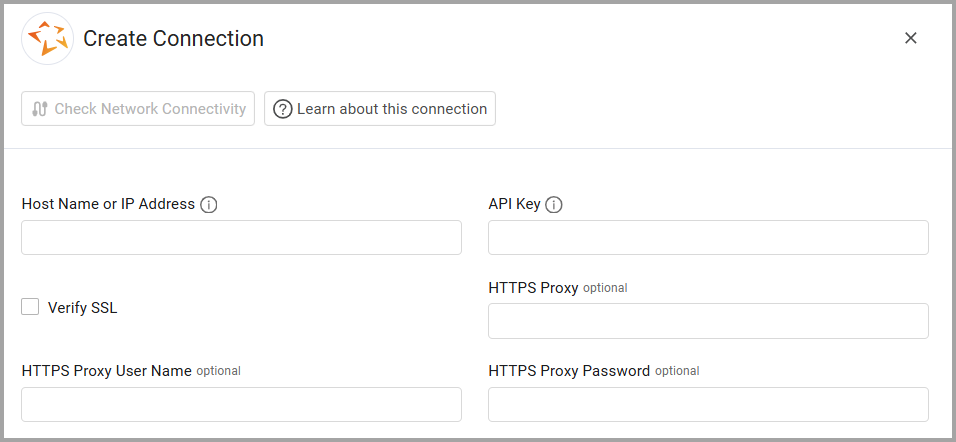
Optional Parameters
-
Verify SSL - Select whether to verify the SSL certificate of the server against the CA database inside of Axonius.
-
HTTPS Proxy - Connect the adapter to a proxy instead of directly connecting it to the domain.
-
HTTPS Proxy User Name - The user name to use when connecting to the value supplied in Host Name or IP Address via the value supplied in HTTPS Proxy.
-
HTTPS Proxy Password - The password to use when connecting to the server using the HTTPS Proxy.
-
Select Gateway – Select the Axonius Gateway to use when connecting adapters whose sources are only accessible by an internal network and not from the primary Axonius instance, which may be an Axonius-hosted (SaaS) instance or Customer-hosted (on-premises / private cloud). To use this option, you need to set up an Axonius Gateway.
To learn more about common adapter connection parameters and buttons, see Adding a New Adapter Connection.
Updated 9 months ago