
Hyland Onbase
Hyland OnBase is an enterprise content management platform that provides document management, workflow automation, and case management functions.
Use Cases the Adapter Solves
- Centralized User Access Governance: Consolidate visibility of OnBase users alongside users from other enterprise systems (Active Directory, Okta, etc.), enabling comprehensive identity and access management across your content management infrastructure.
- User Lifecycle Management: Monitor user account status (locked, deactivated) and group memberships to support onboarding, offboarding, and access review processes, reducing security risks from orphaned or inactive accounts.
Asset Types Fetched
- Users
Data Retrieved through the Adapter
The following data can be fetched by the adapter:
Users - Fields such as Username, Display Name, Email Address, Is Locked, Permissions
Before You Begin
Required Ports
- TCP port 443 (HTTPS)
Authentication Methods
Bearer Token Authentication
APIs
Axonius uses the Hyland OnBase Administration API. The following endpoints are called:
GET /api/users- Retrieves list of usersGET /api/users/USERID- Retrieves detailed user informationGET /api/users/user-groups- Retrieves user-to-group membership mappingsGET /api/user-groups- Retrieves all user groupsGET /api/user-groups/USERGROUPID/permissions/privileges- Retrieves group permissions
Required Permissions
The API token must have sufficient privileges to:
- Read user and user group information via the Administration API
- Access user details, group memberships, and permission information
Note: The OnBase API documentation doesn't explicitly list required roles/permissions. The authenticated user must have administrative access to read user and group data. For the most current and accurate permission requirements, please consult your Hyland OnBase administrator or Hyland support.
Supported From Version
Supported from Axonius version 8.0.16.0
Connecting the Adapter in Axonius
Navigate to the Adapters page, search for Hyland OnBase, and click on the adapter tile.
Click Add Connection.
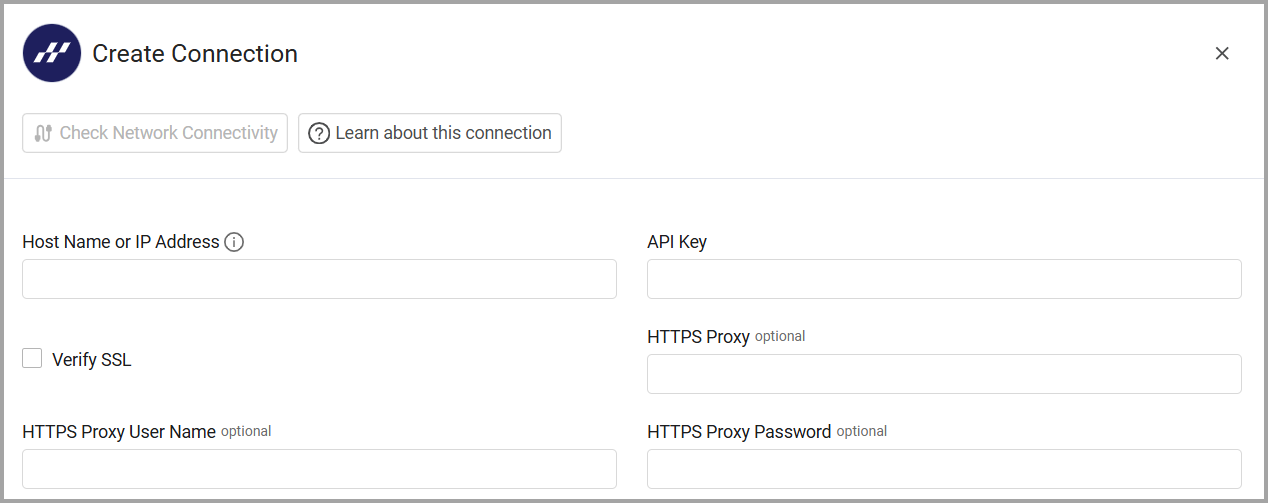
To connect the adapter in Axonius, provide the following parameters:
Required Parameters
- OnBase API URL - The base URL for the Hyland OnBase API. Example:
https://your-onbase-instance.com - API Key (Bearer Token) - The Bearer Token generated from the OnBase Administration Console with permissions to read user and group information.
Optional Parameters
- Verify SSL - Select whether to verify the SSL certificate of the server against the CA database inside of Axonius. For more details, see SSL Trust & CA Settings.
- HTTPS Proxy - Connect the adapter to a proxy instead of directly connecting it to the domain.
- HTTPS Proxy User Name - The user name to use when connecting to the value supplied in OnBase API URL via the value supplied in HTTPS Proxy.
- HTTPS Proxy Password - The password to use when connecting to the server using the HTTPS Proxy.
Related Enforcement Actions
Updated 6 months ago