
Wiz - Update Issues
Wiz - Update Issues updates the status, notes, and resolution details of Wiz Issues for assets selected from a query. or from the relevant Assets page. The action performs a GraphQL UpdateIssue mutation using the Wiz API connection.
See Creating Enforcement Sets to learn more about adding Enforcement Actions to Enforcement Sets.
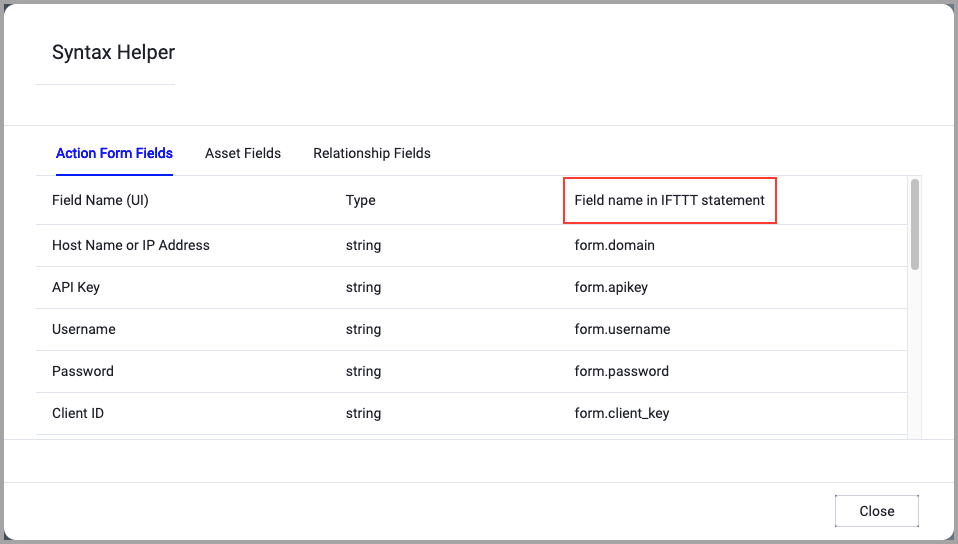
When accessing an enforcement action using the API, you must use the backend form of field names.
Use the Syntax Helper to find the correct name. In the enforcement action, enable Configure Dynamic Values and select Syntax Helper.
Note
- Not all asset types are supported for all Enforcement Actions.
- See Actions supported for Activity Logs, Adapters Fetch History, and Asset Investigation modules.
- See Actions supported for Aggregated Security Findings.
- See Actions supported for Software.
Required Permissions
The Wiz API client must have the following scopes. If any required scope is missing, Wiz returns a GraphQL Unauthorized Error and the action fails.
- write:issue_status
- write:issue_due_at,
- write:service_ticket,
- write:issue_comments
- write:threat_issue_status (For updating threat issues)
APIs
Axonius uses the wiz.io API.
Required Ports
- TCP port 443
Required Fields
These fields must be configured to run the Enforcement Set.
- Action name - The name of this Enforcement Action. The system sets a default name. You can change the name.
- Configure Dynamic Values (optional) - Toggle on to enter a Dynamic Value statement. See Creating Enforcement Action Dynamic Value Statements to learn more about Dynamic Value statement syntax.
-
Use stored credentials from the Wiz adapter - Select this option to use credentials from the adapter connection. By default, the first connection is selected.
-
When you select this option, the Select Adapter Connection drop-down becomes available. Select the adapter connection to use for this Enforcement Action.
Note
To use this option, you must successfully configure a Wiz adapter connection.
-
-
Issue ID - The unique identifier of the Wiz Issue to update.
-
Issue status - Select the status to assign to the issue. The options are:
-
Open
-
In Progress
-
Resolved - When selected, the following fields are also required:
- Resolution reason - Only Threat Detection Issues can be resolved, and the Resolution reasons can be either:
MALICIOUS_THREAT / NOT_MALICIOUS_THREAT / SECURITY_TEST_THREAT / PLANNED_ACTION_THREAT / INCONCLUSIVE_THREAT - Resolution note - Add a free text note explaining the status change.
- Resolution reason - Only Threat Detection Issues can be resolved, and the Resolution reasons can be either:
-
Rejected - When selected, the following fields are also required:
- Resolution reason - Graph Control Issues and Cloud Configuration Issues can be rejected manually, and the Resolution reasons can be either:
MALICIOUS_THREAT / NOT_MALICIOUS_THREAT / SECURITY_TEST_THREAT / PLANNED_ACTION_THREAT / INCONCLUSIVE_THREAT - Issue note - Add a free text note explaining the status change.
- Resolution reason - Graph Control Issues and Cloud Configuration Issues can be rejected manually, and the Resolution reasons can be either:
-
-
Compute Node - The Axonius node to use when connecting to the specified host. For more details, see Working with Axonius Compute Nodes.
Additional Fields
These fields are optional.
Connection and Credentials
If you are using the Wiz Axonius Integration service account for your adapter connection, enable Use stored credentials from the Wiz adapter, as the all the necessary permissions for adapter connection and actions are already set.
If you are using a custom Wiz service account for your adapter connection, migrate to using the Wiz Axonius Integration service account.
For more details about other enforcement actions available, see Action Library.
Updated 9 days ago