
Viewing AVS Data
To explore AVS data for Security Findings:
-
Filter the Security Findings table by assets that have the AVS Risk Score field.

Reminder
- AVS data is available only for CVE-type Security Findings.
- AVS data is also available for Aggregated Security Findings and on the Vulnerability Repository.
-
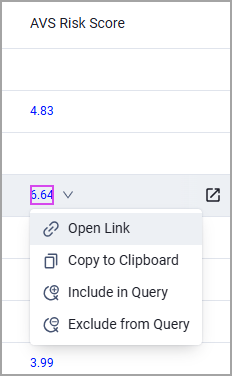
Select a Security Finding, click the numeric value of the AVS Risk Score field, and select Open Link.
-
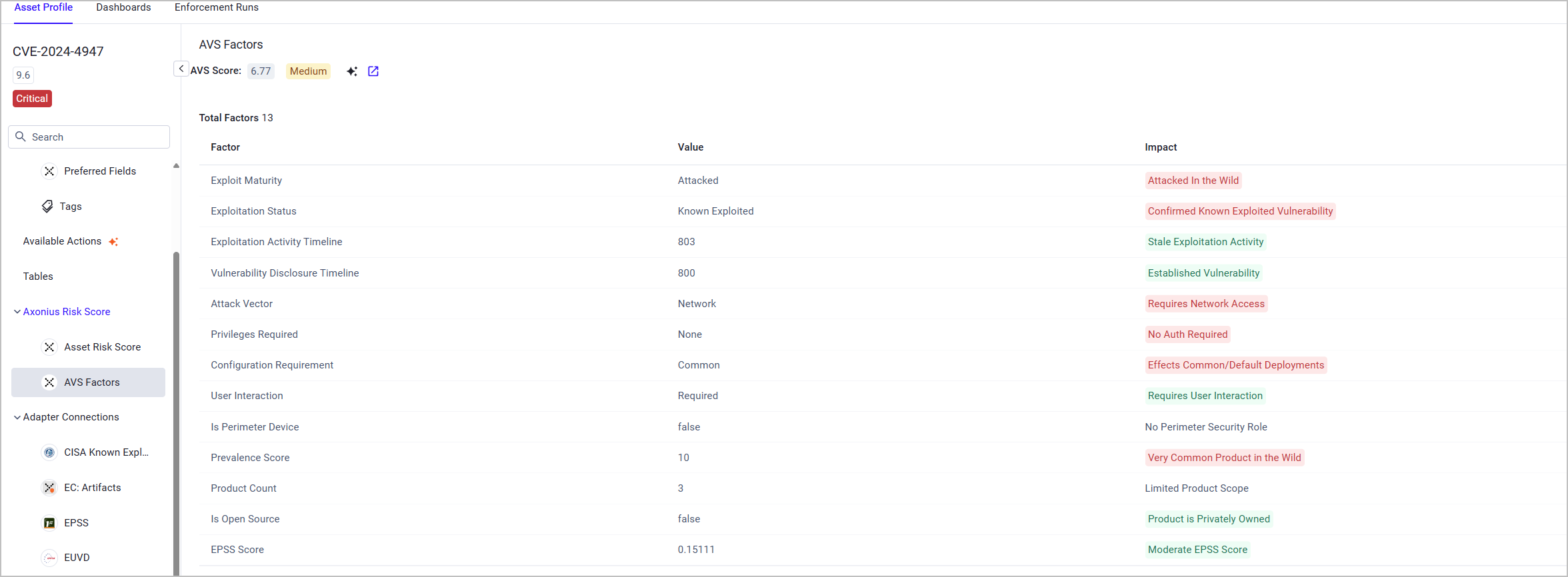
The Asset Profile page opens in a new tab, showing a breakdown of the AVS Factors used in calculating the AVS Risk Score. The AVS Factors table includes the following fields:
-
Factor - Can point to different attributes of the asset on which the vulnerability was found or the vulnerability itself, for example: Product Type (Application, Hardware, OS, etc.), the EPSS score of the vulnerability (Very High, High, Moderate, or Low), whether the product is Open Source or Privately Owned, and more.
-
Value - The value of the factor, for example, EPSS score =
Low EPSS Score. -
Impact - The actual contribution of the factor to the overall risk, based on the factor's value.
-
Risk-increasing factors are highlighted in red (Example: No Auth Required)
-
Risk-reducing factors are highlighted in green (Example: Low EPSS Score)
-
Neutral factors are highlighted in grey (Example: No Perimeter Security Role)
-
-
See Fields Used in AVS Calculation for the full list of factors, their values and their impact.
The AVS Score appears above the table in grey, and next to it - a None/Low/Medium/High/Critical severity. The severity is calculated by the range of the vulnerability's CVSS Score:
| CVSS Score | Severity |
|---|---|
| 0.0 | None |
| 0.1-3.9 | Low |
| 4.0-6.9 | Medium |
| 7.0–8.9 | High |
| 9.0–10.0 | Critical |
See Asset Profile Page Tabs for information on the different actions you can perform from this page (create tickets, add tags, etc.)
Updated 3 months ago