
Solink
Solink is a physical security platform that aggregates, indexes, and manages video data streams from connected surveillance cameras and IoT devices. The Solink adapter enables Axonius to connect to the Solink API to collect asset data relevant for device and security management.
Use Cases the Adapter Solves
- Detects unmanaged or offline surveillance cameras in your organization.
- Monitors real-time camera and IoT device status for improved physical security coverage.
- Aggregates video device metadata for asset inventory and compliance reporting.
Assets Types Fetched
 Devices
Data Retrieved through the Adapter
Fields fetched by the adapter include:
Devices - Device ID, Device Name, Device Type, Location, Status, Model and more
Before You Begin
Required Ports
TCP port 443
Authentication Method
The adapter uses API oauth token credentials.
APIs
Axonius uses the following API endpoints:
- /v2/cameras - Returns a list of surveillance camera devices connected to Solink, including their unique identifiers and metadata.
- */v2/devices - Retrieves information about other IoT devices managed by Solink.
Permissions
The following permissions are required:
- Permissions for:
- Camera and Device listing
- Real-time status monitoring (online/offline state)
Supported From Version
Supported from Axonius version 8.0.12
Setting Up Solink to Work with Axonius
Follow instructions in Solink to create the API Key, Client ID, and Client Secret. The API Key must be requested from Solink.
Connecting the Adapter in Axonius
Navigate to the Adapters page, search for "Solink", and click on the adapter tile.
Click Add Connection.
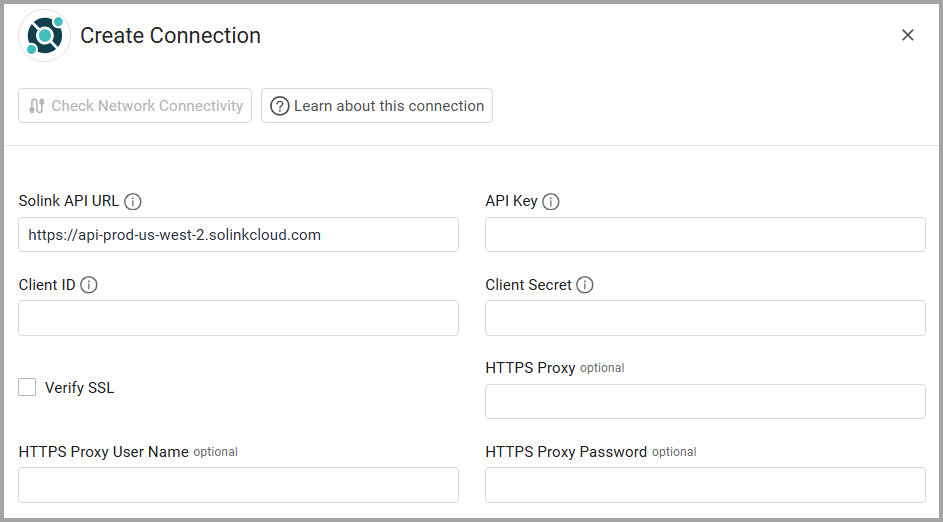
To connect the adapter in Axonius, provide the following parameters:
Required Parameters
- Solink API URL - The hostname of the Solink API server. The default value is
https://api-prod-us-west-2.solinkcloud.com. Adjust the region status as required. - API Key - Your Solink API key (sometimes referred to as
x-api-key). - Client ID - The client ID generated in Solink for API authentication. The Client ID is issued when you register an application or integration in the Solink platform’s API credentials section.
- Client Secret - The client secret associated with your client ID.
- Connection Label - A unique label to identify this connection.
Optional Parameters
- Verify SSL - Select whether to verify the SSL certificate of the server against the CA database inside of Axonius. For more details, see SSL Trust & CA Settings.
- HTTPS Proxy - Connect the adapter to a proxy instead of directly connecting it to the domain.
- HTTPS Proxy User Name - The user name to use when connecting via the HTTPS Proxy.
- HTTPS Proxy Password - The password to use when connecting via the HTTPS Proxy.
Select Gateway – Select the Axonius Gateway to use when connecting adapters whose sources are only accessible by an internal network and not from the primary Axonius instance, which may be an Axonius-hosted (SaaS) instance or Customer-hosted (on-premises / private cloud). To use this option, you need to set up an Axonius Gateway.
To learn more about common adapter connection parameters and buttons, see Adding a New Adapter Connection.
Updated 9 months ago