
Configuring an Exit Node
Use an Exit node to stop the execution of a workflow and gain greater control over the automation logic, allowing you to terminate processes early when specific criteria are met or errors occur. It can be used at the end of a workflow, within a Condition branch, or within a Repeat For Each loop. When used within a Repeat For Each loop, the node becomes an Exit Repeat node and stops execution immediately under specified conditions. An Exit node is always the last node in the workflow, Condition branch, or Repeat For Each loop.
Note
When no Exit or Exit Repeat node occurs at the end of a workflow or loop, execution of the workflow ends.
The Exit node supports two modes of operation depending on its placement in the workflow:
-
Exit Workflow:
- Terminates the entire workflow run immediately.
- No further nodes in the workflow will execute.
- Can also be used within a Repeat For Each block to stop processing of the workflow.
- Use to prevent further actions if a critical condition is not met (e.g., if a Query returns 0 assets, or if a "User Response" in a previous step was "Deny").
-
Exit Repeat:
- Terminates the current loop iteration and stops the loop.
- The workflow continues execution at the first node following the Repeat For Each block. If the Exit Repeat occurs in a nested Repeat For Each, execution continues at the first node of the parent block that follows the nested Repeat For Each block.
- Only available when the Exit node is placed inside a Repeat For Each loop.
- Also works in nested Repeat For Each loops.
- Use to stop processing once a specific item is found or a condition is met, allowing the rest of the workflow (outside the loop) to proceed.
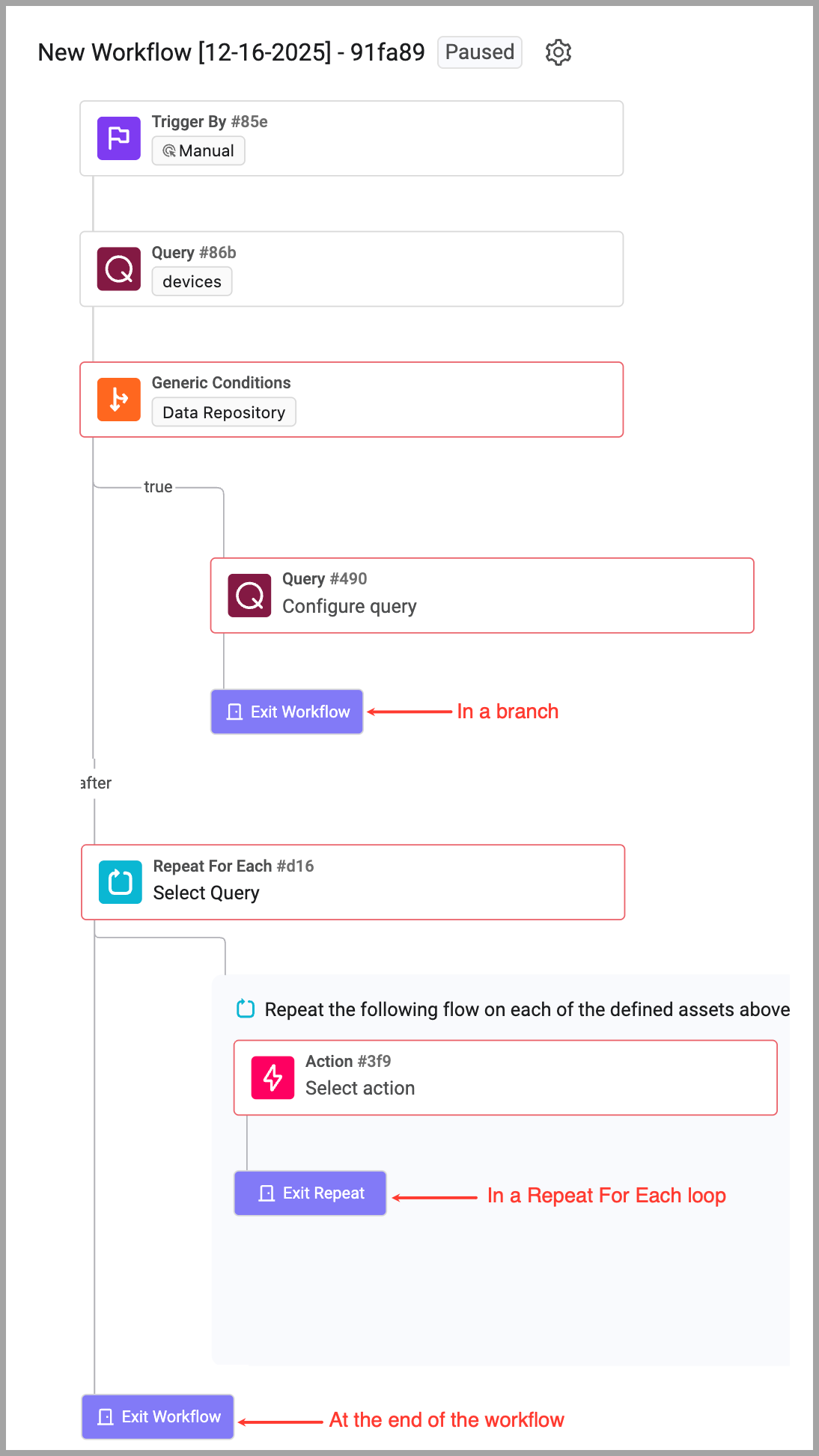
Adding an Exit Node to the Workflow
You can add an Exit node at any point in the workflow where you wish to halt execution.
To add an Exit node to a workflow:
- Hover over the + icon where you want to add the node.
- Select Exit. When within a Repeat node, select Exit Workflow or Exit Repeat.
- Continue with workflow configuration.
Workflow Scenario: Stale Admin Account Cleanup (With Safety Brakes)
Goal - Automate the disabling of Administrator accounts that haven’t logged in for 90 days. The Twist (Using Exit Nodes): Because disabling admins is risky, we use Exit Nodes to "fail safe" and stop the workflow immediately if anything looks suspicious or if specific safety criteria are met.
Updated 1 day ago