
XenServer
XenServer is a virtualization platform that enables the creation and management of virtualized server infrastructures.
Types of Assets Fetched
This adapter fetches the following types of assets:
- Devices
Parameters
-
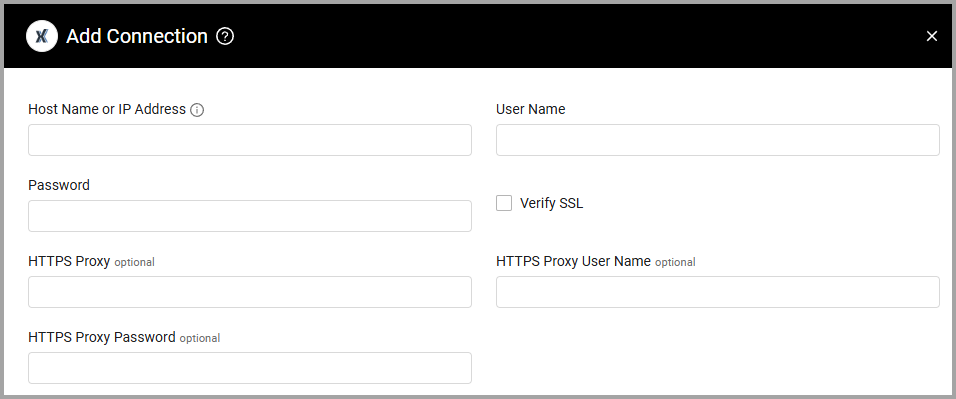
Host Name or IP Address (required) - The hostname or IP address of the XenServer server that Axonius can communicate with via the Required Ports.
-
User Name and Password (required) - The credentials for a user account that has permission to fetch assets.
-
Verify SSL - Select whether to verify the SSL certificate of the server against the CA database inside of Axonius. For more details, see SSL Trust & CA Settings.
-
HTTPS Proxy (optional) - Connect the adapter to a proxy instead of directly connecting it to the domain.
-
HTTPS Proxy User Name (optional) - The user name to use when connecting to the value supplied in Host Name or IP Address via the value supplied in HTTPS Proxy.
-
HTTPS Proxy Password (optional) - The password to use when connecting to the server using the HTTPS Proxy.
To learn more about common adapter connection parameters and buttons, see Adding a New Adapter Connection.
APIs
Axonius uses the following APIs through XenServer SDK:
- https://docs.xenserver.com/en-us/xenserver/developer/sdk-guide/python
- https://github.com/xenserver/xenserver-samples/tree/master/python
Axonius calls the following XenAPI methods:
login_with_passwordVM.get_all_recordshost.get_all_recordsVIF.get_all_records(only if Network Interfaces is enabled)VM_guest_metrics.get_all_records(only if Guest Metrics is enabled)logout
Advanced Settings
Note:
- Advanced settings can apply to either all connections of this adapter, or to a specific connection. For more detailed information, see Advanced Configuration for Adapters.
- For more general information about advanced settings, see Adapter Advanced Settings.
- Network Interfaces (default: disabled) - Select this option to fetch network interface records and associate their MAC addresses with virtual machines.
- Guest Metrics (default: disabled) - Select this option to fetch guest metrics and associate guest IP addresses and operating system information with virtual machines. IP addresses are available only for virtual machines that have XenServer guest tools installed.
Supported From Version
Supported from Axonius version 6.1.64
Updated 13 days ago