
AI Workforce Guides
Use the AI Guides to orient yourself with Axonius, learn how the platform works, and expand your program over time.
The guides are interactive, step-by-step sessions that run directly in the chat — not workers. They don't run checks or produce briefings, and they don't appear in the Workforce Hub worker list.
To open the guides, click the Guides pill in the AI Workforce page header. The Your guides panel lists all three. You can also find them in the Help menu (? in the top bar), listed as Learn Axonius, Set up Axonius, and Grow with Axonius.
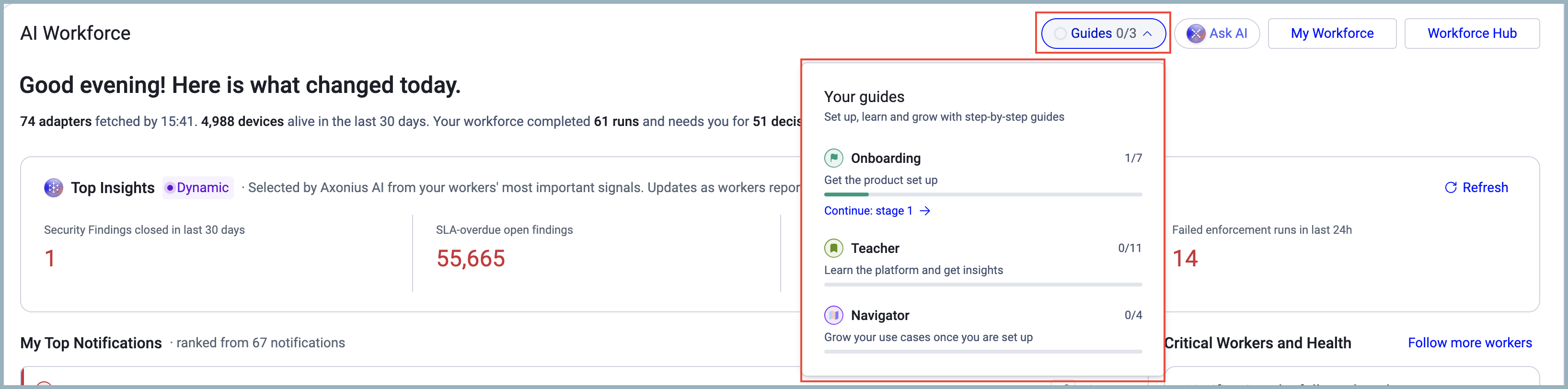
The Guides pill shows your completion progress — for example, Guides 1/3 means you completed one of the three guides.
The Three Guides
Onboarding
Use Onboarding to configure your Axonius environment step by step.
The guide has seven stages — for example, "Connect your sources", "Tune adapters", "Meet the AI workers", and "Learn as you go". Each stage opens a chat session that walks you through real actions: connecting adapters, configuring settings, and exploring the AI Workforce. Some stages open other flows, such as the connect-adapter wizard or system settings.
A progress bar tracks how many stages you've started — for example, 2 of 7 started. Stages are marked as visited, not completed.
Teacher
Use Teacher to build your platform knowledge through structured, interactive lessons.
The guide has 11 learning tracks — for example, "The big picture", "Access and governance", "Finding anything: queries", and "Dashboards and charts". Each track card shows an estimated duration (for example, ~5 min) and a status: Not started, In progress, or Completed.
A track is marked Completed when you finish all its lessons. Two tracks are hands-on tutorials:
- Track 5 walks you through the Query Wizard.
- Track 6 walks you through the Chart Wizard.
Both end with a "Try it yourself" moment in the product.
Navigator
Use Navigator to expand and mature your Axonius program.
The guide has four journey stages:
- Centralize and Normalize Data
- Visualize and Prioritize Risks
- Reduce Risk and Improve Productivity
- Democratize Actions and Insights
Each stage gives you a checklist of required actions, a recommendation, and a chip to take the next step.
A progress bar tracks how many stages you've started — for example, 1 of 4 started. The journey is cyclical — you return to earlier stages as your use cases grow — so stages are visited rather than permanently completed.
Starting and Resuming a Guide
To start a guide:
- Open the Guides pane and click a guide row.
- Click Start.
The guide session opens in the chat.
To resume a guide, click Continue on the guide row, or click Continue in the Guides pill.
Each guide uses a specific opening phrase, so clicking from the pane and clicking a chip in the chat both land in the same place.
Guide Sessions
When you're in a guide conversation, a strip above the thread shows the guide name — for example, Onboarding · Guides. To return to the guides pane, click Back to AI Workforce.
To try the concept in the product, click Open [page] at the end of each lesson or stage. Then click Done — I saw it to continue or I couldn't find it to get help.
Progress Tracking
Guide progress is personal — your progress doesn't affect other users and follows you across data scopes. The Guides pill in the page header updates as you complete guides — for example, Guides 2/3. Time estimates on each track or stage card are static — they ship with the guide and don't adjust based on your pace.
Updated 18 days ago