
OutThink
OutThink is a human risk management platform that provides security awareness training, phishing simulations, and behavioral analytics to reduce human cyber risk through data-driven interventions.
Use Cases the Adapter Solves
- Identify High-Risk Users: Detect users who have failed phishing simulations or have low security awareness scores to prioritize targeted training interventions.
- Monitor Security Training Compliance: Track user enrollment and completion of security awareness training campaigns to ensure organizational compliance with security policies.
Asset Types Fetched
- Users
Data Retrieved through the Adapter
The following data can be fetched by the adapter:
Users - Fields such as First Name, Last Name, Email, Department, Country
Before You Begin
Required Ports
- TCP port 443 (HTTPS)
Authentication Methods
OutThink uses API Key authentication with a Bearer token.
APIs
Axonius uses the OutThink Analytics API v1. The following endpoints are called:
- GET
/analytics/v1/campaigns - GET
/analytics/v1/users - GET
/analytics/v1/trainingCampaigns/{trainingCampaignId}/users - GET
/analytics/v1/trainingCampaigns/{trainingCampaignId}/users/USERID - GET
/analytics/v1/attackSimulations/{attackSimulationId}/users - GET
/analytics/v1/attackSimulations/{attackSimulationId}/users/USERID
Required Permissions
The API key must have the following permissions:
- User Management - Read access to user profiles, departments, and roles
- Human Risk Intelligence (HRI) - Access to Human Risk Index and behavioral data
- Campaign Management - Query access to phishing simulations and training modules
- Event Reporting - Access to behavioral signals and security events
Note:
The exact permission scopes are determined by the Platform Administrator when generating the API key. Please verify with your OutThink administrator that the API key has the necessary scopes for the data you want to retrieve.
Supported From Version
Supported from Axonius version 8.0.21
Connecting the Adapter in Axonius
Navigate to the Adapters page, search for OutThink, and click on the adapter tile.
Click Add Connection.
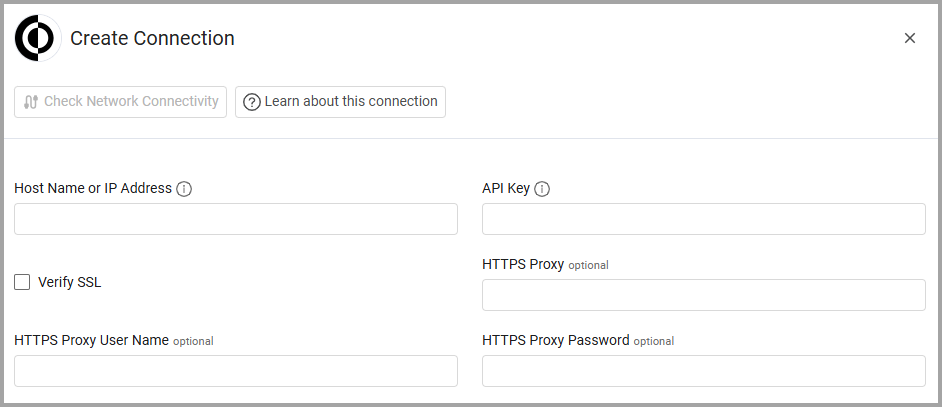
To connect the adapter in Axonius, provide the following parameters:
Required Parameters
- Host Name or IP Address - Base URL of the OutThink API. Example:
https://api.outthink.app - API Key - API Key for authentication.
- Customer ID - The OT-Customer-Id header value required by the OutThink API.
Optional Parameters
- Verify SSL - Select whether to verify the SSL certificate of the server against the CA database inside of Axonius. For more details, see SSL Trust & CA Settings.
- HTTPS Proxy - Connect the adapter to a proxy instead of directly connecting it to the domain.
- HTTPS Proxy User Name - The user name to use when connecting to the value supplied in Host Name or IP Address via the value supplied in HTTPS Proxy.
- HTTPS Proxy Password - The password to use when connecting to the server using the HTTPS Proxy.
To learn more about common adapter connection parameters and buttons, see Adding a New Adapter Connection.
Advanced Settings
Note:
Advanced settings can either apply to all connections for this adapter, or to a specific connection. Refer to Advanced Configuration for Adapters.
To learn more about Adapter Configuration tab advanced settings, see Adapter Advanced Settings.
- Enrich Users with Training Campaigns- Select this option to enrich user data with training campaign information including status, engagement scores, knowledge scores, productivity scores, intention to comply scores, self-efficacy scores, enrollment dates, and completion dates.
- Enrich Users with Attack Simulation Campaigns - Select this option to enrich user data with attack simulation campaign information including status, simulation status, email sent dates, and opened dates.
Updated 5 days ago