
HackerOne
HackerOne is a vulnerability coordination platform that provides bug bounty programs, penetration testing, and coordinated disclosure for ethical security research.
Use Cases the Adapter Solves
- Vulnerability Discovery and Tracking: Correlate security vulnerabilities reported through HackerOne with your existing asset inventory to identify which devices and URLs in your environment have known security issues.
- Asset Security Posture Assessment: Identify which assets are eligible for bounty programs and track submission eligibility across your domain and network infrastructure.
- CVE Correlation: Automatically associate CVE identifiers from HackerOne reports with your assets to understand vulnerability exposure and prioritize remediation efforts.
Asset Types Fetched
- Devices, Aggregated Security Findings, SaaS Applications, Domains & URLs
Data Retrieved through the Adapter
Devices - Fields such as Name, Network Interfaces IPs, Eligible for Bounty, Eligible for Submission
Domains & URLs - Fields such as Base URL, Name, Remote ID, Eligible for Bounty
Before You Begin
Required Ports
- TCP port 443 (HTTPS)
Authentication Methods
API Token Authentication
APIs
Axonius uses the HackerOne API v1. The following endpoints are called:
GET /v1/reports
Required Permissions
The API token used for the adapter must have the appropriate permissions to read reports from your organization's programs. The API Token should be assigned to groups with at least the following permissions:
- View report details - Allows reading vulnerability reports from the organization's programs
- Access to Inboxes - The token must have access to the specific inboxes (engagement or custom) you want to fetch reports from
Note: API tokens inherit permissions from the groups they are added to. Ensure the token is added to groups with appropriate access to the inboxes specified in the Inbox IDs configuration parameter. These can be found in the URL when viewing an inbox (e.g., https://api.hackerone.com/organizations/[org]/inboxes/[inbox_id]).
For more information about API tokens and permissions, see the HackerOne API Token documentation.
Supported From Version
Supported from Axonius version 8.0.24
Connecting the Adapter in Axonius
Navigate to the Adapters page, search for HackerOne, and click on the adapter tile.
Click Add Connection.
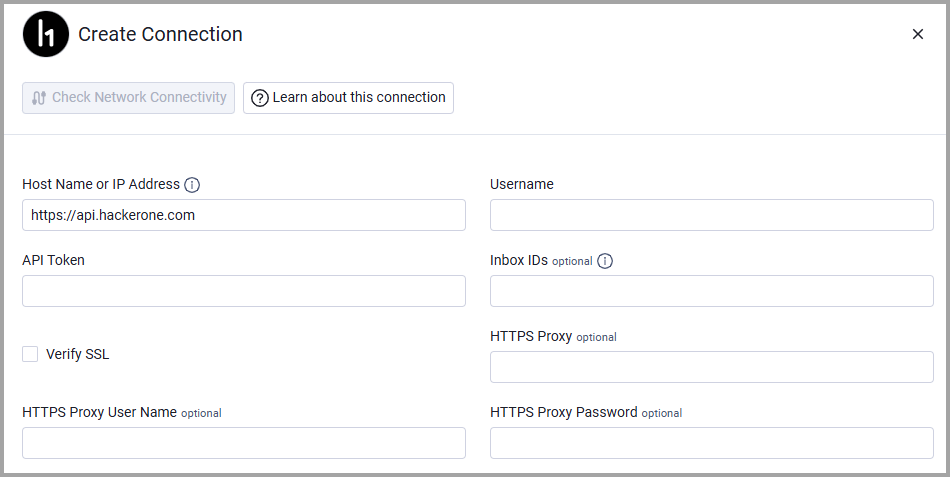
To connect the adapter in Axonius, provide the following parameters:
Required Parameters
- Host Name or IP Address (default:
https://api.hackerone.com) - The base domain for the HackerOne API. Example:https://api.hackerone.com - Username - The API Token identifier from your HackerOne organization settings.
- API Token - The API Token value from your HackerOne organization settings.
- Inbox IDs - A comma-separated list of inbox IDs to fetch reports from. Example:
12345,67890
Optional Parameters
- Verify SSL - Select whether to verify the SSL certificate of the server against the CA database inside of Axonius. For more details, see SSL Trust & CA Settings.
- HTTPS Proxy - Connect the adapter to a proxy instead of directly connecting it to the domain.
- HTTPS Proxy User Name - The user name to use when connecting to the value supplied in Host Name or IP Address via the value supplied in HTTPS Proxy.
- HTTPS Proxy Password - The password to use when connecting to the server using the HTTPS Proxy.
To learn more about common adapter connection parameters and buttons, see Adding a New Adapter Connection.
Updated 5 months ago