
Group-IB Threat Intelligence CVE Enrichment
Group-IB provides threat intelligence and vulnerability data from the OSI Vulnerability feed to enhance CVE analysis.
Use Cases the Adapter Solves
The Group-IB Threat Intelligence CVE Enrichment adapter enriches data in the Axonius' Aggregated Security Findings module with threat intelligence from Group-IB's OSI (Open Source Intelligence) vulnerability feed. This process contributes to enhanced CVE validation, threat intelligence correlation, and comprehensive vulnerability coverage.
Asset Types Fetched
This adapter doesn't fetch any assets as it only enriches data for existing CVEs.
Data Retrieved through the Adapter
Data enriched for Aggregated Security Findings includes fields such as CVE ID, Group-IB Threat Intelligence Status, Validation Result, and Enrichment Timestamp.
Before You Begin
Required Ports
- TCP port 443 (HTTPS)
Authentication Methods
API Key authentication
APIs
Axonius uses the Group-IB Threat Intelligence API v2. The following endpoints are called:
GET /api/v2/osi/vulnerability- Retrieves the list of CVEs tracked by Group-IB threat intelligence.
Required Permissions
IP Whitelisting
The Axonius instance IP address must be added to the Group-IB's Allowed List. Contact your Group-IB administrator for more information.
Feed-Level Access
You must have an active subscription to the Group-IB OSI vulnerability feed. To verify your feed access permissions, on your Group-IB profile page, navigate to Security and Access.
Supported From Version
Supported from Axonius version 8.0
Connecting the Adapter in Axonius
- Navigate to the Adapters page, search for Group-IB Threat Intelligence CVE Enrichment, and click on the adapter tile.
- Click Add Connection.
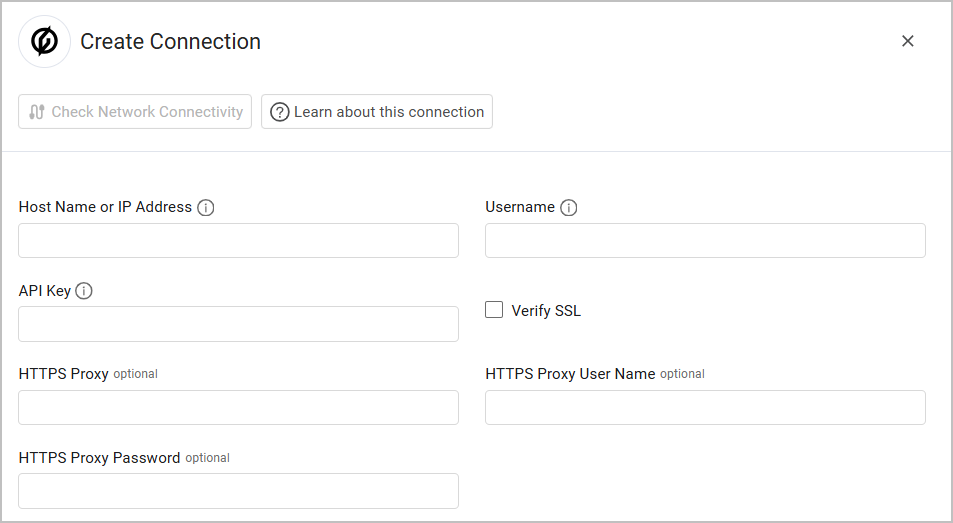
- To connect the adapter in Axonius, provide the following parameters:
Required Parameters
- Host Name or IP Address - The Group-IB API endpoint URL. Example:
https://[your-instance].group-ib.com - Username - Username for API authentication, typically your email address.
- API Key - Your personal API key for Basic Authentication provided by Group-IB.
Optional Parameters
- Verify SSL - Select whether to verify the SSL certificate of the server against the CA database inside of Axonius. For more details, see SSL Trust & CA Settings.
- HTTPS Proxy - Connect the adapter to a proxy instead of directly connecting it to the domain.
- HTTPS Proxy User Name - The user name to use when connecting to the value supplied in Domain via the value supplied in HTTPS Proxy.
- HTTPS Proxy Password - The password to use when connecting to the server using the HTTPS Proxy.
To learn more about common adapter connection parameters and buttons, see Adding a New Adapter Connection.
Updated 7 months ago