
NetBeez
NetBeez is a network monitoring platform that provides active performance testing, traffic visibility, and diagnostics to identify availability, latency, and application delivery issues.
Use Cases the Adapter Solves
- Network Device Discovery: Automatically discover and inventory all NetBeez agents deployed across your network infrastructure, including wired, wireless, and virtual agents, to maintain an accurate asset inventory.
- Network Monitoring Integration: Integrate network monitoring data from NetBeez agents into your asset management platform to correlate network performance metrics with device inventory and identify connectivity issues.
Asset Types Fetched
- Devices
Data Retrieved through the Adapter
The following data can be fetched by the adapter:
Devices - Fields such as Name, UUID, Agent Class, Category
Before You Begin
Required Ports
- TCP port 443 (HTTPS)
Authentication Methods
API Token Authentication
APIs
Axonius uses the NetBeez API. The following endpoints are called:
GET /agents- Retrieve list of agents with network interface information
Required Permissions
The following permissions are required:
- A role with Read-only permissions.
Supported From Version
Supported from Axonius version 8.0.21
Setting Up NetBeez to Work with Axonius
To generate an API key in NetBeez refer to NetBeez API Authentication.
Connecting the Adapter in Axonius
Navigate to the Adapters page, search for NetBeez, and click on the adapter tile.
Click Add Connection.
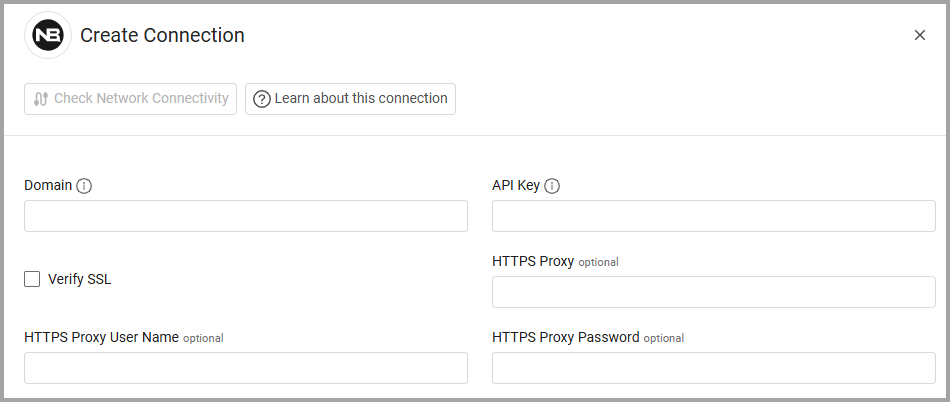
To connect the adapter in Axonius, provide the following parameters:
Required Parameters
- Domain - The NetBeez API base URL. Example:
https://api.netbeez.net - API Key - The API key generated from the NetBeez Dashboard. Example:
your_api_key_here
Optional Parameters
- Verify SSL - Select whether to verify the SSL certificate of the server against the CA database inside of Axonius. For more details, see SSL Trust & CA Settings.
- HTTPS Proxy - Connect the adapter to a proxy instead of directly connecting it to the domain.
- HTTPS Proxy User Name - The user name to use when connecting to the value supplied in Domain via the value supplied in HTTPS Proxy.
- HTTPS Proxy Password - The password to use when connecting to the server using the HTTPS Proxy.
To learn more about common adapter connection parameters and buttons, see Adding a New Adapter Connection.
Updated 7 months ago