
F5 Distributed Cloud
F5 Distributed Cloud is a cloud-based security and application management platform.
Types of Assets Fetched
This adapter fetches the following types of assets:
- Devices
Parameters
-
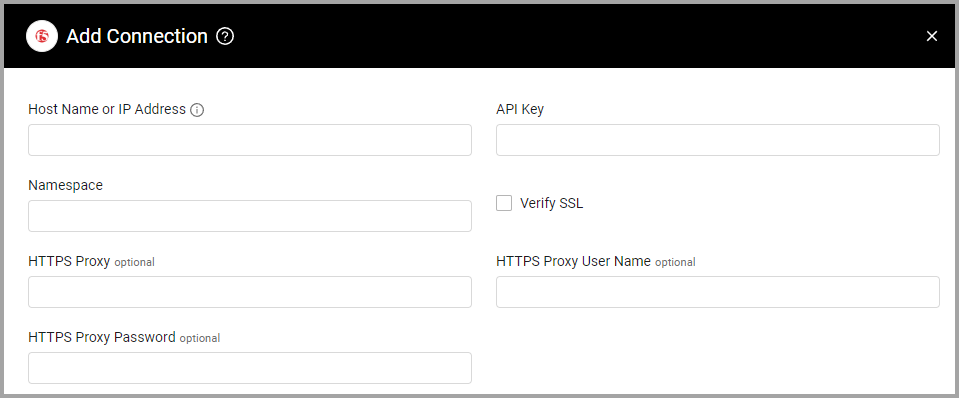
Host Name or IP Address (required) - The hostname or IP address of the F5 Distributed Cloud server that Axonius can communicate with via the Required Ports.
-
API Key (required) - An API Key associated with a user account that has permissions to fetch assets.
-
Namespace (required) - Specify the Namespace of the F5 Distributed Cloud server.
-
Verify SSL - Select whether to verify the SSL certificate of the server against the CA database inside of Axonius. For more details, see SSL Trust & CA Settings.
-
HTTPS Proxy (optional) - Connect the adapter to a proxy instead of directly connecting it to the domain.
-
HTTPS Proxy User Name (optional) - The user name to use when connecting to the value supplied in Host Name or IP Address via the value supplied in HTTPS Proxy.
-
HTTPS Proxy Password (optional) - The password to use when connecting to the server using the HTTPS Proxy.
To learn more about common adapter connection parameters and buttons, see Adding a New Adapter Connection.
APIs
Axonius uses the F5 Distributed Cloud Services API.
Required Ports
Axonius must be able to communicate with the value supplied in Host Name or IP Address via the following ports:
- TCP port 443
Advanced Settings
Note
Advanced settings can either apply to all connections for this adapter, or to a specific connection. Refer to Advanced Configuration for Adapters.
- Enrich Firewalls with Firewall Details and Enrich Load Balancers with Load Balancer Details - Enable these settings to enrich those assets with additional data about their possible public exposure to the internet.
Note
For details on general advanced settings under the Adapter Configuration tab, see Adapter Advanced Settings.
Supported From Version
Supported from Axonius version 6.1.30.0
Updated 9 days ago