
Zadara zCompute
Zadara zCompute is a cloud compute platform that provides virtual machines, block and object storage, virtual networking, and machine images for building private and hybrid cloud infrastructure.
Use Cases the Adapter Solves
- Monitor compute inventory: View zCompute instances and their network information alongside other devices in Axonius.
- Track cloud storage resources: Review zCompute disks and their status to support cloud asset governance.
- Review cloud network controls: Identify zCompute firewall security groups and their inbound and outbound rules.
Asset Types Fetched
- Devices
- Compute Images
- Disks
- Firewalls
Data Retrieved through the Adapter
Devices - fields such as: Cloud ID, Name, Image ID, Network Interfaces
Compute Images - fields such as: Cloud ID, Name, Description, State
Disks - fields such as: Cloud ID, Size, State, Encrypted
Firewalls - fields such as: Cloud ID, Name, Description, VPC ID
Before You Begin
Required Ports
- TCP port 443 (HTTPS).
Authentication Methods
The adapter uses AWS Signature Version 4 authentication with an access key and secret key. It signs requests for the EC2 service.
APIs
Axonius uses the Zadara zCompute API. The following operations are called:
POST /api/v2/aws/ec2with Action=DescribeInstances - Retrieves instances.POST /api/v2/aws/ec2with Action=DescribeAddresses - Retrieves addresses associated with instances.POST /api/v2/aws/ec2with Action=DescribeImages - Retrieves compute images.POST /api/v2/aws/ec2with Action=DescribeVolumes - Retrieves disks.POST /api/v2/aws/ec2with Action=DescribeSecurityGroups - Retrieves firewall security groups.
Required Permissions
The configured credentials need permission to call the listed zCompute API operations.
Supported From Version
Supported from Axonius version 9.0.8
Connecting the Adapter in Axonius
- Navigate to the Adapter Catalog, search for Zadara zCompute, and select the adapter.
- Click Add Connection.
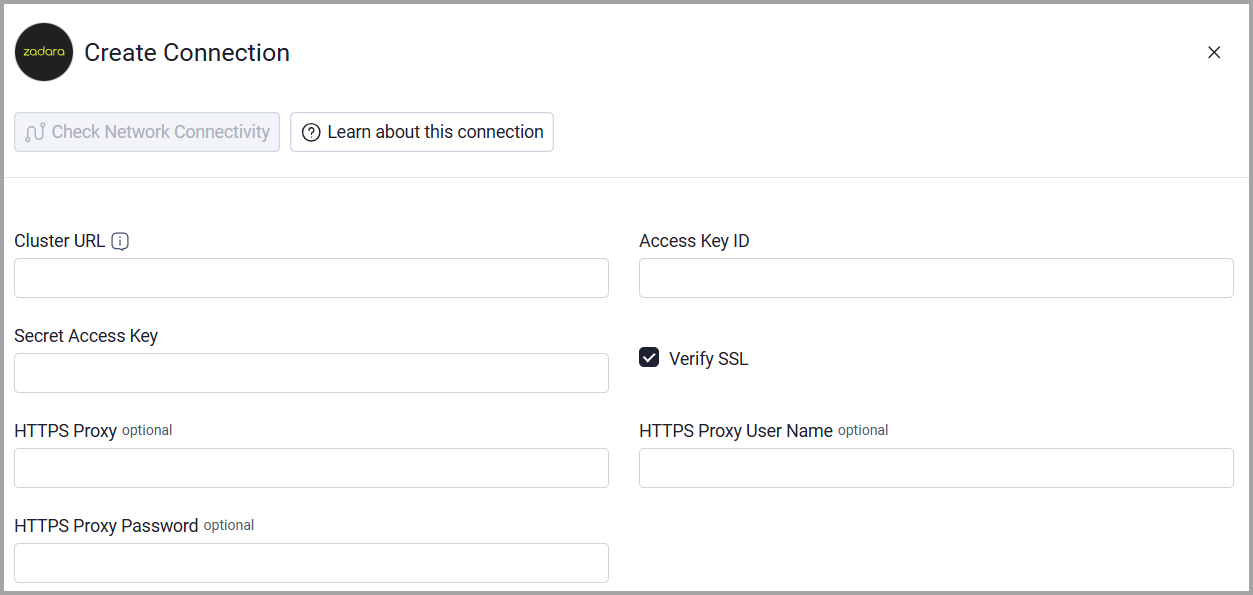
- Provide the following parameters.
Required Parameters
- Cluster URL - The base URL of the zCompute cluster. Example:
https://mycluster.zadara.com - Access Key ID - The access key used to sign requests to the zCompute API.
- Secret Access Key - The secret access key used to sign requests to the zCompute API.
Optional Parameters
- Verify SSL - Select whether to verify the SSL certificate of the server against the CA database inside of Axonius. For more details, see SSL Trust & CA Settings.
- HTTPS Proxy - Connect the adapter to a proxy instead of directly connecting it to the cluster URL.
- HTTPS Proxy User Name - The user name to use when connecting to the cluster URL through the HTTPS proxy.
- HTTPS Proxy Password - The password to use when connecting through the HTTPS proxy.
To learn more about common adapter connection parameters and buttons, see Adding a New Adapter Connection.
Updated 20 days ago