
Personio
Personio is an HR platform that provides personnel data management, absence tracking, and organizational structure for workforce administration.
Use Cases the Adapter Solves
- Monitor workforce status and availability: Track employee status, absence periods, and leave types to identify staffing gaps and ensure adequate coverage across teams and departments.
- Verify organizational structure compliance: Map organizational units, teams, and departments to validate reporting hierarchies and ensure alignment with governance policies.
Asset Types Fetched
- Users, Organizational Units
Data Retrieved through the Adapter
Users - Fields such as First Name, Last Name, Email Address, Username
Organizational Units - Fields such as Name, Asset Type, Abbreviation, Description
Before You Begin
Required Ports
- TCP port 443 (HTTPS)
Authentication Methods
OAuth 2.0 Client Credentials
APIs
Axonius uses the Personio API v2. The following endpoints are called:
POST /v2/auth/token- Obtains an OAuth 2.0 access token using Client Credentials grantGET /v2/persons- Retrieves employee data including personal information and statusGET /v2/absence-periods- Retrieves absence period information for employeesGET /v2/absence-types- Retrieves absence type metadata (leave types, categories)GET /v2/org-units- Retrieves organizational units (departments and teams)
Required Permissions
The following permissions (OAuth scopes) are required:
- personio:persons:read - Allows reading employee data
- personio:absences:read - Allows reading absence periods and types
- personio:org-units:read - Allows reading organizational unit data
Note: These permissions are assigned when you generate API credentials in the Personio platform. The exact permission names and scopes should be confirmed with your Personio administrator when creating the API credentials.
Supported From Version
Supported from Axonius version 9.0.4
Connecting the Adapter in Axonius
Navigate to the Adapters page, search for Personio, and click on the adapter tile.
Click Add Connection.
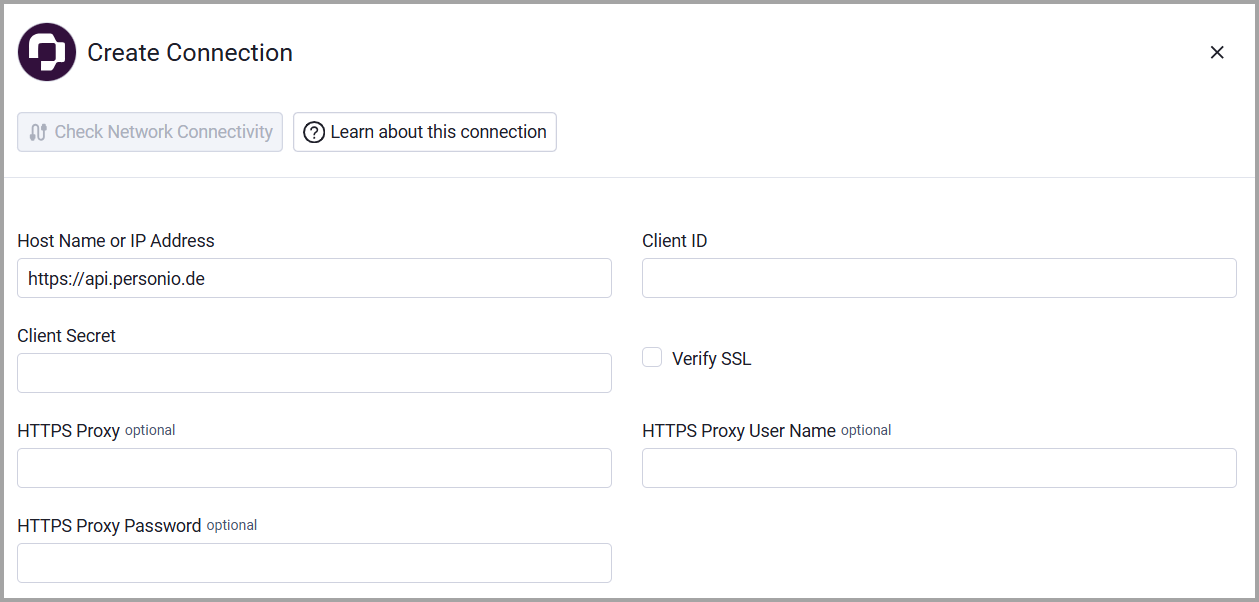
To connect the adapter in Axonius, provide the following parameters:
Required Parameters
- Host Name or IP Address - The base URL for the Personio API. Default:
https://api.personio.de - Client ID - The Client ID from your Personio API credentials
- Client Secret - The Client Secret from your Personio API credentials
Optional Parameters
- Verify SSL - Select whether to verify the SSL certificate of the server against the CA database inside of Axonius. For more details, see SSL Trust & CA Settings.
- HTTPS Proxy - Connect the adapter to a proxy instead of directly connecting it to the domain.
- HTTPS Proxy User Name - The user name to use when connecting to the value supplied in Host Name or IP Address via the value supplied in HTTPS Proxy.
- HTTPS Proxy Password - The password to use when connecting to the server using the HTTPS Proxy.
To learn more about common adapter connection parameters and buttons, see Adding a New Adapter Connection.
Updated 3 months ago