
MISP
MISP is an open source threat intelligence platform that collects, stores, correlates, analyzes, and shares structured indicators and cybersecurity intelligence. The adapter fetches MISP users and enriches CVEs with the published MISP events that reference them.
Use Cases the Adapter Solves
- Investigate vulnerability intelligence: View published MISP events that reference a CVE alongside vulnerability data in Axonius.
- Review user access: Collect MISP user accounts, including account status and assigned roles, when the API key has the required administrative access.
- Focus intelligence collection: Limit MISP event enrichment to a specific organization when needed.
Asset Types Fetched
- Users
- SaaS Applications
- Aggregated Security Findings
Data Retrieved through the Adapter
Users - fields such as: Email, Account Disabled, Previous Login Date, Admin Roles
Aggregated Security Findings - MISP Events include: Event ID, Info, Organisation, Threat Level
Before You Begin
Required Ports
- TCP port 443 (HTTPS)
Authentication Methods
The adapter uses API key authentication.
APIs
Axonius uses the MISP API. The following endpoints are called:
GET /admin/users- Retrieves users visible to the API key when the Users endpoint is enabled.POST /events/restSearch- Retrieves published events with vulnerability attributes to enrich matching CVEs.GET /servers/getVersion- Tests the connection with the configured API key.
Required Permissions
- Access to an MISP instance is required, either your organization’s own MISP deployment or a community instance you are a member of. Use the URL of your own instance as the Host Name or IP Address. Community-hosted MISP instances usually need membership approval from that community, note that Axonius has no arrangement that grants access.
- Base URL: https://misp.example.com
- Fetching Users requires admin-level permissions. Site admins can access all users; org admins are limited to users in their own organization.
- Security Findings enrichment is accessible to standard API users with the auth permission enabled on their role.
Supported From Version
Supported from Axonius version 10.0.2
Connecting the Adapter in Axonius
- Navigate to the Adapter Catalog, search for MISP, and select the adapter.
- Click Add Connection.
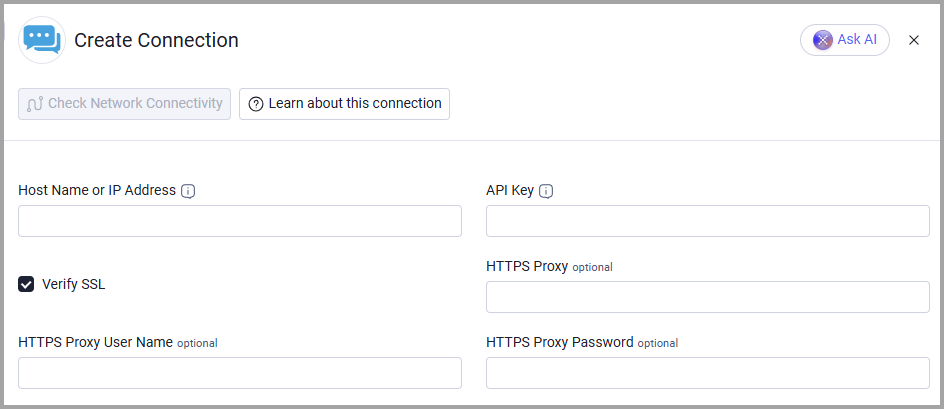
- Provide the following parameters.
Required Parameters
- Host Name or IP Address - The MISP instance URL, including the
https://prefix. Example:https://misp.example.com - API Key - The MISP automation key for the user account Axonius uses to authenticate. Example:
your-misp-automation-key
Optional Parameters
- Verify SSL - Select whether to verify the SSL certificate of the server against the CA database inside of Axonius. For more details, see SSL Trust & CA Settings.
- HTTPS Proxy - Connect the adapter to a proxy instead of directly connecting it to the domain.
- HTTPS Proxy User Name - The user name to use when connecting to the value supplied in Host Name or IP Address via the value supplied in HTTPS Proxy.
- HTTPS Proxy Password - The password to use when connecting to the server using the HTTPS Proxy.
To learn more about common adapter connection parameters and buttons, see Adding a New Adapter Connection.
Advanced Settings
Note:
Advanced settings can either apply to all connections for this adapter, or to a specific connection. Refer to Advanced Configuration for Adapters.
To learn more about Adapter Configuration tab advanced settings, see Adapter Advanced Settings.
- Fetch Users from Users - Disabled by default. Enable this endpoint to retrieve MISP users. It requires an administrator role.
- Organisation Filter - Retrieve vulnerability events only for the specified MISP organization name or numeric ID. Leave this setting empty to retrieve events from every organization.
- Events Page Size - Sets the number of events requested in each restSearch request. The default is 50; supported values are 1 through 1000. If the API key's role has a lower MISP limit, set this value to that limit.
Updated 1 day ago