
Ironclad Contract Lifecycle Management
Ironclad Contract Lifecycle Management is a platform that offers automated contract creation and management.
Note
This adapter was previously named Ironclad.
Asset Types Fetched
- Users, Groups
Before You Begin
Ports
- TCP port 443
Authentication Method
- Access Token
- Client ID / Client Secret
APIs
Axonius uses the Ironclad CLM API.
Permissions
- When using an Access Token: The token provided should have the appropriate permissions to make the API calls listed.
- When using Client Credentials: The user whose credentials are use must have the following scopes:
- scim.users.readUsers
- scim.groups.readGroups
Supported From Version
Supported from Axonius version 6.1.67
Connecting the Adapter in Axonius
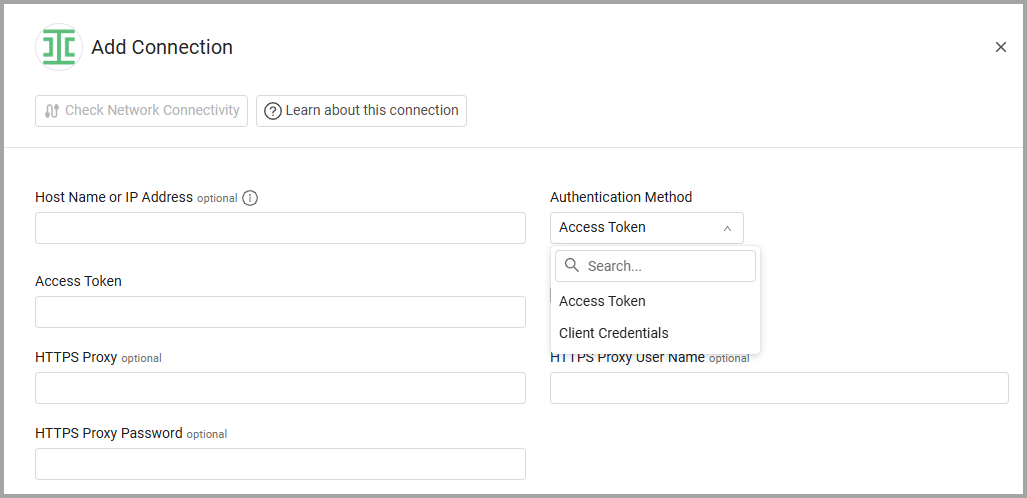
To connect the adapter in Axonius, provide the following parameters:
Required Parameters
- Host Name or IP Address - The hostname or IP address of the Ironclad server.
- Authentication Method - Select the authentication method:
- Access Token - An Access Token associated with a user account that has permissions to fetch assets. For more information on how to create this token, see Authenticate a Request.
- Client Credentials
- Client ID and Client Secret - The credentials for the API key application that has permissions to fetch assets. For more information, see Client Credentials Grant.
- User E-mail - The Email address of the credentials' owner.
Optional Parameters
-
Verify SSL - Select whether to verify the SSL certificate of the server against the CA database inside of Axonius. For more details, see SSL Trust & CA Settings.
-
HTTPS Proxy - Connect the adapter to a proxy instead of directly connecting it to the domain.
-
HTTPS Proxy User Name - The user name to use when connecting to the value supplied in Host Name or IP Address via the value supplied in HTTPS Proxy.
-
HTTPS Proxy Password - The password to use when connecting to the server using the HTTPS Proxy.
To learn more about common adapter connection parameters and buttons, see Adding a New Adapter Connection.
Updated 2 days ago