
Entro Security
Entro Security is a non-human identity and secrets management platform that provides discovery, classification, posture monitoring, and lifecycle management for service accounts, tokens, and exposed credentials across hybrid environments.
Use Cases the Adapter Solves
- Identify Exposed Secrets and Credentials: Discover and track exposed secrets, API keys, tokens, and credentials across your environment to prevent unauthorized access and data breaches.
- Monitor Non-Human Identity Security Posture: Gain visibility into service accounts and non-human identities to ensure proper lifecycle management and compliance with security policies.
Asset Types Fetched
- Users
- Secrets
Data Retrieved through the Adapter
Users
For example:
- Display Name, Department
Secrets
For example:
- Location, Owner
Before You Begin
Required Ports
- TCP port 443 (HTTPS)
Authentication Methods
API Key Authentication
The adapter authenticates to the Entro Security API using an API key provided in the connection settings. The API key is passed in the Authorization header for all API requests.
APIs
Axonius uses the Entro Security REST API. The following endpoints are called:
GET /v1/employees- Retrieves employee information including identity provider sources and account detailsGET /v1/exposed-secrets- Retrieves exposed secrets including type, severity, location, and associated accounts
Required Permissions
The API key must have sufficient permissions to read employee and exposed secrets data.
Note: The exact permission names should be confirmed with your Entro Security administrator or Entro Security support, as the API documentation is not publicly available.
Supported From Version
Supported from Axonius version 9.0.3
Connecting the Adapter in Axonius
Navigate to the Adapters page, search for Entro Security, and click on the adapter tile.
Click Add Connection.
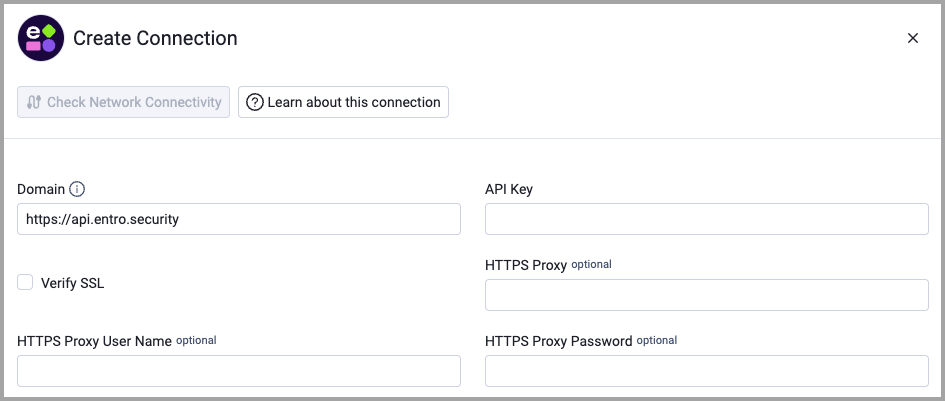
To connect the adapter in Axonius, provide the following parameters:
Required Parameters
- Domain - Base URL for the Entro Security API. Example:
https://api.entro.security - API Key - The API token generated from your Entro Security platform for authentication.
Optional Parameters
- Verify SSL - Select whether to verify the SSL certificate of the server against the CA database inside of Axonius. For more details, see SSL Trust & CA Settings.
- HTTPS Proxy - Connect the adapter to a proxy instead of directly connecting it to the domain.
- HTTPS Proxy User Name - The user name to use when connecting to the value supplied in Domain via the value supplied in HTTPS Proxy.
- HTTPS Proxy Password - The password to use when connecting to the server using the HTTPS Proxy.
To learn more about common adapter connection parameters and buttons, see Adding a New Adapter Connection.
Updated 29 days ago