
Device Discovery Chart
The Device Discovery chart lists the number of devices seen by each connected adapter, separately for each adapter, sorted by the highest to the lowest number of devices, displaying the top 20 adapters by default.
This charts answers the question: How many devices do I have?
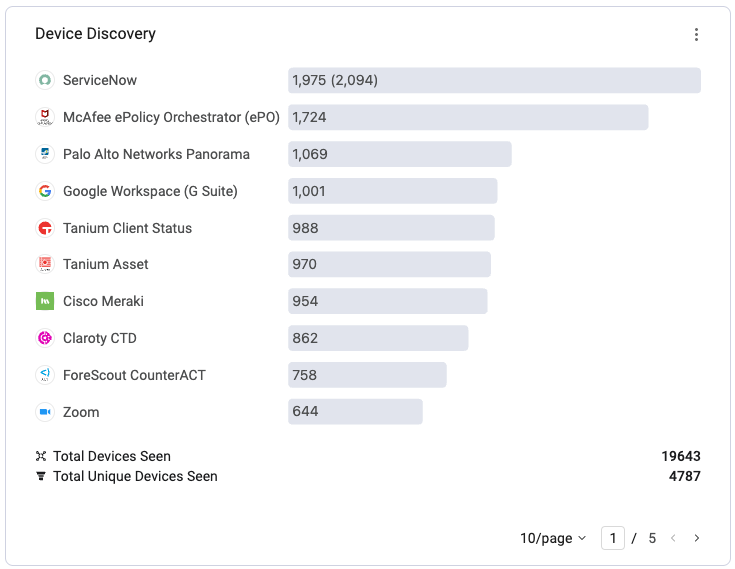
The chart displays the following information:
- Each record displays the adapter logo (hover to view the adapter full name) and two values:
- Number without parentheses - The number of assets fetched from all adapter connections for this adapter.
- The number of assets fetched from all adapter connections for this adapter, including assets fetched from different components/modules of this adapter, outdated or duplicated assets.
NOTE
If you hover over the adapter logo, the number of assets fetched from all adapter connections for this adapter is displayed along with its percentage out of the Total Devices Seen.
- If there are more than 20 connected device adapters, use the pagination buttons to view all connected adapters.
- Total Devices Seen - The sum of all devices reported by each adapter.
- Number without parentheses - The number of adapter-unique assets fetched from all adapter connections.
- Number with parentheses - The number of assets fetched from all adapter connections of all adapters, including assets fetched from different components/modules of all adapters, outdated or duplicated assets.
- Total Unique Devices - The number of total unique devices after Axonius device correlation.
To view all devices per specific adapter, click that row in the chart. The Devices page opens, filtered to results of that adapter.
The Device Discovery chart is permanent and cannot be edited or deleted.
Updated 2 days ago
Did this page help you?