
Figma - Update User
The Figma - Update User Enforcement Action updates user attributes in Figma via the SCIM v2 API for:
- Assets returned by the selected query or assets selected on the relevant asset page.
See Creating Enforcement Sets to learn more about adding Enforcement Actions to Enforcement Sets.
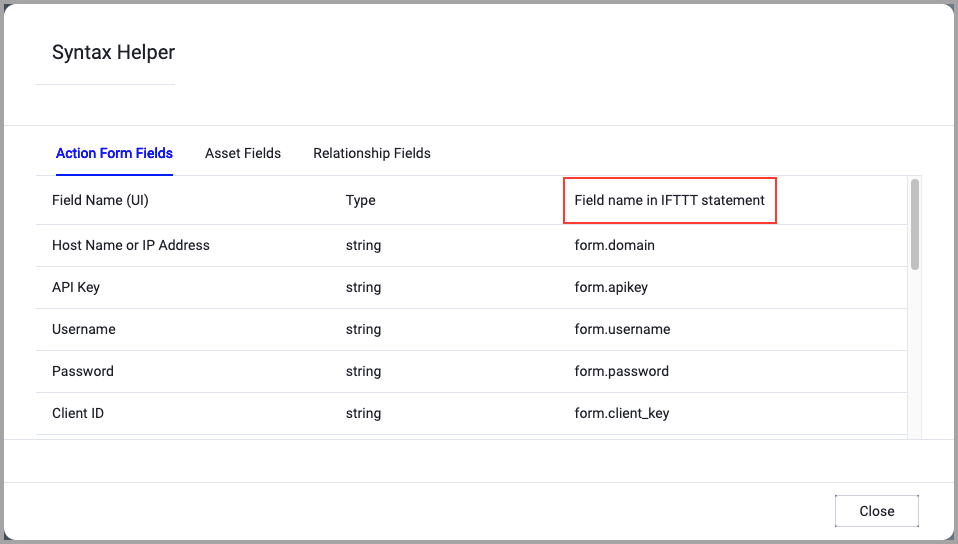
When accessing an enforcement action using the API, you must use the backend form of field names.
Use the Syntax Helper to find the correct name. In the enforcement action, enable Configure Dynamic Values and select Syntax Helper.
Note
- Not all asset types are supported for all Enforcement Actions.
- See Actions supported for Activity Logs, Adapters Fetch History, and Asset Investigation modules.
- See Actions supported for Aggregated Security Findings.
- See Actions supported for Software.
Required Fields
These fields must be configured to run the Enforcement Action.
- Action name - The name of this Enforcement Action. The system sets a default name. You can change the name.
- Configure Dynamic Values (optional) - Toggle on to enter a Dynamic Value statement. See Creating Enforcement Action Dynamic Value Statements to learn more about Dynamic Value statement syntax.
- Use stored credentials from the Figma adapter - Select this option to use credentials from the adapter connection. By default, the first connection is selected.
-
When you select this option, the Select Adapter Connection drop-down becomes available. Select the adapter connection to use for this Enforcement Action.
-
NoteThe User Name and User is Active fields are required by the Figma SCIM API. All other fields are optional and will only update the user attributes if provided.
Compute Node - The Axonius node to use when connecting to the specified host. For more details, see Working with Axonius Compute Nodes.
- User Name - The user's email address. Changing this updates the Figma account email.
- User is Active - Set to
falseto deactivate the user. Deactivated users are removed from the organization.
Additional Fields
These fields are optional.
- External ID - The IdP's external ID for the user. Figma stores but does not use this parameter (limited to 255 characters).
- Display Name - Display name for the user profile in Figma (limited to 100 characters). If not provided, the User Name value is used.
- Title - Job title of the user, displayed in the user profile.
- First Name - First name of the user.
- Last Name - Last name of the user.
- Seat Type - Enterprise plan only. Assigns a seat type to the user. Options:
Full,Dev,Collab,View. - Employee Number - Unique identifier of employee within your HR system.
- Cost Center - Cost center of employee. Figma allows for one extra metadata field in the Admin Console.
- Organization - Organization of the employee. Figma allows for one extra metadata field in the Admin Console.
- Division - Division of the employee. Figma allows for one extra metadata field in the Admin Console.
- Department - Department of the employee. Figma allows for one extra metadata field in the Admin Console.
- Manager ID - Username or email of the manager.
- Manager Display Name - User profile name of the manager.
- Figma Admin - If
true, sets the user as a Figma organization administrator. Enterprise plan only.
Connection and CredentialsWhen Use stored credentials from the adapter is toggled off, some of the connection fields below are required to create the connection, while other fields are optional.
Gateway Name - Select the Gateway through which to connect to perform the action.
APIs
Axonius uses the Figma SCIM API - PATCH /scim/v2/:tenantId/Users/:userId
Required Ports
Axonius must be able to communicate via the following ports:
- TCP port 443 (HTTPS)
Required Permissions
The stored credentials, or those provided in Connection and Credentials, must have the following permission(s) to perform this Enforcement Action:
- SCIM API Token - A bearer token generated by a Figma enterprise admin in the Figma admin console (Admin → SCIM).
- The SCIM API Token must be associated with a Figma organization that has SCIM provisioning enabled.
- The token must have permissions to update user attributes via the SCIM API.
Version Matrix
This Enforcement Action was tested only with the versions marked as supported, but may work with other versions. Please contact Axonius Support if you have a version that is not listed and it is not functioning as expected.
| Version | Supported | Notes |
|---|---|---|
| SCIM v2 | ✅ | Figma SCIM API v2 |
For more details about other enforcement actions available, see Action Library.
Updated 13 days ago