
Axonius BACnet Scanner
BACnet (Building Automation and Control Networks) is a communication protocol for building automation systems defined by the ASHRAE, ANSI, and ISO 16484-5 standards. The Axonius-provided BACnet scanner, discovers BACnet devices on a network using the BACnet/IP protocol (Who-Is/I-Am).
This adapter supports query-driven scanning.
NoteThis adapter has an extended device deletion threshold and per-connection custom scheduling enabled by default. Devices discovered by this adapter stay visible in Axonius for 90 days before being deleted if not seen again, and each connection can now be configured with its own custom discovery schedule.
Use Cases the Adapter Solves
- OT/IoT Device Inventory: Automatically discover and inventory all BACnet-enabled building automation devices — including HVAC controllers, access control panels, lighting systems, and sensors — across your facility networks, eliminating manual discovery processes.
- Firmware and Patch Management: Surface firmware revision and application software version data for each discovered BACnet device, enabling security teams to identify devices running outdated or vulnerable firmware and prioritize remediation.
Asset Types Fetched
- Devices
Data Retrieved through the Adapter
The following data can be fetched by the adapter:
Devices - Fields such as Vendor Name, Firmware Revision, Model Name, System Status
Before You Begin
Required Ports
- UDP port 47808 (BACnet/IP)
Authentication Methods
No authentication is required. The BACnet Scanner uses the standard BACnet/IP Who-Is/I-Am broadcast discovery mechanism. The Axonius node must have UDP network access to the target BACnet subnets.
APIs
Axonius uses the BACnet/IP protocol (ASHRAE Standard 135) for device discovery and data collection. The following protocol messages are used:
Who-Is(Unconfirmed Request) - Broadcast sent to each target subnet to discover BACnet devicesI-Am(Unconfirmed Request) - Response received from BACnet devices confirming their presenceReadProperty(Confirmed Request) - Reads individual device properties (object name, vendor name, firmware revision, etc.) when Fetch Properties is enabledReadPropertyMultiple(Confirmed Request) - Reads the full object list from devices when Fetch Object List is enabled
Required Permissions
Network-level access is required:
- The Axonius node must be able to send and receive UDP traffic on port 47808 to/from the BACnet network segments being scanned.
- No BACnet credentials, API keys, or service accounts are required. BACnet/IP device discovery relies on standard broadcast messaging defined in the BACnet protocol specification.
- If BACnet devices are protected by a firewall or network segmentation, ensure that UDP port 47808 is open between the Axonius node and the target subnets.
Supported From Version
Supported from Axonius version 8.0.17
Setting Up BACnet Scanner to Work with Axonius
No configuration changes are required on the BACnet devices themselves. Before adding the adapter connection, verify the following network prerequisites:
- Identify the IPv4 subnets (in CIDR notation) that contain the BACnet devices you want to discover. Example:
192.168.1.0/24or10.0.0.0/16. - Confirm that UDP port 47808 is open between the Axonius node and the target subnets.
- If the BACnet devices are on isolated OT/building automation network segments, ensure the Axonius node (or an Axonius Gateway) has routed network access to those segments.
- Note the BACnet port in use on your network. The standard port is
47808; confirm this with your building automation team if unsure.
Connecting the Adapter in Axonius
Navigate to the Adapters page, search for BACnet Scanner, and click on the adapter tile.
Click Add Connection.
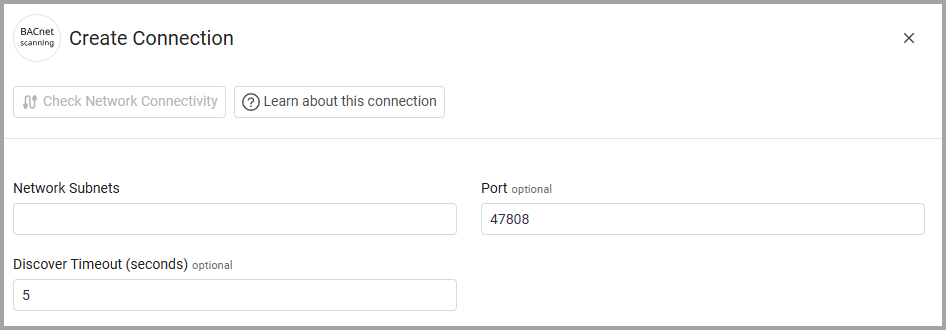
To connect the adapter in Axonius, provide the following parameters:
Required Parameters
- Network Subnets - Enter one or more IPv4 subnets in CIDR notation to scan for BACnet devices. Separate multiple subnets with a comma or newline. Example:
192.168.1.0/24, 10.0.0.0/16
Optional Parameters
- Port (Default:
47808) - The UDP port used for BACnet/IP communication. - Discover Timeout (seconds) (Default:
5)- The number of seconds to wait for BACnet device responses during each subnet scan. - Max Concurrent Devices (Default:
20) - Enter a value to limit the number of unique devices queried at any give moment. - Max Retries (Default:
2)- Enter a value to define the maximum retries per device. - Inter-Packet Delay (ms) (Default:
50)- Set the delay between packets in ms. to prevent buffer overflow.
To learn more about common adapter connection parameters and buttons, see Adding a New Adapter Connection.
Advanced Settings
NoteAdvanced settings can either apply to all connections for this adapter, or to a specific connection. Refer to Advanced Configuration for Adapters.
To learn more about Adapter Configuration tab advanced settings, see Adapter Advanced Settings.
BACnet Scanner Configuration
- Fetch Properties - By default the system fetches device properties (such as Object Name, Vendor Name, Model Name, Firmware Revision, Location, and System Status) from each discovered BACnet device. Clear this option to only fetch basic discovery data (device instance, vendor ID, and network address) .
- Fetch Object List - Enable this option to read the full object list from each discovered BACnet device. The object list enumerates all BACnet objects present on the device, such as analog inputs, binary outputs, schedules, and trend logs.
Related Enforcement Actions
Updated 12 days ago