
Nautobot
Nautobot is a network documentation and automation platform for managing network resources.
Types of Assets Fetched
This adapter fetches the following types of assets:
- Devices
- Networks (when Prefixes is enabled)
Data Retrieved through the Adapter
Devices - Fields such as Name, Hostname, Device Serial, OS
Networks - Fields such as Prefix, CIDR Blocks, Description, Status
Before You Begin
Required Ports
- TCP port 443 (HTTPS), or TCP port 80 (HTTP) when your Nautobot server uses an
http://address
Authentication Methods
The adapter authenticates with a Nautobot API token. Axonius sends the token in the Authorization header of every request.
APIs
Axonius uses the Nautobot REST API. The following endpoints are called:
GET /api/dcim/devices/- Retrieves devices (when Devices Source is REST API)POST /api/extras/graphql-queries/{id}/run/- Runs each saved GraphQL query and retrieves devices from its results (when Devices Source is Saved GraphQL Queries)GET /api/virtualization/virtual-machines/- Retrieves virtual machinesGET /api/ipam/prefixes- Retrieves network prefixes (when Prefixes is enabled)
Required Permissions
The following permissions are required for the user account that owns the API token:
- View permission on devices (
dcim.view_device), virtual machines, and, when Prefixes is enabled, IPAM prefixes. - When Devices Source is Saved GraphQL Queries, the add permission on GraphQL queries (extras.add_graphqlquery), and view permission on the objects that each query returns. Nautobot runs a saved query with a POST request, which it maps to the add permission. Nautobot returns only the objects that the user is permitted to view.
Supported From Version
Supported from Axonius version 6.1
Parameters
-
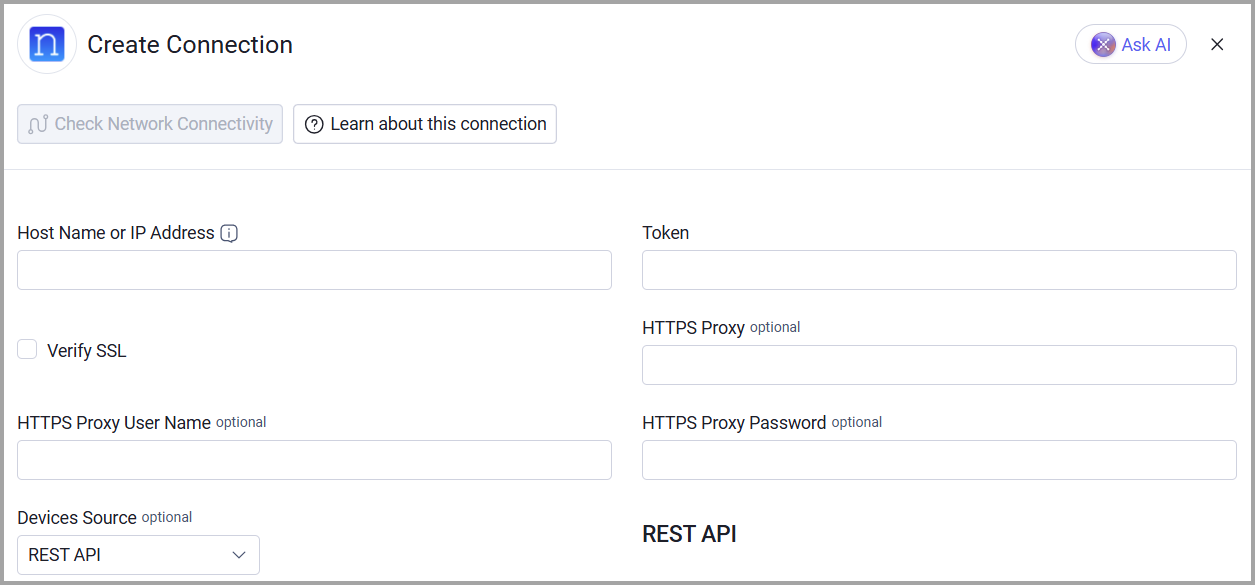
Host Name or IP Address (required) - The hostname or IP address of the Nautobot server.
-
Token (required) - An API Key associated with a user account that has permissions to fetch assets.
-
Verify SSL - Select whether to verify the SSL certificate of the server against the CA database inside of Axonius. For more details, see SSL Trust & CA Settings.
-
HTTPS Proxy (optional) - Connect the adapter to a proxy instead of directly connecting it to the domain.
-
HTTPS Proxy User Name (optional) - The user name to use when connecting to the value supplied in Host Name or IP Address via the value supplied in HTTPS Proxy.
-
HTTPS Proxy Password (optional) - The password to use when connecting to the server using the HTTPS Proxy.
-
Devices Source (default: REST API) - Select how the adapter fetches devices: REST API or Saved GraphQL Queries. For more details, see Using Saved GraphQL Queries.
-
Saved GraphQL Query IDs (required when Devices Source is Saved GraphQL Queries) - Enter one or more IDs (UUIDs) of saved GraphQL queries in Nautobot. The adapter runs each query and fetches devices from the results instead of using the REST devices endpoint.
To learn more about common adapter connection parameters and buttons, see Adding a New Adapter Connection.
Using Saved GraphQL Queries
Set Devices Source to Saved GraphQL Queries to fetch devices by running saved Nautobot GraphQL queries instead of using the REST devices endpoint. Keep REST API selected to continue fetching devices from the REST devices endpoint. Connections created before Devices Source was added continue to use the REST API.
To fetch devices with saved GraphQL queries:
- Edit the Nautobot adapter connection.
- Set Devices Source to Saved GraphQL Queries.
- In Saved GraphQL Query IDs, enter one or more IDs of saved queries. In Nautobot, saved queries are under Extensibility > GraphQL Queries.
- If needed, set Saved GraphQL Queries Page Size in the adapter's advanced settings.
Saved Query Requirements
Each saved query must return a data.devices list. Every device in the list must include both id and name. Axonius uses name as the device hostname. Axonius pages through the results by sending limit and offset as GraphQL variables, so declare $limit and $offset in the query and pass them to devices.
The device fetch fails if a saved query returns GraphQL errors, does not return data.devices, or returns a device without id or name.
Advanced Settings
Note:
- Advanced settings can apply to either all connections of this adapter, or to a specific connection. For more detailed information, see Advanced Configuration for Adapters.
- For more general information about advanced settings, see Adapter Advanced Settings.
- Saved GraphQL Queries Page Size (default: 500) - Enter the number of devices that each saved GraphQL query returns in a request, from 1 to 1000. Lower the value if a heavy query times out. This setting applies when Devices Source is Saved GraphQL Queries.
- Prefixes (optional, default: disabled) - Enable fetching network prefixes from the Nautobot IPAM (IP Address Management) module. When enabled, the adapter will fetch network prefix data from the /api/ipam/prefixes endpoint and populate the Networks asset type in Axonius.
Related Enforcement Actions
Updated 5 days ago