
Axonius - Convert Custom Data to Managed Asset
Axonius - Convert Custom Data to Managed Asset converts custom data (manually entered by the user) into managed asset data for either:
- Assets returned by the selected query.
- Assets selected on the relevant asset page.
Learn more about Custom Data.
For a detailed explanation on this action and the specific issues it targets, see Converting Custom Data to Managed Assets.
See Creating Enforcement Sets to learn more about adding Enforcement Actions to Enforcement Sets.
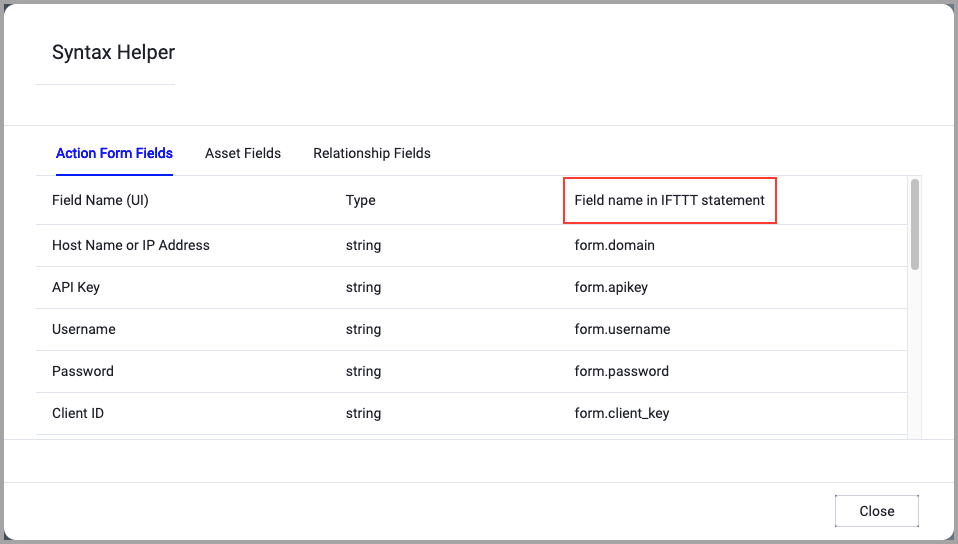
When accessing an enforcement action using the API, you must use the backend form of field names.
Use the Syntax Helper to find the correct name. In the enforcement action, enable Configure Dynamic Values and select Syntax Helper.
Note
- Not all asset types are supported for all Enforcement Actions.
- See Actions supported for Activity Logs, Adapters Fetch History, and Asset Investigation modules.
- See Actions supported for Aggregated Security Findings.
- See Actions supported for Software.
Required Fields
These fields are required to run the Enforcement Set.
- Action name - The name of this Enforcement Action. The system sets a default name. You can change the name.
- Configure Dynamic Values (optional) - Toggle on to enter a Dynamic Value statement. See Creating Enforcement Action Dynamic Value Statements to learn more about Dynamic Value statement syntax.
NoteThe Use stored credentials from the adapter toggle is meaningless in this action - you can ignore it, as well as the Additional Fields tab. Only provide the required fields mentioned above.
For more details about other enforcement actions available, see Action Library.
Updated 14 days ago