
HashiCorp Consul
HashiCorp Consul is a multi-cloud service networking platform to connect and secure services across any runtime platform and public or private cloud.
Types of Assets Fetched
This adapter fetches the following types of assets:
- Devices, Firewalls
APIs
Axonius uses the HashiCorp Consul Catalog HTTP API.
The following endpoints are called:
GET /v1/catalog/nodes- Fetches the nodes, as Devices.GET /v1/session/node/{node_name}- Fetches the sessions of each node.GET /v1/catalog/services- Fetches the service names. Called when Enrich Nodes with Node Services is selected.GET /v1/catalog/service/{service_name}- Fetches the nodes that run each service. Called when Enrich Nodes with Node Services is selected.GET /v1/connect/intentions- Fetches the intentions, as Firewall assets. Called when Fetch Firewall from Intentions is selected.
Parameters
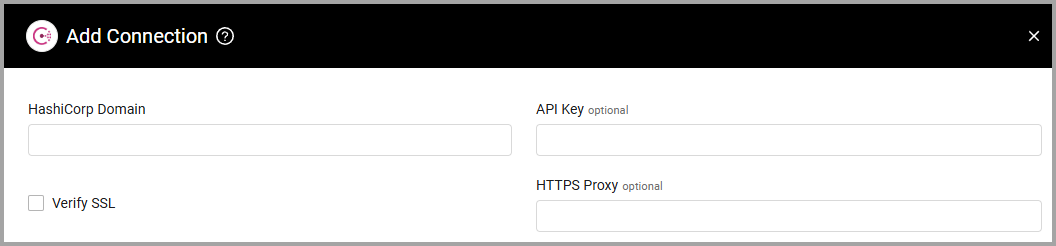
- HashiCorp Domain (required) - The hostname of the HashiCorp Consul server.
- API Key (optional) - Specify the Consul token you have generated. For more details, see Consul ACL Token Create.
- Verify SSL - Select whether to verify the SSL certificate of the server against the CA database inside of Axonius. For more details, see SSL Trust & CA Settings.
- HTTPS Proxy (optional) - Connect the adapter to a proxy instead of directly connecting it to the domain.
To learn more about common adapter connection parameters and buttons, see Adding a New Adapter Connection.
Advanced Settings
Note:
- Advanced settings can apply to either all connections of this adapter, or to a specific connection. For more detailed information, see Advanced Configuration for Adapters.
- For more general information about advanced settings, see Adapter Advanced Settings.
- Enrich Nodes with Node Services (default: disabled) - Select this option to fetch the services registered on each Consul node. The adapter adds the service port and service details to the matching device.
- Fetch Firewall from Intentions (default: disabled) - Select this option to fetch Consul intentions as Firewall assets.
Updated 19 days ago
Did this page help you?