
CloudPassage Halo
CloudPassage Halo is a security automation platform providing visibility, protection, and continuous compliance monitoring for AWS and Azure deployments.
Asset Types Fetched
This adapter fetches the following types of assets:
- Devices
Data Retrieved through the Adapter
Devices - Fields such as Host Name, Cloud Provider, Cloud Account ID, Operating System
Before You Begin
Required Ports
Axonius must be able to communicate with the value supplied in Cloudpassage Domain via the following ports:
- TCP port 443
Authentication Methods
The adapter authenticates with a Key ID and Key Secret. Axonius uses them to request an access token from CloudPassage Halo, and refreshes the token automatically when it expires.
APIs
Axonius uses the CloudPassage Halo API to retrieve asset data. The following endpoints are called:
POST /oauth/access_token- Request an access token.GET /v1/servers- Fetch the servers (devices).
Connecting the Adapter in Axonius
- Navigate to the Adapter Catalog, search for CloudPassage Halo, and select the adapter.
- Click Add Connection.
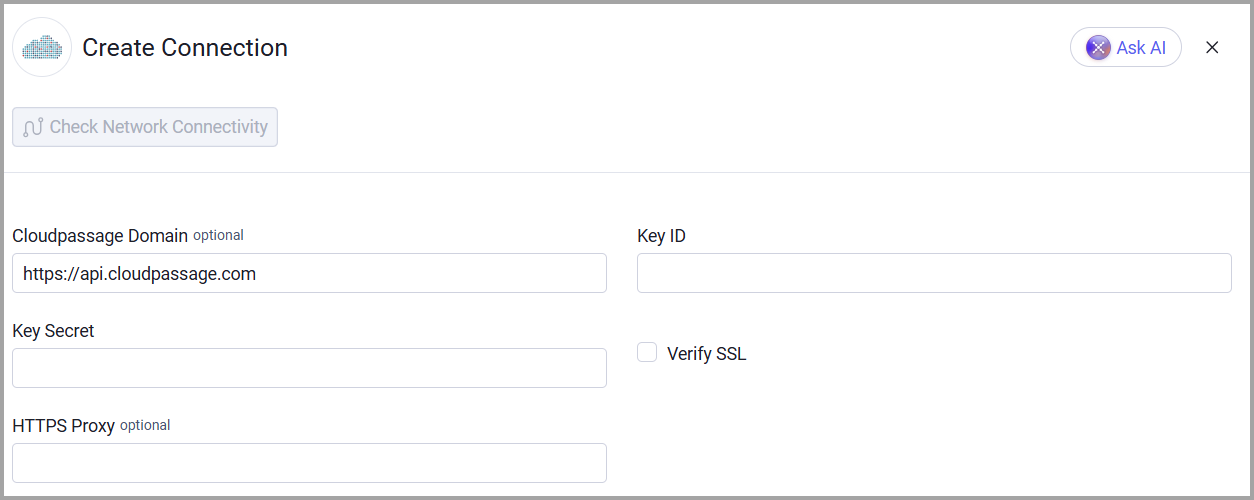
- Provide the following parameters.
Required Parameters
-
Cloudpassage Domain (default:
https://api.cloudpassage.com) - The URL of the CloudPassage Halo API. -
Key ID (required) - The ID of the API key that Axonius uses to fetch assets.
-
Key Secret (required) - The secret of the API key that Axonius uses to fetch assets.
-
Verify SSL - Select whether to verify the SSL certificate of the server against the CA database inside of Axonius. For more details, see SSL Trust & CA Settings.
Optional Parameters
- HTTPS Proxy - Enter an HTTPS proxy address to connect the adapter to a proxy instead of directly connecting it to the domain.
To learn about additional optional/common adapter connection parameters, see Adding a New Adapter Connection.
Updated 1 day ago