
Incident.io
Incident.io is an incident management platform that provides on-call scheduling, automated response workflows, and status pages directly within chat applications to streamline engineering operations.
Use Cases the Adapter Solves
- Identify User Roles and Permissions: Gain visibility into which users have administrative privileges, owner roles, or custom roles within your incident management platform to ensure proper access controls.
- Monitor On-Call and Response Access: Track which users have on-call scheduling access and response viewer/contributor permissions to verify coverage and compliance with incident response policies.
Asset Types Fetched
- Users
Data Retrieved through the Adapter
Users - Fields such as User Remote ID, Display Name, Email Address, Slack User ID
Before You Begin
Required Ports
- TCP port 443 (HTTPS)
Authentication Methods
API Key Authentication
APIs
Axonius uses the Incident.io API. The following endpoints is called:
GET /v2/users
Required Permissions
The API key used for the adapter must have Admin or Owner role in order to read user information from your Incident.io account.
Note: The exact permission names should be confirmed with your Incident.io administrator or Incident.io support.
Supported From Version
Supported from Axonius version 8.0.23
Connecting the Adapter in Axonius
Navigate to the Adapters page, search for Incident.io, and click on the adapter tile.
Click Add Connection.
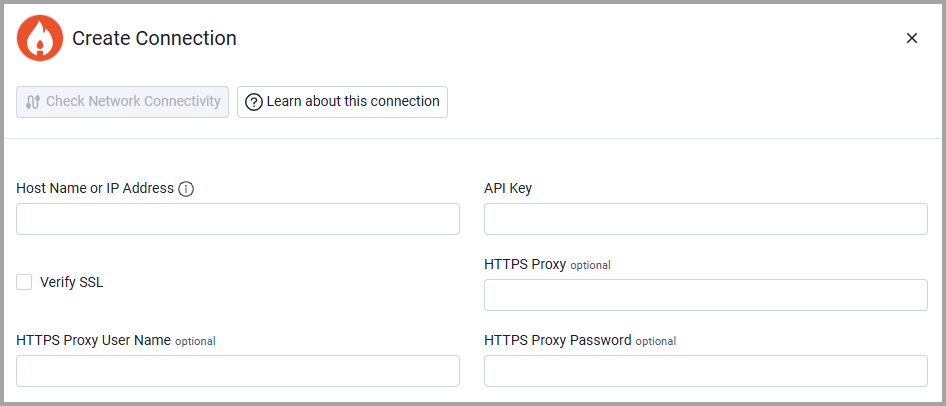
To connect the adapter in Axonius, provide the following parameters:
Required Parameters
- Host Name or IP Address - Base URL for the Incident.io API. Example:
https://api.incident.io - API Key - The API key generated from your Incident.io dashboard (Settings → API keys). Refer to Authentication.
Optional Parameters
- Verify SSL - Select whether to verify the SSL certificate of the server against the CA database inside of Axonius. For more details, see SSL Trust & CA Settings.
- HTTPS Proxy - Connect the adapter to a proxy instead of directly connecting it to the domain.
- HTTPS Proxy User Name - The user name to use when connecting to the value supplied in Host Name or IP Address via the value supplied in HTTPS Proxy.
- HTTPS Proxy Password - The password to use when connecting to the server using the HTTPS Proxy.
To learn more about common adapter connection parameters and buttons, see Adding a New Adapter Connection.
Updated about 1 month ago