
Efecte
Efecte is an IT service management (ITSM) and collaboration platform with a focus on SaaS security and configuration management. The Efecte adapter for Axonius allows organizations to aggregate and manage assets from the Efecte platform to gain visibility into their IT infrastructure and service environment.
Assets Types Fetched
This adapter fetches the following types of assets:
- Devices, Software, SaaS Applications
Use Cases the Adapter Solves
-
Comprehensive ITSM Asset Visibility: Consolidate device, software, and SaaS application data from Efecte into a single asset management view, eliminating data silos between ITSM systems and your asset inventory.
-
Software License Compliance: Track installed applications across devices discovered in Efecte to ensure software license compliance and identify unlicensed or unauthorized software installations.
Data Retrieved through the Adapter
Devices - Fields such as Hostname, Device Type (Workstation, Server, Mobile Device, Network Device)
Software - Fields such as Software Name, Software Vendor, Software Version
SaaS Applications - Fields such as Application Name, Application Vendor
Before you start
Authentication Method
User Name and Password
APIs
Axonius uses the Efecte REST API (v1). The following endpoints are called:
POST /v1/users/login- Authenticate and retrieve authorization tokenGET /v1/dc/workstation/data- Fetch workstation device dataGET /v1/dc/server/data- Fetch server device dataGET /v1/dc/server_patch_group/data- Fetch server patch group informationGET /v1/dc/application_installation/data- Fetch application installationsGET /v1/dc/systemfamily/data- Fetch system family dataGET /v1/dc/adc_proxy/data- Fetch ADC proxy informationGET /v1/dc/mobile_device/data- Fetch mobile device dataGET /v1/dc/network_device/data- Fetch network device dataGET /v1/dc/printer/data- Fetch printer data
Required Ports
TCP port 443
Required Permissions
To use the REST API:
- AREST API license is required.
- A technical (local) user and a role defined for access management purposes.
- Folder permissions
- Template permissions
- Permissions to use the External API
Supported From Version
Supported from Axonius version 6.1
Setting Up Efecte to Work with Axonius
The Efecte Service Management tool needs to have a local EMS user account for Axonius with the required permissions.
Create an account as follows:
- Create a role and select 'Efecte External API module permissions.
- Add folder and template permissions to the role.
- Create a REST API user for Axonius.
- Add the user to the Role you created
Connecting the Adapter in Axonius
Navigate to the Adapters page, search for Efecte, and click on the adapter tile.
Click Add Connection.
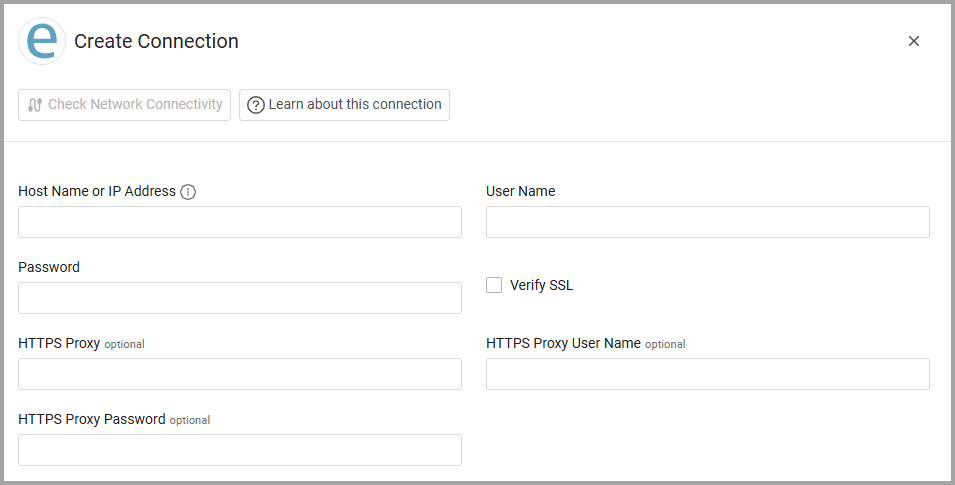
To connect the adapter in Axonius, provide the following parameters:
Required Parameters
-
Host Name or IP Address - The hostname or IP address of the Efecte server.
-
User Name and Password - The credentials for a user account that has permission to fetch assets.
Optional Parameters
-
Verify SSL - Select whether to verify the SSL certificate of the server against the CA database inside of Axonius. For more details, see SSL Trust & CA Settings.
-
HTTPS Proxy - Connect the adapter to a proxy instead of directly connecting it to the domain.
-
HTTPS Proxy User Name - The user name to use when connecting to the value supplied in Host Name or IP Address via the value supplied in HTTPS Proxy.
-
HTTPS Proxy Password - The password to use when connecting to the server using the HTTPS Proxy.
To learn more about common adapter connection parameters and buttons, see Adding a New Adapter Connection.
Advanced Settings
Note
- Advanced settings can apply to either all connections of this adapter, or to a specific connection. For more detailed information, see Advanced Configuration for Adapters.
- For more general information about advanced settings, see Adapter Advanced Settings.
- Exclude Hidden Systems from Installed Software - When enabled, application_installation records marked as hidden in Efecte are excluded from Installed Software in Axonius. Device records (servers, workstations, etc.) are always fetched regardless of their hidden status.
Updated 1 day ago