
FortiAuthenticator
FortiAuthenticator is an identity and access management appliance that provides centralized authentication, two-factor authentication, single sign-on, and RADIUS and LDAP services for users and devices.
Use Cases the Adapter Solves
- Centralized User Identity Visibility: Gain comprehensive visibility into all user identities managed across local, LDAP, and RADIUS authentication sources, enabling better identity governance and access management.
- Device Authentication Tracking: Monitor and track MAC-based device registrations and authentication status to identify authorized and unauthorized devices accessing your network resources.
Asset Types Fetched
- Devices, Users, Groups
Data Retrieved through the Adapter
Users - Fields such as Username, Display Name, Email Address, First Name
Groups - Fields such as Display Name, Password Policy
Devices - Fields such as Name, MAC Address, Description
Before You Begin
Required Ports
- TCP port 443 (HTTPS)
Authentication Methods
Basic Authentication with API Web Service Access Key
The adapter authenticates using Basic Authentication with a username and API Web Service Access Key.
APIs
Axonius uses the FortiAuthenticator REST API v1. The following endpoints are called:
GET /api/v1/localusers/GET /api/v1/ldapusers/GET /api/v1/radiususers/GET /api/v1/usergroups/GET /api/v1/macdevices/
Required Permissions
The following permissions are required:
Administrator Role with Web Service Access
The API user must be configured with:
- Administrator Role - Grants access to FortiAuthenticator administrative functions
- Web Service Access - Enables REST API access for the administrator account
The administrator must have the following granular permissions through admin profiles:
- Can view local users - Required to fetch local user data
- Can view LDAP users - Required to fetch LDAP user data
- Can view RADIUS users - Required to fetch RADIUS user data
- Can view user groups - Required to fetch user group data
- Can view MAC devices - Required to fetch MAC device data
Note: Admin profiles are configured in System > Administration > Admin Profiles. The specific permissions listed above should be confirmed with your FortiAuthenticator administrator or refer to your FortiAuthenticator REST API documentation.
Supported From Version
Supported from Axonius version 8.0.25
Connecting the Adapter in Axonius
Navigate to the Adapters page, search for FortiAuthenticator, and click on the adapter tile.
Click Add Connection.
To connect the adapter in Axonius, provide the following parameters:
Required Parameters
- Host Name or IP Address - Base URL for the FortiAuthenticator REST API, including the http:// or https:// prefix. Do not add any specific endpoints after the domain. Example:
https://fortiauthenticator.example.com - User Name - The administrator username with web service access enabled. Example:
api_admin - API Web Service Access Key - The API key generated for the administrator account. This key is sent via email when web service access is enabled for the user.
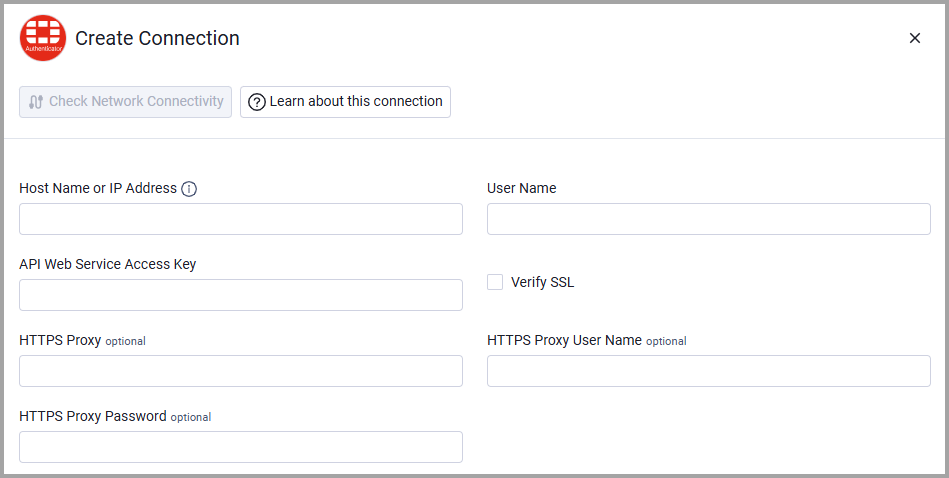
Optional Parameters
- Verify SSL - Select whether to verify the SSL certificate of the server against the CA database inside of Axonius. For more details, see SSL Trust & CA Settings.
- HTTPS Proxy - Connect the adapter to a proxy instead of directly connecting it to the domain.
- HTTPS Proxy User Name - The user name to use when connecting to the value supplied in Host Name or IP Address via the value supplied in HTTPS Proxy.
- HTTPS Proxy Password - The password to use when connecting to the server using the HTTPS Proxy.
To learn more about common adapter connection parameters and buttons, see Adding a New Adapter Connection.
Updated 5 months ago