
Axonius CIP Scanner
Axonius-provided CIP scanner, queries known EtherNet/IP devices using the Common Industrial Protocol ListIdentity command (0x63) to retrieve detailed asset information.
This adapter supports query-driven scanning.
NoteThis adapter has an extended device deletion threshold and per-connection custom scheduling enabled by default. Devices discovered by this adapter stay visible in Axonius for 90 days before being deleted if not seen again, and each connection can now be configured with its own custom discovery schedule.
Use Cases the Adapter Solves
- OT/ICS Asset Enrichment: Retrieve detailed identity information from known industrial devices — including PLCs, HMIs, and motor drives - that have been identified as CIP-enabled through passive network monitoring.
- Industrial Asset Inventory Enrichment: Enrich your inventory of known EtherNet/IP devices across manufacturing and industrial environments with CIP identity data, improving asset visibility and security posture.
Asset Types Fetched
- Devices
Data Retrieved through the Adapter
Devices - Fields such as Device Name, Device Manufacturer, Device Model, Device Serial Number, Device Hardware Version, CIP Vendor ID
Before You Begin
Required Ports
- TCP port 44818 (EtherNet/IP - CIP protocol default port)
Authentication Methods
No authentication is required for this adapter. The Axonius CIP Scanner uses the stateless EtherNet/IP ListIdentity command (0x63) to query specific known devices and retrieve their identity information. This is a standard CIP discovery mechanism that does not require credentials or session establishment.
APIs
The Axonius CIP Scanner uses the EtherNet/IP protocol (Common Industrial Protocol - CIP) ListIdentity command. This adapter does not use a REST API; instead, it sends a targeted CIP ListIdentity request (command 0x63) over TCP directly to specific devices already identified as CIP-enabled through passive network monitoring.
Protocol Details:
- The adapter sends a 24-byte EtherNet/IP encapsulation header with command 0x63 (ListIdentity) to each configured device address.
- Devices respond with their CIP Identity Object information (vendor ID, device type, product code, serial number, product name, firmware revision).
- No session registration or authentication is required.
Note: Network access to TCP port 44818 on the target devices is required.
Required Permissions
No permissions are required for this adapter. The CIP ListIdentity command is a standard industrial protocol discovery mechanism that does not require authentication.
Note: Network access to TCP port 44818 on target devices is required for successful discovery.
Supported From Version
Supported from Axonius version 8.0
Setting Up Axonius CIP Scanner to Work with Axonius
No setup is required on the target devices. The CIP Scanner queries specific known devices using the standard EtherNet/IP ListIdentity protocol.
Important Considerations:
- Network Accessibility: Ensure that the Axonius collector node can reach TCP port 44818 on the target devices.
- OT Network Impact: The scanner includes configurable rate limiting and inter-packet delays to minimize impact on operational technology (OT) networks. Use these settings appropriately for your environment.
- Firewall Rules: If devices are behind firewalls, ensure TCP port 44818 is allowed from the Axonius collector to the target devices.
Connecting the Adapter in Axonius
Navigate to the Adapters page, search for Axonius CIP Scanner, and click on the adapter tile.
Click Add Connection.
To connect the adapter in Axonius, provide the following parameters:
Required Parameters
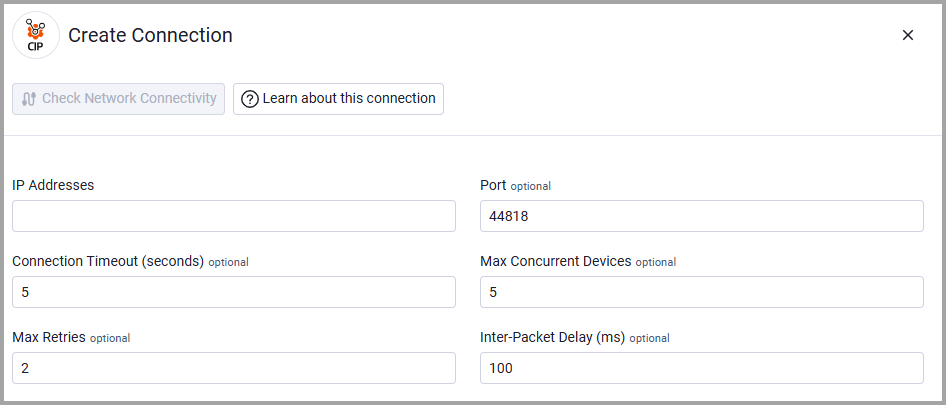
- IP Addresses - IIP addresses of known CIP devices to query. Enter the specific IP addresses of devices previously identified as CIP-enabled. Individual addresses or a comma-separated list are recommended. CIDR ranges are supported but should only be used if all addresses within the range are known CIP devices. Example:
192.168.1.0/24or10.0.0.1, 10.0.0.2, 172.16.0.0/16
Optional Parameters
- Port - EtherNet/IP TCP port to use for device querying. Default:
44818(standard EtherNet/IP port). Only change this if your CIP devices listen on a non-standard port. - Connection Timeout (seconds) - Timeout for each connection attempt in seconds. Default:
5.0. Increase this value for slow networks or devices with high latency. - Max Concurrent Devices - Maximum number of devices queried simultaneously. Default:
5. Lower values reduce network load but increase scan time; higher values speed up querying but may overwhelm OT networks. - Max Retries - Maximum number of retries per device on timeout. Default:
2. Devices that don't respond after this many attempts will be skipped. - Inter-Packet Delay (ms) - Delay between packets in milliseconds to avoid overloading OT devices. Default:
100ms. Increase this value for sensitive OT environments to reduce network stress. - Verify SSL - Select whether to verify the SSL certificate of the server against the CA database inside of Axonius. For more details, see SSL Trust & CA Settings.
- HTTPS Proxy - Connect the adapter to a proxy instead of directly connecting it to the domain.
- HTTPS Proxy User Name - The user name to use when connecting to the value supplied in IP Addresses via the value supplied in HTTPS Proxy.
- HTTPS Proxy Password - The password to use when connecting to the server using the HTTPS Proxy.
To learn more about common adapter connection parameters and buttons, see Adding a New Adapter Connection.
Updated 7 days ago