
Device Lifecycle Status
The Lifecycle Status page offers:
- Data Filtering Automation: Implement a logic engine that automatically shows only active devices based on custom-defined triggers.
- Persistent Tagging: Introduce recurrent tagging logic that survives data refreshes, thus replacing the current flow with custom tags (e.g., "Deactivated: Missing for >30 days").
Example Use Case
An IT Asset Manager is performing a quarterly audit to reduce licensing costs and ensure the CMDB (ServiceNow or Jira Service Management) is accurate. They are specifically looking for "retired" assets that might still be drawing power, running vulnerable software, or consuming expensive SaaS licenses.
Challenge: The CMDB marks 200 legacy workstations and 20 virtual servers as "Retired" or "Decommissioned." Based on this, the organization assumes these assets are off the network and no longer represent a risk or a cost, even though they might certainly do.
Solution: Axonius Lifecycle Status page cross-references CMDB data with live telemetry (e.g., CrowdStrike, Active Directory, or Network Discovery adapters) and identifies that 45 of those "Retired" devices are still checking in and communicating with the internet.
Business Value: Improving data accuracy and reducing noise from decommissioned assets.
Lifecycle Status Rules
The Lifecycle Status page lists the following Status Rules. All statuses except for Decommissioned are predefined by an Axonius default query that you can edit according to your needs.
- New - New devices that have just appeared in the environment for the the first time (Axonius default: were seen for the first time in the last 2 days).
- Active - Devices that were seen by adapters in the last X days (Axonius default: in the last 7 days).
- Ephemeral - Devices that were previously seen for a short period of time in the environment (up to 2 days) and then disappeared (Axonius default: more than 7 days have passed since these devices were last seen).
- Decommissioned - Devices officially retired by the organization.
- Inactive - Devices that were active in the past and were not seen in the last X days (Axonius default: in the last 8 days).
The following details are provided for each rule:
- Status priority and name (see explanation in the Business Units page about priorities).
- Asset Count - How many assets are affected by this rule
- Rule Status - Active or Inactive
- When the rule was last updated and by whom
Editing a Status Rule
Hover over a rule row to edit it. Only the following fields can be edited: Description, Priority, Saved Query, and the Activate rule toggle.
The Lifecycle Status Asset Field
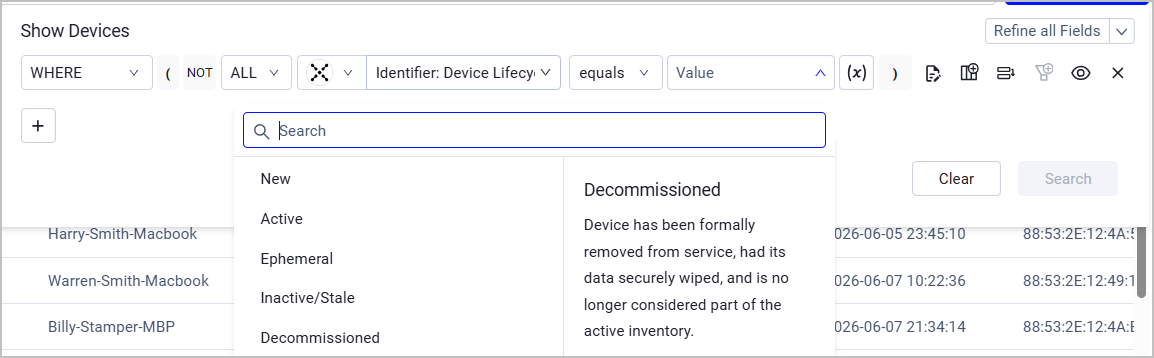
To see Lifecycle Status data from the Devices pages, add the Identifier: Device Lifecycle Status field to the Devices table (learn more about Setting Page Columns Display). You can also use this field for filtering in the Query Wizard.
Updated 4 months ago