
Tenable Cloud Security
Tenable Cloud Security (formerly Ermetic) provides cloud-native application protection platform (CNAPP) capabilities for vulnerability management, compliance, and security posture management across multi-cloud environments.
Use Cases the Adapter Solves
- Cloud Asset Visibility: Gain comprehensive visibility into virtual machines across AWS, Azure, GCP, and other cloud providers to identify all cloud-based assets in your environment.
- Vulnerability Management: Track and prioritize vulnerabilities (CVEs) across cloud workloads with severity ratings and exploitability information to focus remediation efforts.
- Cloud Security Posture: Monitor cloud security configurations and compliance status across multi-cloud environments to ensure adherence to security policies.
Asset Types Fetched
- Devices , Aggregated Security Findings, Users, Roles, Groups, SaaS Applications, Networks, Load Balancers, Databases, Containers, Object Storage, Accounts/Tenants, Serverless Functions, Secrets, Certificates, Network/Firewall Rules
Below is the full list of asset types fetched by the adapter, the API endpoints they are fetched from and the data sources in Tenable:
| Data Source | API Endpoint | Axonius Asset Type |
|---|---|---|
| Compute Resources | POST /api/graph (GraphQL: Entities query filtering AwsEc2Instance, AzureComputeVirtualMachine, GcpComputeInstance) | Devices |
| Container Images | POST /api/graph (GraphQL: Entities query filtering ContainerImage, AwsEcrRepository, AzureContainerRegistry, etc.) | Containers |
| Kubernetes Resources | POST /api/graph (GraphQL: Entities query filtering KubernetesDeployment, AwsEksCluster, AzureContainerServiceManagedCluster, GcpGkeCluster, etc.) | Containers |
| IAM Users | POST /api/graph (GraphQL: Entities query filtering AwsIamUser, AzureAdUser, GcpIamServiceAccount) | Users |
| IAM Roles | POST /api/graph (GraphQL: Entities query filtering AwsIamRole, AzureAdApplicationServicePrincipal) | Security Roles |
| IAM Groups | POST /api/graph (GraphQL: Entities query filtering AwsIamGroup, AzureAdGroup) | Groups |
| Databases | POST /api/graph (GraphQL: Entities query filtering AwsRdsDatabaseInstance, AwsDynamoDbTable, AwsRedshiftCluster, AzureSqlServerDatabase, GcpBigQueryDataset) | Databases |
| Object Storage | POST /api/graph (GraphQL: Entities query filtering AwsS3Bucket, AzureStorageStorageAccount, GcpStorageBucket) | Object Storages |
| Management Resources | POST /api/graph (GraphQL: Entities query filtering AwsAccountResource, AzureSubscriptionResource, GcpProjectResource, etc.) | Accounts |
| Network Resources | POST /api/graph (GraphQL: Entities query filtering AwsEc2Vpc, AwsEc2Subnet, AzureNetworkVirtualNetwork, GcpComputeNetwork, etc.) | Networks |
| Load Balancers | POST /api/graph (GraphQL: Entities query filtering AwsElbApplicationLoadBalancer, AzureNetworkLoadBalancer, GcpComputeForwardingRule, etc.) | Load Balancers |
| Firewalls | POST /api/graph (GraphQL: Entities query filtering AwsEc2SecurityGroup, AzureNetworkNetworkSecurityGroup, GcpComputeFirewallPolicy, etc.) | Firewalls |
| Serverless Functions | POST /api/graph (GraphQL: Entities query filtering AwsLambdaFunctionConfiguration, AzureWebApplication, GcpCloudRunService, GcpFunctionsFunction) | Serverless Functions |
| Secrets / KMS Keys | POST /api/graph (GraphQL: Entities query filtering AwsKmsKey, AwsSecretsManagerSecret, AzureKeyVaultVault, GcpSecretManagerSecret, etc.) | Secrets |
| Certificates | POST /api/graph (GraphQL: Entities query filtering AwsAcmCertificate, AzureKeyVaultVaultCertificate, GcpComputeSslCertificate) | Certificates |
Data Retrieved through the Adapter
The following data can be fetched by the adapter:
- Device information: Fields such as: Hostname, Cloud Provider, Cloud Account Name
- Infrastructure: Compute instances, containers, Kubernetes clusters, networks, load balancers, and firewalls
- Identity & Access: IAM users, roles, groups across all three major cloud providers
- Data: Databases and object storage resources
- Security: Secrets, KMS keys, and certificates
- Cloud Management: Account and subscription hierarchies
Before You Begin
Required Ports
- TCP port 443 (HTTPS)
Authentication Methods
API Token Authentication
APIs
Axonius uses the Tenable Cloud Security GraphQL API (login required). The following endpoint is called:
POST /api/graph
Required Permissions
The adapter requires a user with the Collaborator role at minimum.
The Collaborator role provides the minimum required access:
- Inventory: view — Required to fetch virtual machines
- Findings: view — Required to fetch vulnerability findings
Supported From Version
Supported from Axonius version 8.0.17.2
Connecting the Adapter in Axonius
- Navigate to the Adapters page, search for Tenable Cloud Security, and click on the adapter tile.
- Click Add Connection.
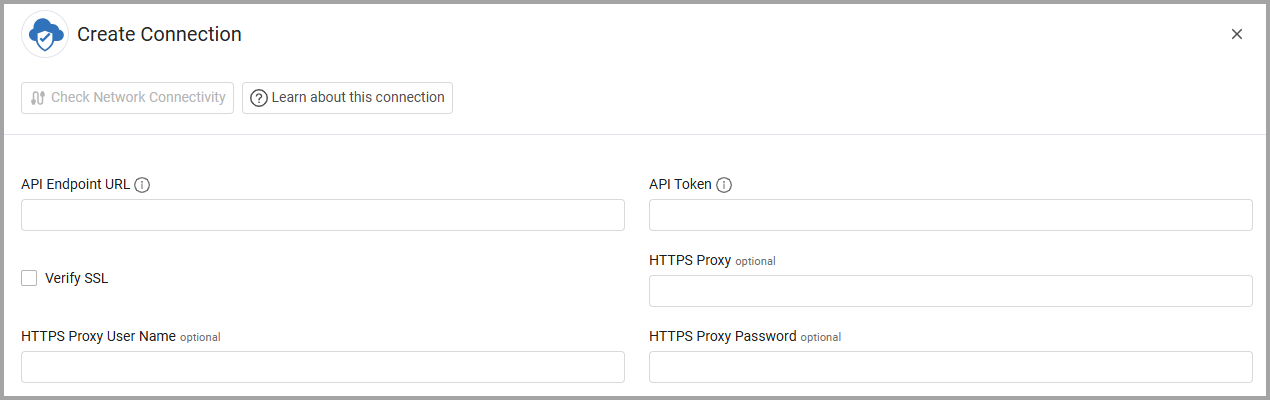
To connect the adapter in Axonius, provide the following parameters:
Required Parameters
-
API Endpoint URL - Tenable Cloud Security API endpoint URL based on your tenant region. Example:
https://us.app.ermetic.comAvailable regions: us, eu, au, br, ca, de, fr, in, jp, sg, uk, uae
-
API Token - Bearer token for authentication. Obtain from Tenable Cloud Security console.
Optional Parameters
- Verify SSL - Select whether to verify the SSL certificate of the server against the CA database inside of Axonius. For more details, see SSL Trust & CA Settings.
- HTTPS Proxy - Connect the adapter to a proxy instead of directly connecting it to the domain.
- HTTPS Proxy User Name - The user name to use when connecting to the value supplied in API Endpoint URL via the value supplied in HTTPS Proxy.
- HTTPS Proxy Password - The password to use when connecting to the server using the HTTPS Proxy.
To learn more about common adapter connection parameters and buttons, see Adding a New Adapter Connection.
Advanced Settings
Note
Advanced settings can either apply to all connections for this adapter, or to a specific connection. Refer to Advanced Configuration for Adapters. To learn more about Adapter Configuration tab advanced settings, see Adapter Advanced Settings.
- Fetch maximum commits - Set the maximum number of commits to fetch (default: 50).
- Max audit log record pages to parse - Set the maximum number of log record pages to parse (default: 50).
Note
All the following settings are enabled by default. Disable any settings to optimize data collection based on your environment's needs.
- Fetch Compute Resources (EC2/Azure VM/GCP instances) - Select this option to fetch cloud compute instances (EC2, Azure VMs, GCP Compute instances).
- Fetch Container Resources - Select this option to fetch container images and repositories (ECR, ACR, GCR, Artifact Registry).
- Fetch Kubernetes Resources - Select this option to fetch Kubernetes clusters, deployments, nodes, and workloads (EKS, AKS, GKE).
- Fetch IAM Users - Select this option to fetch IAM users and service accounts (AWS IAM Users, Azure AD Users, GCP Service Accounts).
- Fetch IAM Roles - Select this option to fetch IAM roles and service principals (AWS IAM Roles, Azure AD Service Principals).
- Fetch IAM Groups - Select this option to fetch IAM groups (AWS IAM Groups, Azure AD Groups).
- Fetch Databases - Select this option to fetch database resources (RDS, DynamoDB, Redshift, Azure SQL, BigQuery).
- Fetch Object Storage (S3 / Blob / GCS) - Select this option to fetch object storage resources (S3 buckets, Azure Storage Accounts, GCS buckets).
- Fetch Cloud Accounts / Management Resources - Select this option to fetch cloud account and management hierarchy (AWS Accounts, Azure Subscriptions, GCP Projects).
- Fetch Network Resources (VPCs / subnets) - Select this option to fetch network infrastructure (VPCs, subnets, internet gateways).
- Fetch Load Balancers - Select this option to fetch load balancer resources (ALB, NLB, ELB, Azure Load Balancers, GCP Forwarding Rules).
- Fetch Firewalls / Security Groups - Select this option to fetch firewall and security group configurations.
- Fetch Serverless Functions (Lambda / GCP Functions) - Select this option to fetch serverless function resources (AWS Lambda, Azure Web Apps, GCP Cloud Run, GCP Functions).
- Fetch Secrets / KMS Keys - Select this option to fetch secrets and key management resources (KMS, Secrets Manager, Key Vault, Secret Manager).
- Fetch Certificates - Select this option to fetch certificate resources (ACM, Azure Key Vault Certificates, GCP SSL Certificates).
Updated 1 day ago