
Snow Atlas
Snow Atlas is a SaaS management platform designed to provide visibility and optimization of software-as-a-service applications.
Asset Types Fetched
- Devices, Users, Software, SaaS Applications
Before You Begin
Ports
- TCP port 80/443
Authentication Method
- Client ID/Client Secret
APIs
Axonius uses the Snow Atlas API.
Permissions
The following API permissions are required for basic Snow Atlas configuration:
- sam.user.r - Get users
- sam.mobiledevice.r - Get mobile devices,SAM: Mobile devices
- sam.computer.r - Get computers,Get computer applications
- sam.application.r - Get registry applications
Supported From Version
Supported from Axonius version 6.1
Connecting the Adapter in Axonius
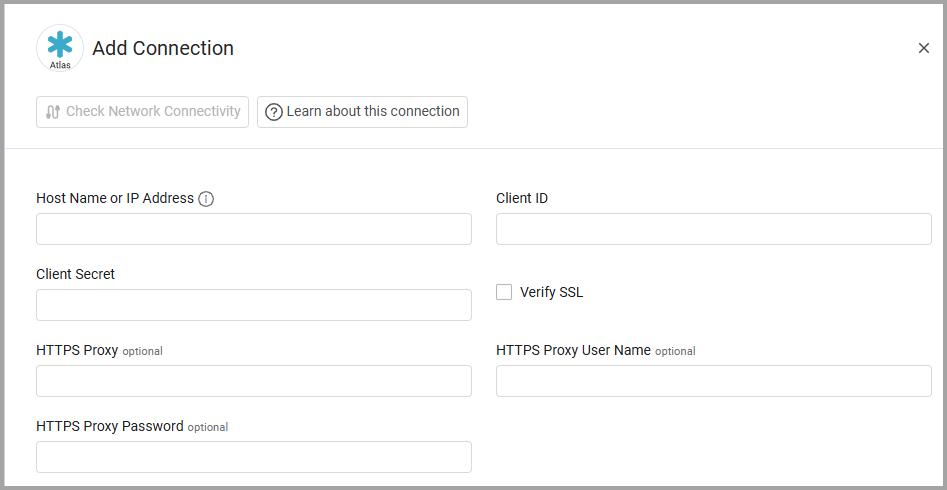
To connect the adapter in Axonius, provide the following parameters:
Required Parameters
-
Host Name or IP Address - The hostname or IP address of the Snow Atlas server.
-
Client ID and Client Secret - The credentials for a user account used to obtain a token to access Snow Atlas APIs. This has the Required Permissions to fetch assets. Learn how to get Client credentials for authentication.
Optional Parameters
-
Verify SSL - Select whether to verify the SSL certificate of the server against the CA database inside of Axonius. For more details, see SSL Trust & CA Settings.
-
HTTPS Proxy - Connect the adapter to a proxy instead of directly connecting it to the domain.
-
HTTPS Proxy User Name - The user name to use when connecting to the value supplied in Host Name or IP Address via the value supplied in HTTPS Proxy.
-
HTTPS Proxy Password - The password to use when connecting to the server using the HTTPS Proxy.
To learn more about common adapter connection parameters and buttons, see Adding a New Adapter Connection.
Advanced Settings
Note
Advanced settings can either apply to all connections for this adapter, or to a specific connection. Refer to Advanced Configuration for Adapters.
This section lists devices and computers that the adapter can enrich with different types of data, retrieving the information from different endpoints.
- Fetch Devices of sub type Mobile Device from List Mobile Devices - Enable this setting to fetch Mobile Devices from the List Mobile Devices endpoint. Enabling this makes the following settings available:
- Enrich List Mobile Devices with Get Mobile Device Details - Enable this setting to fetch Mobile Device Details for all devices fetched from the List Mobile Devices endpoint.
- Fetch Devices of sub type Computer from List Computers - Enable this setting to fetch Computers from the List Computers endpoint. Enabling this makes the following settings available:
- Enrich List Computers with List Computer Applications - Enable this setting to fetch Computer Applications for all the devices fetched from the List Computers endpoint.
- Filters For Computer Applications - Select which types of Computer Applications to fetch: Only Installed or Only Used.
- Enrich List Computer Applications with List Registry Applications - Enable this setting to fetch Registry Applications for all the devices fetched from the List Computers endpoint.
- Enrich List Computers with List Computer Network Adapters -Enable this setting to fetch Computer Network Adapters for all the devices fetched from the List Computers endpoint.
- Enrich List Computers with List Custom Fields Values - Enable this setting to fetch Custom Fields Values for all the devices fetched from the List Computers endpoint.
- Enrich List Computers with List Installations - Enable this setting to fetch Installations for all the devices fetched from the List Computers endpoint.
- Enrich List Computers with List Users - Enable this setting to fetch Users for all the devices fetched from the List Computers endpoint.
- Enrich List Computers with List Computer Applications - Enable this setting to fetch Computer Applications for all the devices fetched from the List Computers endpoint.
- Fetch Users from List Users - Enable this setting to fetch Users from the List Users endpoint.
Note
To learn more about Adapter Configuration tab advanced settings, see Adapter Advanced Settings.
Updated 9 months ago