
Tencent Cloud EdgeOne
Tencent Cloud EdgeOne is an edge security acceleration platform that provides web application firewall protection, DDoS mitigation, bot management, and rate-limiting rules for internet-facing services.
Use Cases the Adapter Solves
- Monitor edge-service inventory: Track EdgeOne zones, acceleration domains, security IP groups, and load balancers in Axonius.
- Review internet-facing services: Use zone and domain information to support visibility of services protected or accelerated through EdgeOne.
- Support security reviews: Review load balancer status, steering policies, and security IP group content alongside other Axonius assets.
Asset Types Fetched
- Domains & URLs, Compute Services, Load Balancers, Network/Firewall Rules
| Data Source | API Endpoint | Axonius Asset Type |
|---|---|---|
| Zones | POST / (DescribeZones) | Domains & URLs |
| Acceleration Domains | POST / (DescribeAccelerationDomains) | Network/Firewall Rules |
| Security IP Groups | POST / (DescribeSecurityIPGroup) | Load Balancers |
| Load Balancers | POST / (DescribeLoadBalancerList) | Compute Services |
Data Retrieved through the Adapter
Domains & URLs - fields such as: Name, Domain, Zone ID, Status
Network/Firewall Rules - fields such as: Name, Zone ID, Domain Status, CNAME
Load Balancers - fields such as: Name, Security IP Group ID, IP Total Count, IP Content
Compute Services - fields such as: Name, Status, Load Balancer Instance ID, Load Balancer Type
Before You Begin
Required Ports
- TCP port 443 (HTTPS)
Authentication Methods
Secret ID and Secret Key authentication: The adapter signs EdgeOne requests with TC3-HMAC-SHA256 using the supplied Secret ID and Secret Key.
APIs
Axonius uses the Tencent Cloud EdgeOne API. The following API actions are called:
POST /withX-TC-Action: DescribeZones- retrieves zones.POST /withX-TC-Action: DescribeAccelerationDomains- retrieves acceleration domains for each zone.POST /withX-TC-Action: DescribeSecurityIPGroup- retrieves security IP groups for each zone.POST /withX-TC-Action: DescribeLoadBalancerList- retrieves load balancers for each zone.
Required Permissions
The required Tencent Cloud permissions are not specified. Confirm with your Tencent Cloud administrator that the credentials supplied to the adapter can call the EdgeOne API actions listed above.
Supported From Version
Suppoted from version 9.0.8
Connecting the Adapter in Axonius
- Navigate to the Adapter Catalog, search for Tencent Cloud EdgeOne, and select the adapter.
- Click Add Connection.
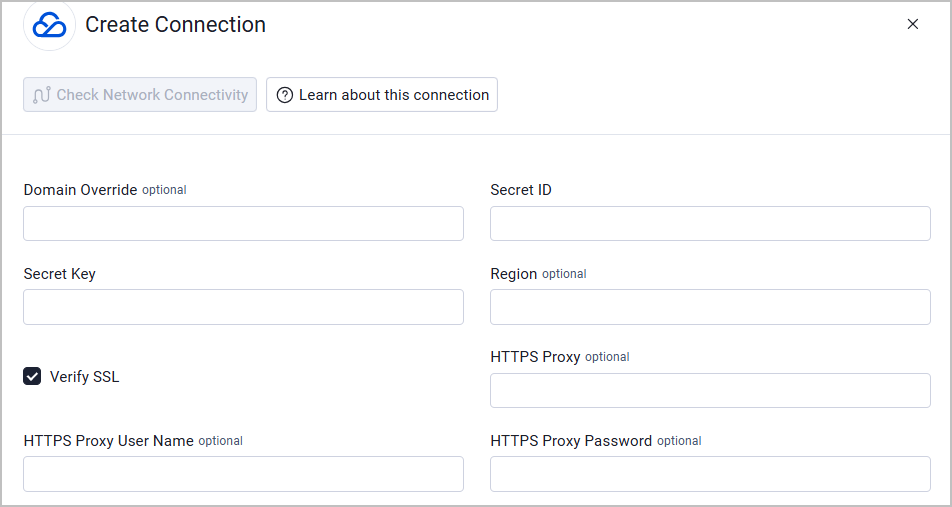
- Provide the following parameters.
Required Parameters
- Secret ID - The access key ID used to sign Tencent Cloud EdgeOne API requests.
- Secret Key - The access key secret used to sign Tencent Cloud EdgeOne API requests.
Optional Parameters
- Domain Override - Leave empty to use the production endpoint. Set a different domain to direct requests to another endpoint.
- Region - An optional Tencent Cloud region code, for example,
ap-hongkong. Leave empty to use nearest-region routing. - Verify SSL - Select whether to verify the SSL certificate of the server against the CA database inside of Axonius. For more details, see SSL Trust & CA Settings.
- HTTPS Proxy - Connect the adapter to a proxy instead of directly connecting to EdgeOne.
- HTTPS Proxy User Name - The user name to use when connecting through the HTTPS Proxy.
- HTTPS Proxy Password - The password to use when connecting through the HTTPS Proxy.
To learn more about common adapter connection parameters and buttons, see Adding a New Adapter Connection.
Updated 15 days ago