
Lark
Lark (Feishu) is a collaboration and HR platform that provides user identity, organizational structure, and employment information management.
Use Cases the Adapter Solves
- User Identity Verification: Gain comprehensive visibility into all user accounts in your Lark environment to detect orphaned or unauthorized accounts.
- Employee Status Monitoring: Track employee status changes including frozen, resigned, activated, and exited accounts to ensure timely access reviews and security compliance.
Asset Types Fetched
- Users
Data Retrieved through the Adapter
For example:
- Username, Job Title
Before You Begin
Required Ports
- TCP port 443 (HTTPS)
Authentication Methods
API Key Authentication (App ID and App Secret)
The adapter authenticates using Lark's internal app authentication mechanism. It exchanges the App ID and App Secret for a tenant access token via the /open-apis/auth/v3/tenant_access_token/internal endpoint, which is then used as a Bearer token for all subsequent API calls.
APIs
Axonius uses the Lark Open Platform API. The following endpoints are called:
POST /open-apis/auth/v3/tenant_access_token/internal- Authenticates and retrieves the tenant access tokenGET /open-apis/contact/v3/users/find_by_department- Retrieves user information from a specified department
Required Permissions
The following permissions are required (any one of these permissions allows the API to be called):
- contact:contact.base:readonly - Get basic contact information
- contact:contact:readonly_as_app - Read contacts as app identity
- contact:department.organize:readonly - Get department organizational structure information
- contact:contact:access_as_app - Access contacts as app identity
- contact:contact:readonly - Read contacts
Additional Permissions for Sensitive Fields:
The following permissions are required to retrieve sensitive user information fields:
- contact:user.employee_id:readonly - Access employee ID
- contact:user.email:readonly - Access email address
- contact:user.phone:readonly - Access phone number
Note: The app can only access users and departments within the Contacts permission scope configured by the Lark administrator. If you need to fetch users from the entire organization, ensure the Contacts permission scope is set to "All employees" in the Lark Admin Console.
Supported From Version
Supported from Axonius version 9.0.3
Connecting the Adapter in Axonius
Navigate to the Adapters page, search for Lark, and click on the adapter tile.
Click Add Connection.
To connect the adapter in Axonius, provide the following parameters:
Required Parameters
- Domain - Base URL for the Lark API. Example:
https://open.larksuite.com - App ID - The App ID from your Lark custom app credentials
- App Secret - The App Secret from your Lark custom app credentials
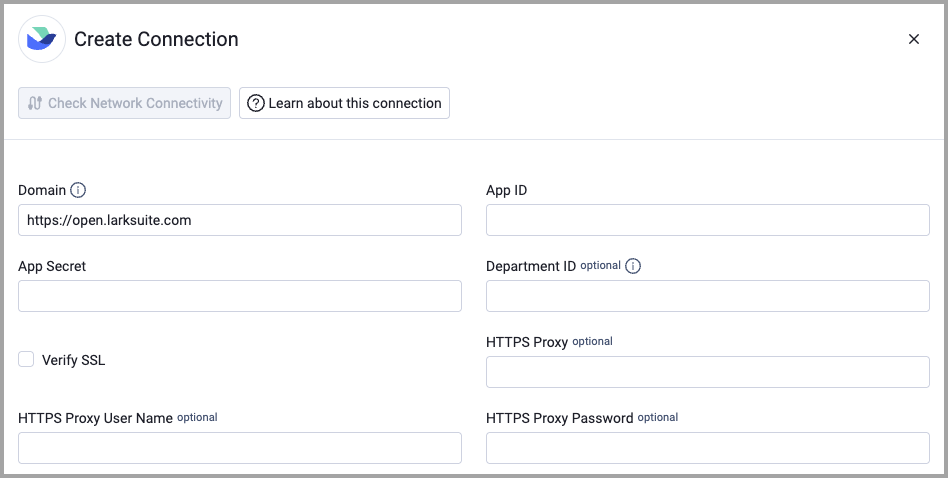
Optional Parameters
- Department ID - Department ID to fetch users from. Leave blank to fetch from the root department (ID: 0)
- Verify SSL - Select whether to verify the SSL certificate of the server against the CA database inside of Axonius. For more details, see SSL Trust & CA Settings.
- HTTPS Proxy - Connect the adapter to a proxy instead of directly connecting it to the domain.
- HTTPS Proxy User Name - The user name to use when connecting to the value supplied in Domain via the value supplied in HTTPS Proxy.
- HTTPS Proxy Password - The password to use when connecting to the server using the HTTPS Proxy.
To learn more about common adapter connection parameters and buttons, see Adding a New Adapter Connection.
Updated 2 months ago