
Anthropic (Claude)
Anthropic (Claude) is an AI assistant platform that provides enterprise administration capabilities for API key inventory, user and group management, and compliance activity monitoring.
The Anthropic (Claude) adapter connects Axonius to the Anthropic API to provide visibility into your organization's Anthropic usage: who has access, which groups they belong to, and which API keys are active. It supports two distinct API modes - Enterprise and Compliance - each backed by a different API key type and fetching a different set of entities.
Use Cases the Adapter Solves
API Key Inventory and Lifecycle Management (Enterprise only)
-
What it solves: API keys are a primary attack surface for AI services. Leaked, expired, or orphaned keys pose a significant risk of unauthorized access to LLM capabilities and, indirectly, to data processed through Anthropic.
Security value:
- Provides a complete inventory of all API keys issued within the organization.
- Surfaces key metadata including creation date, expiration date, current status (
active/inactive), and type. - Enables security teams to detect keys that are expired but still present, keys with no expiration date (indefinite lifetime), and keys that may have been created outside of normal provisioning processes.
User Access VisibilityWhat it solves: Understanding who has access to Anthropic — both at the organization level and at the workspace level — is essential for access reviews, off-boarding validation, and least-privilege enforcement.
Security value:
- Provides a complete roster of users with access to the organization's Anthropic account.
- Captures user roles (
organization_role/role), enabling differentiation between admins and standard users. - Records when users were created (
created_at) and when they were added to a workspace or group (added_at), supporting audit trail and onboarding/off-boarding reviews. - Both API modes (Enterprise and Compliance) produce user entities, allowing the mode to be selected based on available credential type without losing user coverage.
Workspace and Group Access Control AuditingWhat it solves: Anthropic organizes resources into workspaces (Enterprise) and groups (Compliance). Knowing which users belong to which workspaces/groups is critical for access boundary enforcement and blast-radius analysis.
Security value:
- Maps the full membership of every workspace or group in the organization.
- Enables detection of over-privileged groups, unexpected cross-team membership, and groups with no members (zombie groups).
- Captures group descriptions, source types, and assigned roles — providing context for who owns the group and what it controls.
- Supports Axonius policy enforcement rules that flag users with access to multiple high-privilege workspaces.
Asset Types Fetched
- Secrets (API Keys) - Enterprise mode only , Users, Roles, Groups (Workspaces or Compliance Groups)
Data Retrieved through the Adapter
Secrets (API Keys) - Enterprise mode only - Fields such as Name, Created Time, Expires At, Status
Users - Fields such as Email, Username, Display Name, User Created Date
Groups (Workspaces or Compliance Groups) - Fields such as Name, Display Name, Description, Source Type
Roles- Fields such as Name, Description, Created Time, Permissions
Before You Begin
Required Ports
- TCP port 443 (HTTPS)
Authentication Methods
The Anthropic adapter supports the following authentication methods based on API key type:
- Enterprise API Key (Admin API) - Uses an Admin API key (starting with
sk-ant-admin01-...) - Compliance API Key - Uses a Compliance Access Key (starting with
sk-ant-api01-...)
APIs
Axonius uses the Claude API (version 2023-06-01). The following endpoints are called:
Enterprise Mode Endpoints:
GET /v1/organizations/api_keys- Retrieves all API keys in the organizationGET /v1/organizations/users- Retrieves all users in the organizationGET /v1/organizations/workspaces- Retrieves all workspacesGET /v1/organizations/workspaces/{workspace_id}/members- Retrieves members of each workspace
Compliance Mode Endpoints:
GET /v1/compliance/organizations- Retrieves organization UUID (helper endpoint)GET /v1/compliance/organizations/{org_uuid}/users- Retrieves all organization usersGET /v1/compliance/groups- Retrieves all compliance groupsGET /v1/compliance/groups/{group_id}/members- Retrieves members of each group
Required Permissions
Enterprise Mode - Organization Admin API Key
To use Enterprise mode, you need an Organization-level Admin API key with the following scopes:
read:organization:api_keys / admin roleread:organization:users / admin roleread:organization:workspaces / admin roleread:organization:workspaces / admin role
Compliance Mode - Compliance API Key
To use Compliance mode, you need a Compliance API key with the following scopes:
read:compliance:organizations / Parent Org Complianceread:compliance:users / Parent Org Compliance Access Keyread:compliance:roles / Parent Org Compliance Access Keyread:compliance:permissions / Parent Org Compliance Access Keyread:compliance:groups / Parent Org Compliance Access Keyread:compliance:groups / Parent Org Compliance Access Key
Supported From Version
Supported from Axonius version 9.0
Connecting the Adapter in Axonius
Navigate to the Adapters page, search for Anthropic, and click on the adapter tile.
Click Add Connection.
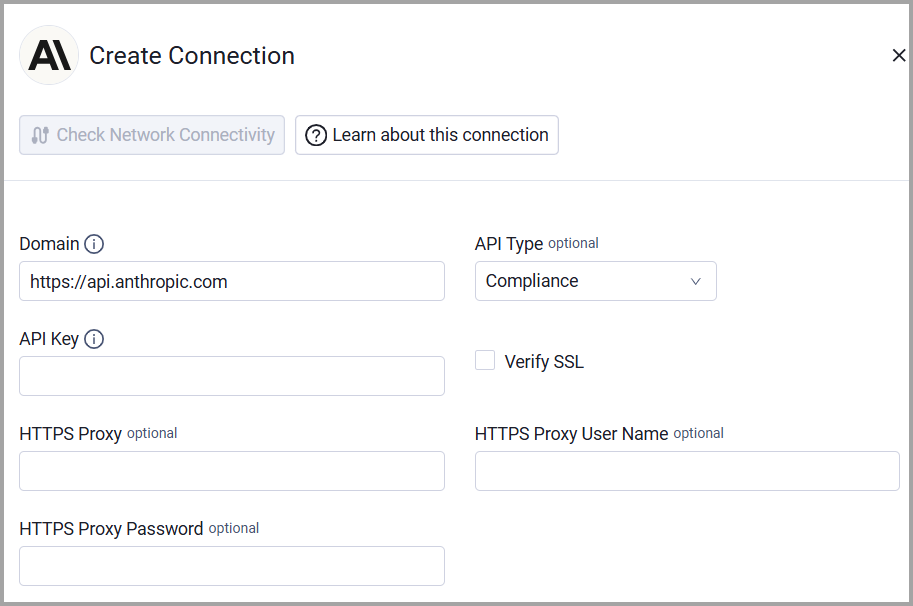
To connect the adapter in Axonius, provide the following parameters:
Required Parameters
- Domain - Base URL for the Claude API. Defaults to
https://api.anthropic.com. Change only when routing through a proxy. - API Type (default: compliance) - Selects the mode and determines which entities are fetched and which endpoints are called:
Enterprise(to fetch Secrets, Users, and Groups) orCompliance(to fetch Users and Groups, but does not expose API keys).
The adapter automatically enables the appropriate endpoints based on the selected API Type (Enterprise or Compliance) connection setting. If you want to fetch both API types, you need two adapter connections. - API Key - The secret key for the selected API type. This is passed as the
x-api-keyrequest header.
Optional Parameters
- Verify SSL - Select whether to verify the SSL certificate of the server against the CA database inside of Axonius. For more details, see SSL Trust & CA Settings.
- HTTPS Proxy - Connect the adapter to a proxy instead of directly connecting it to the domain.
- HTTPS Proxy User Name - The user name to use when connecting to the value supplied in Domain via the value supplied in HTTPS Proxy.
- HTTPS Proxy Password - The password to use when connecting to the server using the HTTPS Proxy.
To learn more about common adapter connection parameters and buttons, see Adding a New Adapter Connection.
Updated 3 days ago