
Autotask PSA
Autotask PSA (Professional Services Automation) by Datto is an IT service management platform that provides ticketing, asset tracking, project workflows, and service delivery management for IT operations.
Use Cases the Adapter Solves
- Automated Ticket Lifecycle Management: Automatically create, update, and close tickets in Autotask PSA based on Axonius queries, enabling proactive remediation workflows without manual intervention.
- Service Desk Accountability: Route tickets to specific teams based on remediation domains (OS, Application, Network) using queue assignments; ensure clear ownership and prevent dependency deadlocks in large-scale environments.
Asset Types Fetched
- Tickets
Data Retrieved through the Adapter
Tickets data
- Ticket Number, Title, Description, Status, Priority, Assigned Resource ID, Company ID, Queue ID, Created Date, Last Activity Date, Due Date
Before You Begin
Required Ports
- TCP port 443 (HTTPS)
Authentication Methods
API User Credentials
APIs
Axonius uses the Autotask PSA REST API v1.0. The following endpoints are called:
POST /atservicesrest/v1.0/Tickets/query- Fetch tickets with optional filtering and field selectionPOST /atservicesrest/v1.0/Tickets- Create new tickets (Enforcement Center action)PATCH /atservicesrest/v1.0/Tickets- Update existing tickets (Enforcement Center action)POST /atservicesrest/v1.0/TicketNotes- Add notes to tickets (used for deduplication workflows)
Required Permissions
Autotask PSA uses security levels to control API access. The API User must be assigned a security level that grants the required permissions.
Required security level: API User (API-only)
Only resources with this security level can access the REST API. The API User (API-only) security level provides full system administrator access to Autotask modules, features, and data via the REST API with no access to the Autotask UI. For more information, see Autotask API Security and Authentication.
Required permissions:
- Tickets - Query, Create, Update (Required to fetch tickets and create/update tickets in the Enforcement Center)
- Ticket Notes - Create (Required to append notes to existing tickets for deduplication workflows)
- User Defined Fields (UDFs) - Query, Update (Required to query tickets by custom fields and store Axonius metadata)
Note
While the API User security level can grant write capabilities, the ticket fetching adapter only reads data from Autotask. The Enforcement Center actions perform create and update operations.
Supported From Version
Supported from Axonius version 8.0.19.0
Connecting the Adapter in Axonius
- Navigate to the Adapters page, search for Autotask PSA, and click on the adapter tile.
- Click Add Connection.
To connect the adapter in Axonius, provide the following parameters:
Required Parameters
- Zone URL - The base URL for your Autotask zone. Identify your Zone URL by logging into Autotask and checking the browser address bar (for example
https://webservices2.autotask.net/), or contact Autotask support. - Username - The email address of the Autotask API user.
- Secret - The API secret key associated with the Autotask API user.
- API Integration Code - The API integration code (tracking identifier) from Autotask. This is a 27-character tracking identifier that authorizes the integration.
- Verify SSL - Select whether to verify the SSL certificate of the server against the CA database inside of Axonius. For more details, see SSL Trust & CA Settings.
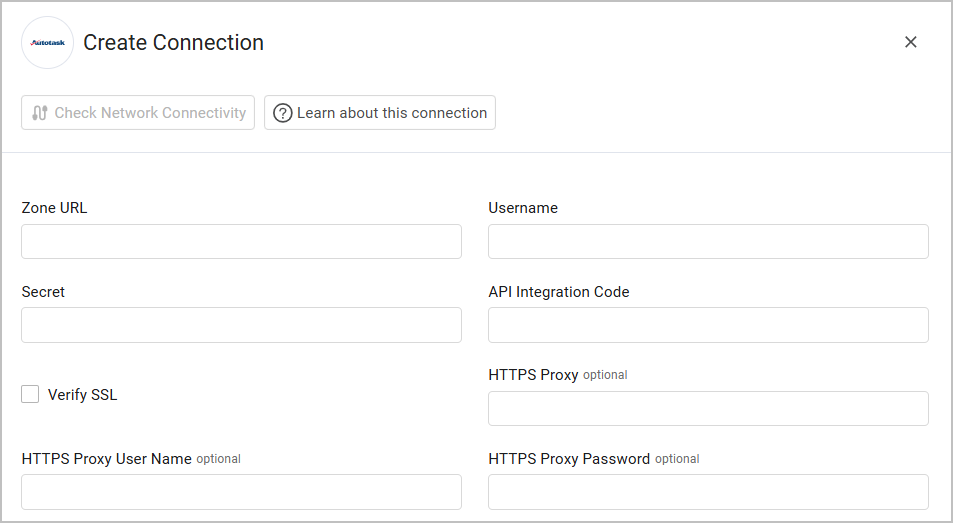
Optional Parameters
- HTTPS Proxy - Connect the adapter to a proxy instead of directly connecting it to the domain.
- HTTPS Proxy User Name - The user name to use when connecting to the value supplied in Zone URL via the value supplied in HTTPS Proxy.
- HTTPS Proxy Password - The password to use when connecting to the server using the HTTPS Proxy.
To learn more about common adapter connection parameters and buttons, see Adding a New Adapter Connection.
Version Matrix
This Enforcement Action was tested only with the versions marked as supported, but may work with other versions. Please contact Axonius Support if you have a version that is not listed and it is not functioning as expected.
| Version | Supported | Notes |
|---|---|---|
| Autotask PSA with REST API v1.0 | Yes |
Related Enforcement Actions
Updated 9 days ago