
ThousandEyes
ThousandEyes is a network infrastructure monitoring and troubleshooting platform.
Use Cases the Adapter Solves
- Network Infrastructure Visibility: Gain a unified view of ThousandEyes Enterprise and Endpoint Agents across your environment, correlating network monitoring agent data with other asset sources in Axonius.
- Endpoint Agent Discovery: Surface devices running the ThousandEyes Endpoint Agent — including OS version, network interfaces, and location — to identify coverage gaps in your network monitoring deployment.
Types of Assets Fetched
This adapter fetches the following types of assets:
- Devices, Software, Application Settings, SaaS Applications
Data Retrieved through the Adapter
Devices - fields such as: Hostname, IP Address, Last Seen, Location, Agent ID
Application Settings - fields such as: CloudTrail Integration Enabled
Before You Begin
Required Ports
- TCP port 443 (HTTPS)
Authentication Methods
The ThousandEyes adapter supports two authentication methods:
- Version 6 (Username and Password) — Standard username/password credentials for a ThousandEyes user account.
- Version 7 (API Token) — An API token associated with a ThousandEyes user account.
APIs
The ThousandEyes adapter calls the following ThousandEyes REST API endpoints.
Supported API Versions: v6, v7
GET /{version}/agents- Retrieves Cloud and Enterprise Agent data, including cluster members. In v6, appends.jsonto the URL. Paginated viapages.next.GET /v6/endpoint-agents.json- Retrieves Endpoint Agent data. Available in v6 only. Paginated viapages.next.GET /v7/tests/agent-to-agent- Retrieves agent-to-agent test configuration, including Test ID, Test Name, Test Type, and Protocol. Available in v7 only. Called only when Agent-to-Agent Tests is enabled.GET /cloud-insights/integration/aws/policy/settings- Retrieves AWS Cloud Insights policy settings.
Required Permissions
To connect the ThousandEyes adapter, the user account must have the API access permission. All three ThousandEyes built-in roles include this permission by default.
Option 1: Built-In Role (Recommended)
Assign the Regular User role. This role includes all permissions required for read-only API access to agent and endpoint data.
Option 2: Custom Role (Minimum Permissions)
If you prefer to use a custom role, grant the following permissions:
API access-Required for all API access.View agents in account group-View Enterprise Agent settings and configurations.View endpoint agent settings-View Endpoint Agent settings and configurations.View endpoint agent data-View data collected by Endpoint Agents.View endpoint agent monitored domain sets- View monitored domain sets.View endpoint agent monitored networks- View monitored networks.View endpoint experience data that identifies users- View user-identifying Endpoint data. If absent, usernames are anonymized.View endpoint experience data that identifies location- View location-identifying Endpoint data. If absent, agent and gateway location are anonymized.View endpoint experience data that identifies network- View network-identifying Endpoint data. If absent, IP addresses, SSID, BSSID, and gateway MAC address are anonymized.View endpoint experience data that identifies endpoint agents- View agent name, hostname, and serial number. If absent, these values are anonymized.View tests- View tests created in an account group. Required when Agent-to-Agent Tests is enabled.
Note:The
/cloud-insights/integration/aws/policy/settingsendpoint may require Organization Admin-level permissions if your account uses AWS Cloud Insights. Verify with your ThousandEyes administrator.
Connecting the Adapter in Axonius
- Navigate to the Adapter Catalog, search for ThousandEyes, and select the adapter.
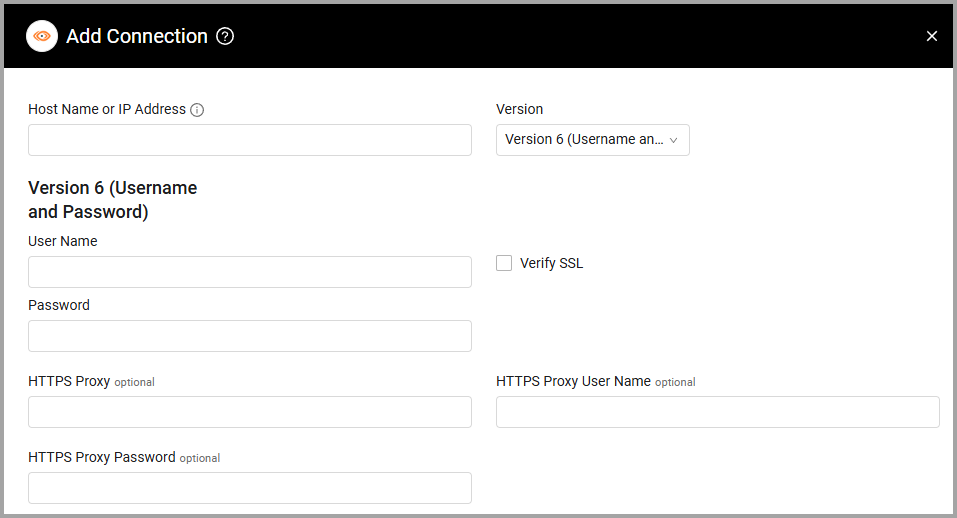
- Click Add Connection.
- Provide the following parameters.
Parameters
-
Host Name or IP Address (required) - Use this value:
https://api.thousandeyes.com/ -
Version - Select the API Version, either Version 6 (Username and Password) (default) or Version 7 (API Token). Then provide the parameters for the version you selected:
- User Name (required) - The user name of a user account that has permission to fetch assets.
- Password (required) - The password of that user account.
- API Token (required) - An API Token associated with a user account that has permissions to fetch assets.
-
Verify SSL - Select whether to verify the SSL certificate of the server against the CA database inside of Axonius. For more details, see SSL Trust & CA Settings.
-
HTTPS Proxy (optional) - Connect the adapter to a proxy instead of directly connecting it to the domain.
-
HTTPS Proxy User Name (optional) - The user name to use when connecting to the value supplied in Host Name or IP Address via the value supplied in HTTPS Proxy.
-
HTTPS Proxy Password (optional) - The password to use when connecting to the server using the HTTPS Proxy.
To learn more about common adapter connection parameters and buttons, see Adding a New Adapter Connection.
Advanced Settings
Note:
- Advanced settings can apply to either all connections of this adapter, or to a specific connection. For more detailed information, see Advanced Configuration for Adapters.
- For more general information about advanced settings, see Adapter Advanced Settings.
Endpoints Config
Select and enable the settings listed in this section to fetch data from specific endpoints.
- Enterprise Agents Endpoint (default: enabled) - Fetch Cloud and Enterprise Agent data from the
/{version}/agentsendpoint.- Enrich Enterprise Agents Endpoint with Agent-to-Agent Tests (default: disabled) - Select this option to retrieve agent-to-agent test configuration for the target enterprise agents, from the
/v7/tests/agent-to-agentendpoint. The adapter adds the Test ID, Test Name, Test Type, and Protocol to the target enterprise agent's device data. This option is available for Version 7 (API Token) connections.
- Enrich Enterprise Agents Endpoint with Agent-to-Agent Tests (default: disabled) - Select this option to retrieve agent-to-agent test configuration for the target enterprise agents, from the
- Fetch Devices of sub-type endpoint_agent from Endpoint Agents (v6 Only) (default: enabled) - Fetch Endpoint Agent data from the
/v6/endpoint-agents.jsonendpoint.
Updated 9 days ago