
ISS Cyber Risk Score
ISS Cyber Risk Score is a security ratings platform that provides external attack surface observations, domain-level findings, network attribution data, and vendor risk assessment scoring.
Use Cases the Adapter Solves
- Monitor external domain risk: Review cyber risk scores and configuration issues associated with your domains.
- Investigate security findings: Identify observations for domains, including their status, hostname, IP address, and details.
- Improve attack-surface visibility: Combine ISS domain observations with other Axonius asset data for risk assessment.
Asset Types Fetched
- Aggregated Security Findings
- Domains & URLs
- SaaS Applications
Data Retrieved through the Adapter
Domains & URLs - fields such as: Domain, Cyber Risk Score, ISS Tags, Redirect To Domain
Before You Begin
Required Ports
- TCP port 443 (HTTPS)
Authentication Methods
The adapter uses API key authentication.
APIs
Axonius uses the ISS Cyber Risk Score Enterprise (Portrait) API. The following endpoints are called:
GET /v2/domains- Retrieves domains in the account profile.GET /findings- Retrieves findings for each domain and finding tab.
Required Permissions
Confirm the exact permissions required to access the API endpoints listed above with your ISS administrator.
Supported From Version
Supported from Axonius version 10.0.2
Connecting the Adapter in Axonius
- Navigate to the Adapter Catalog, search for ISS Cyber Risk Score, and select the adapter.
- Click Add Connection.
- Provide the following parameters.
Required Parameters
- API Base URL - The base URL of the ISS Cyber Risk Score Enterprise (Portrait) API, including the
/portrait/v1prefix. Do not add a specific endpoint. Default:https://api.iss-cyber.com/portrait/v1 - API Key - The API key issued by ISS for the account profile.
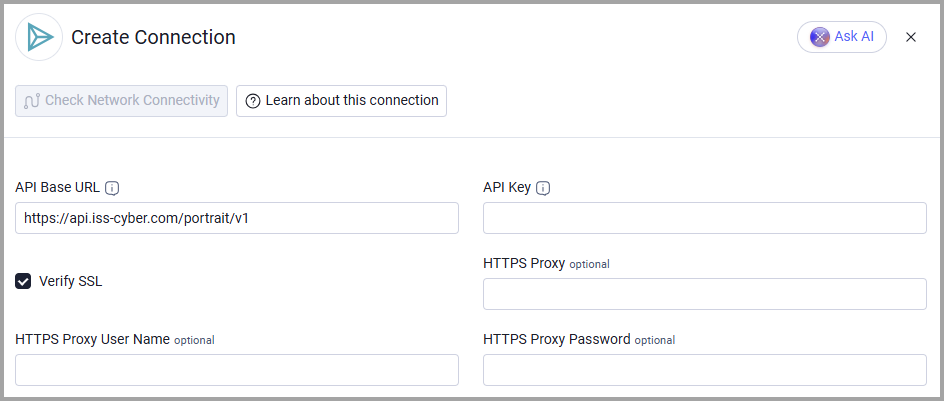
Optional Parameters
- Verify SSL - Select whether to verify the SSL certificate of the server against the CA database inside of Axonius. For more details, see SSL Trust & CA Settings.
- HTTPS Proxy - Connect the adapter to a proxy instead of directly connecting it to the API base URL.
- HTTPS Proxy User Name - The user name to use when connecting to the API base URL through the HTTPS Proxy.
- HTTPS Proxy Password - The password to use when connecting to the API base URL through the HTTPS Proxy.
To learn more about common adapter connection parameters and buttons, see Adding a New Adapter Connection.
Advanced Settings
Note:
Advanced settings can either apply to all connections for this adapter, or to a specific connection. Refer to Advanced Configuration for Adapters.
To learn more about Adapter Configuration tab advanced settings, see Adapter Advanced Settings.
- Enrich Domains with Findings - Enabled by default. Disable it to fetch domain data without retrieving and attaching security findings to URLs.
Updated 5 days ago