
Ingestion Rule Statement Reference
This page describes how to construct an ingestion rule statement. Each statement is made up of a primary statement and an optional post action.
This page describes how to construct an ingestion rule statement. Each statement is made up of a primary statement and an optional post action. For the full list of operators you can use in a primary statement, see Ingestion Rules Operators. For post actions, see Ingestion Rules Post Actions.
Primary Statement
An entity is considered for ingestion if the primary statement is true. A primary statement can be built in one of two ways (use the relevant asset name in the first position):
{asset type}.{flattened key path of the entity} {operator} {rule values}{asset type} {operator} {rule values}
For the asset names to use, see Entities.
Complex Primary Statements
Primary statements support complex conditions by combining multiple sub-rules using AND, OR, and parentheses. This enables creating detailed asset ingestion criteria. For example: ((Value > 50 AND Confidence = HIGH) OR (Value > 90 AND Confidence = LOW))
- Each sub-rule within a primary statement is evaluated independently for an asset.
- OR: If any sub-rule is TRUE, the statement is TRUE. Evaluation stops when a TRUE sub-rule is found.
- AND: All sub-rules must be TRUE for the statement to be TRUE.
- If multiple primary statements exist, each is evaluated independently.
- OR: If any primary statement is TRUE, the asset is ingested. Evaluation stops when a TRUE primary statement is found.
- AND: All primary statements must be TRUE for the asset to be ingested.
Examples
{entity}.{key} {operator} {value} or/and {entity} {operator} {value}Note:
The above complex statement is equivalent to creating the following two simple primary statements with an OR or AND operator:
{entity}.{key} {operator} {value}OR/AND
{entity} {operator} {value}
({entity}.{key} {operator} {value} or/and {entity} {operator} {value}) and/or {entity}.{key} {operator} {value}({entity}.{key} {operator} {value} or/and {entity} {operator} {value}) and/or ({entity}.{key} {operator} {value} or/and {entity} {operator} {value})Post Action
Post actions are optional actions performed on the entity before it is ingested into Axonius. Common use cases include filtering out poor data or dropping PII.
The syntax is:
{primary statement} then {action} {post rule values}
See Ingestion Rules Post Actions for all available post action operators.
Ingestion Rule Components
Entities
Defines which entity (asset type) this rule will be applied to. In a statement, use the internal name of the asset type, which is not always the same as the name displayed in the Axonius GUI. For example, the internal name of the Security Findings asset type is vulnerability_instance. For the internal name of each asset type, see Asset Type Internal Names.
Finding the Internal Name of an Asset Type
To find the internal name directly in the system:
- Go to Action Center and create an enforcement set. You do not need to save it.
- Set the Module to the asset type you are looking for.
- Open the Select Action tab and select any action, for example, Axonius - Add Customer Data to Assets.
- Enable Configure Dynamic Values, and then click Syntax Helper.
- In the Syntax Helper, open the Asset Fields tab.
- From the Adapter list, select the field you want to use in the ingestion rule statement.
- Copy the value that appears in Field Name in Statement. The part before the first dot is the asset type.
Example: Selecting the CVE ID field of a Security Finding returns vulnerability_instance.specific_data.data.cve_id. The asset type is vulnerability_instance.
The rest of the value is the field path. To use it in an ingestion rule, see Flattened Key Path.
Flattened Key Path
The flattened key path of the entity is the name of the key path as it appears in the Axonius database.
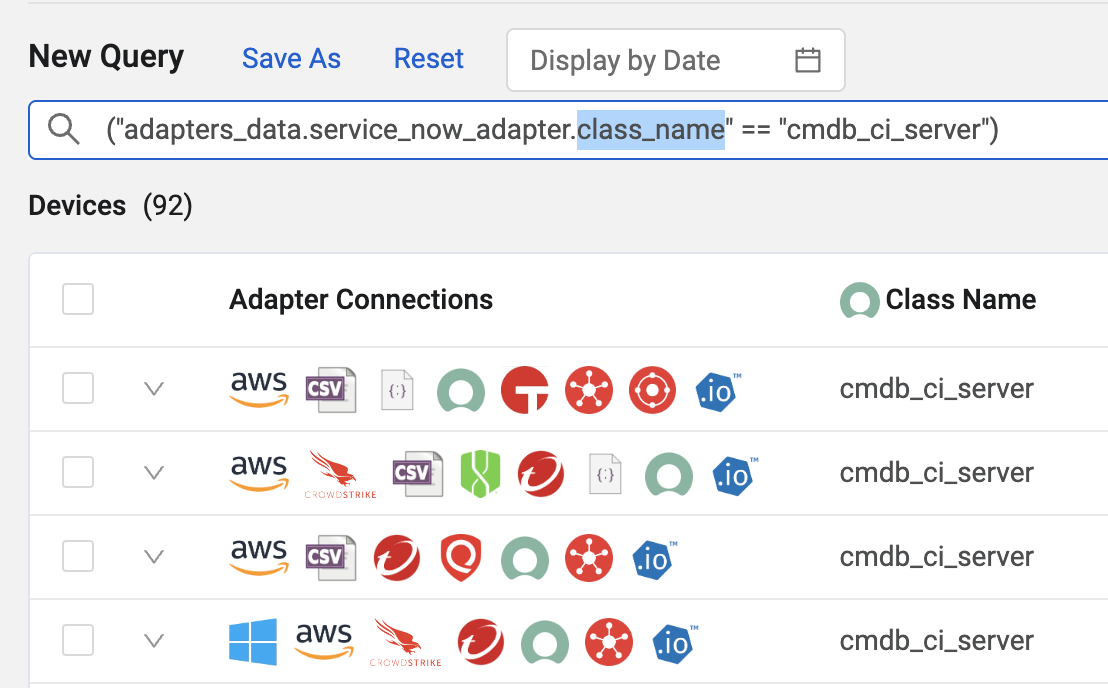
Example: "I want to only ingest devices from the cmdb_ci_server table in ServiceNow."
You can translate this into a Query Wizard statement:

This statement is automatically translated into an Axonius statement in the Devices search bar:
("adapters_data.service_now_adapter.class_name" == "cmdb_ci_server")Because ingestion rules are already applied at the adapter level, you can ignore the adapters_data.service_now_adapter. prefix. That leaves the flattened key path as simply class_name.
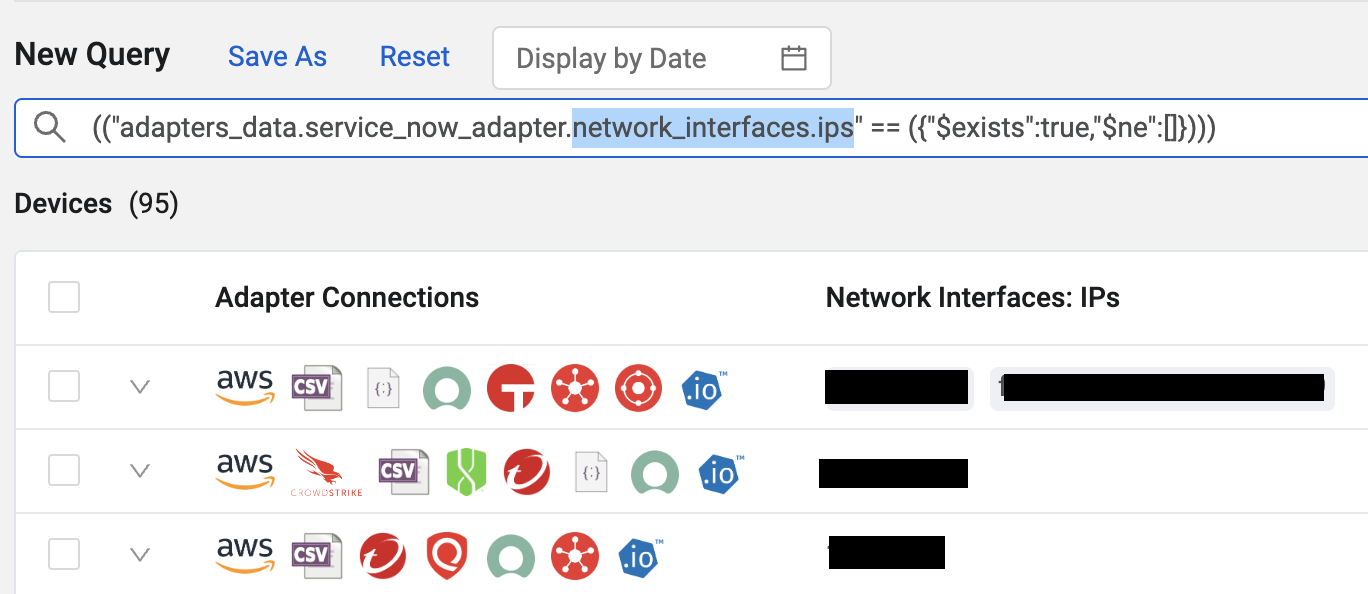
When working with complex objects such as network interface IP addresses, copy the complete complex object path, for example network_interfaces.ips.
Related Pages
- Setting Adapter Ingestion Rules — Overview and required permissions
- Ingestion Rules Operators — All supported filter operators
- Ingestion Rules Post Actions — Modify or drop fields before ingestion
- Ingestion Rules Examples — Real-world configuration examples
Updated 6 days ago