
AWS - Create Security Hub Findings
AWS - Create Security Hub Findings
AWS - Create Security Hub Findings creates one AWS Security Hub finding for:
- Assets returned by the selected query or assets selected on the relevant asset page.
Findings are sent to the asset's AWS account and region; running the action again updates the existing finding instead of creating a duplicate.
See Creating Enforcement Sets to learn more about adding Enforcement Actions to Enforcement Sets.
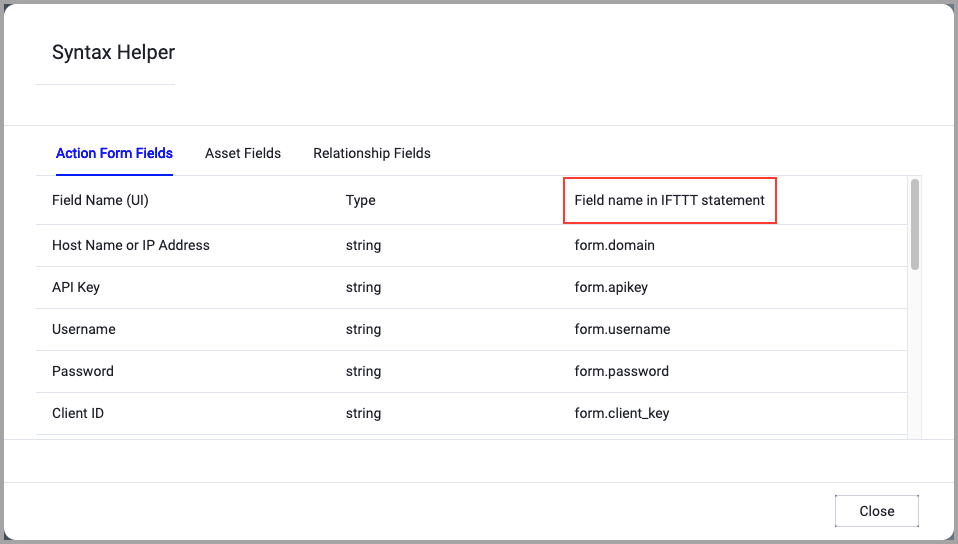
When accessing an enforcement action using the API, you must use the backend form of field names.
Use the Syntax Helper to find the correct name. In the enforcement action, enable Configure Dynamic Values and select Syntax Helper.
Note
- Not all asset types are supported for all Enforcement Actions.
- See Actions supported for Activity Logs, Adapters Fetch History, and Asset Investigation modules.
- See Actions supported for Aggregated Security Findings.
- See Actions supported for Software.
Required Fields
These fields must be configured to run the Enforcement Action.
- Action name - The name of this Enforcement Action. The system sets a default name. You can change the name.
- Configure Dynamic Values (optional) - Toggle on to enter a Dynamic Value statement. See Creating Enforcement Action Dynamic Value Statements to learn more about Dynamic Value statement syntax.
-
When you select this option, the Select Adapter Connection drop-down becomes available. Select the adapter connection to use for this Enforcement Action.
- Finding Title - The title for the finding. Enter up to 256 characters. You can use Configure Dynamic Values to set a value from each asset.
- Finding Description - The description for the finding. Enter up to 1,024 characters. You can use Configure Dynamic Values to set a value from each asset.
- Severity - The severity label for every imported finding. The default is
MEDIUM. - Finding Types - A comma-separated list of AWS Security Finding Format (ASFF) finding types. Enter each type as
namespace/category/classifier. The namespace must be one of the following options:Software and Configuration Checks,TTPs,Effects,Unusual Behaviors, orSensitive Data Identifications. -
Compute Node - The Axonius node to use when connecting to the specified host. For more details, see Working with Axonius Compute Nodes.
Additional Fields
These fields are optional.
Connection and CredentialsWhen Use stored credentials from the adapter is toggled off, some of the connection fields below are required to create the connection, while other fields are optional.
Configure the AWS connection used by this action. The action uses the selected connection only for the AWS account and regions required by the selected assets.
AWS Access Key ID - Specify the AWS Access Key ID to access the Amazon S3 bucket.
AWS Secret Access Key - Specify the AWS Secret Access Key for the specified AWS Access Key ID.
- If supplied (and both Use stored credentials from the AWS adapter and Use attached IAM role are disabled), Axonius uses the account user credentials to send a JSON file to an S3 bucket.
- If not supplied (and both Use stored credentials from the AWS adapter and Use attached IAM role are disabled), Axonius will fail any execution of this action.
Proxy (optional) - HTTPS proxy to use when connecting to the AWS APIs.
- If supplied, Axonius will utilize the proxy when connecting to the AWS APIs.
- If not supplied, Axonius will connect directly to the AWS APIs.
Use instance profile (attached role) (optional) - Check this to authenticate with the role assigned to the Axonius Instance installed on your EC2 instance. When you authenticate with an instance profile, the Access Key ID and Access Key Secret parameters are not required, and if you populate them, they will be ignored.
Regions Names or Get All Regions - (optional) - Specify one or more comma-separated region names for specific regions, OR check Get All Regions to connect to all available regions. See the List of Supported AWS Regions for more information.
Roles to assume - Provide an ARN role that points to a specific IAM role in AWS, which has its own set of permissions defined in its IAM policy. The role should be in the following format:
arn:aws:iam::123456789012:role/MyCrossAccountRoleAdvanced Configuration file (optional) - Upload an advanced configuration JSON file. For details, see AWS Advanced Configuration File.
Additional Optional Fields
- Generator ID - Groups imported findings by the rule that produced them. The default is
axonius. - Product ARN - Overrides the finding product's ARN. If left blank, Axonius uses the target account's default AWS Security Hub product ARN. Set this only when all findings are imported into one AWS account.
- User-Defined Fields - A JSON object of string key-value pairs to attach to every finding.
- Default AWS Account ID - The AWS account to use only for assets that do not have a resolvable AWS account. Set this together with Default Security Hub Region.
- Default Security Hub Region - The AWS region to use only for assets that do not have a resolvable AWS region. Set this together with Default AWS Account ID.
- Note: If an asset has an AWS account and region that the selected connection cannot reach, the action reports a failure for that asset rather than sending its finding to another account.
APIs
Axonius uses the AWS Security Hub BatchImportFindings API.
Required Ports
The supplied implementation does not specify a port number. Ensure the selected AWS connection can reach AWS Security Hub in each target account and region.
Required Permissions
The stored credentials, or those provided in Connection and Credentials, must have the following permission(s) to perform this Enforcement Action:
The following permission is needed:
- securityhub:BatchImportFindings - Allows the action to import findings into AWS Security Hub.
The connection test does not call DescribeHub, because that operation requires a permission separate from BatchImportFindings.
To learn more about Enforcement Actions, see Enforcement Actions.
Version Matrix
This Enforcement Action was tested only with the versions marked as supported, but may work with other versions. Please contact Axonius Support if you have a version that is not listed and it is not functioning as expected.
| Version | Supported | Notes |
|---|---|---|
AWS Security Finding Format 2018-10-08 | Yes | Schema version used when importing findings. |
Updated 2 months ago