
SOCRadar
SOCRadar is an extended threat intelligence platform that provides cyber threat intelligence, attack surface management, digital risk protection, dark web monitoring, and vulnerability intelligence for security operations.
Use Cases the Adapter Solves
- Monitor external assets: View IP addresses, IP blocks, domains, DNS records, websites, and SSL certificates discovered by SOCRadar in Axonius.
- Investigate exposure: Review network, URL, and certificate data together when assessing the external attack surface.
- Support asset governance: Compare SOCRadar attack surface data with other Axonius asset data to identify assets that need review.
Asset Types Fetched
- Devices
- Networks
- Domains & URLs
- Certificates
Data Retrieved through the Adapter
Devices - fields such as: IP address, description, cloud IP provider, asset type
Networks - fields such as: name, IP addresses, total IP count, country
Domains & URLs - fields such as: domain, base URL, asset type, DNS record type
Certificates - fields such as: name, serial number, issuer, overall SSL grade
Before You Begin
Required Ports
- TCP port used by the URL configured in Host Name or IP Address (HTTP or HTTPS)
Authentication Methods
API key authentication
APIs
Axonius uses the SOCRadar API. The following endpoint is called:
GET company/{company_id}/asm/v2- Retrieves Attack Surface Management assets for the configured company, filtered by asset type.
Required Permissions
Required License / Module: To access this API, your account must have one of the following plan packages:
XTI Professional
XTI Enterprise
XTI Premium
ASM Ultimate
The API key must be able to retrieve Attack Surface Management assets for the configured company.
Supported From Version
Supported from Axonius version 9.0.7
Connecting the Adapter in Axonius
- Navigate to the Adapter Catalog, search for SOCRadar, and select the adapter.
- Click Add Connection.
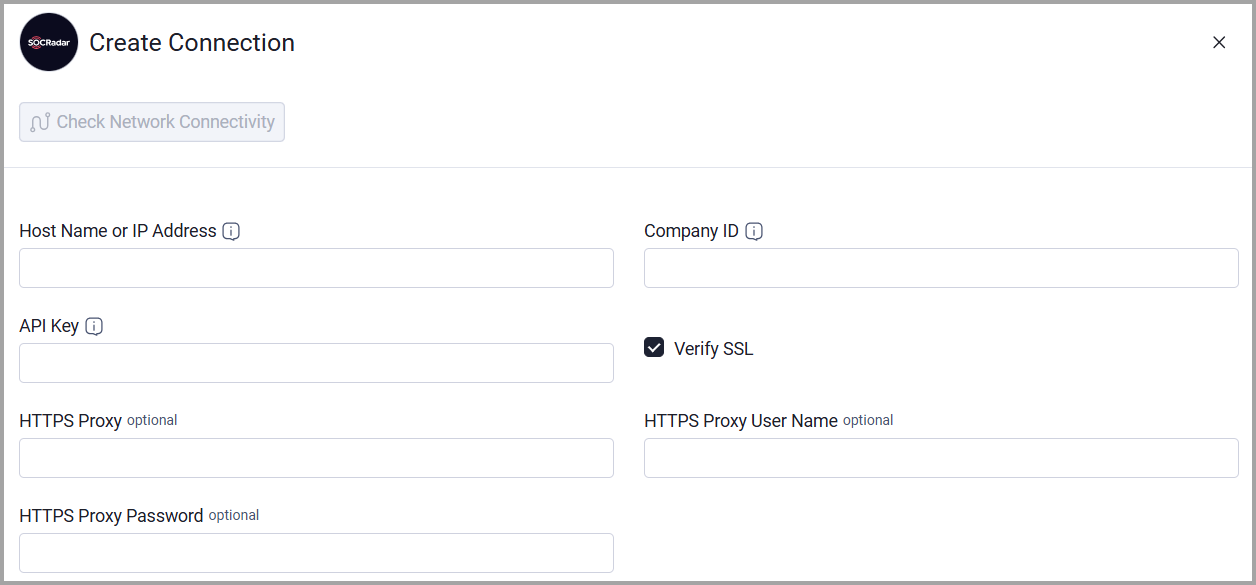
- Provide the following parameters.
Required Parameters
- Host Name or IP Address - Enter the base SOCRadar API domain, including the http:// or https:// prefix and without a specific endpoint. Example:
https://platform.socradar.com/api - Company ID - Enter the SOCRadar company ID used to scope Attack Surface Management asset queries.
- API Key - Enter the SOCRadar API key obtained from Settings > API Options in the SOCRadar Platform.
Optional Parameters
- Verify SSL - Select whether to verify the SSL certificate of the server against the CA database inside of Axonius. For more details, see SSL Trust & CA Settings.
- HTTPS Proxy - Connect the adapter to a proxy instead of directly connecting to the value supplied in Host Name or IP Address.
- HTTPS Proxy User Name - Enter the user name to use when connecting through HTTPS Proxy.
- HTTPS Proxy Password - Enter the password to use when connecting through HTTPS Proxy.
To learn more about common adapter connection parameters and buttons, see Adding a New Adapter Connection.
Updated about 1 month ago