
Upwind
Upwind is a unified cloud-native application protection platform that provides runtime‑powered insights for detecting risks and mitigating misconfigurations across infrastructure and applications.
Asset Types Fetched
Devices, Aggregated Security Findings, Roles, SaaS Applications, Compute Services, Networks, Load Balancers, Databases, Object Storage, Network Services, File Systems, Serverless Functions, Disks, Secrets, Accounts/Tenants, Containers, Application Services
Data Retrieved by the Adapter
The Upwind adapter fetches cloud infrastructure and application assets associated with different asset types.
| Asset Type | Cloud Resources |
|---|---|
| Devices | AWS EC2 Instances, GCP GCE Instances, AWS SSM Managed Instances, Azure Virtual Machines |
| Compute Services | AWS ECS Clusters, AWS EKS Clusters, AWS Auto Scaling Groups, GCP Instance Groups, GCP GKE Clusters, GCP Cloud Run Services, AWS ECR Repositories, Azure AKS Clusters |
| Serverless Functions | AWS Lambda Functions |
| Databases | AWS RDS Clusters, AWS RDS Instances, GCP Cloud SQL Instances, Azure SQL Servers, Azure MySQL Flexible Servers, Azure PostgreSQL Flexible Servers |
| Load Balancers | AWS Application Load Balancers, AWS Network Load Balancers, AWS Classic Load Balancers |
| Network Services | AWS NAT Gateways |
| Networks | AWS VPCs |
| Disks | AWS EBS Volumes |
| File Systems | AWS EFS |
| Object Storage | AWS S3 Buckets, GCP Storage Buckets |
| Secrets | AWS Secrets Manager Secrets |
| Containers | Azure Container Apps |
| Application Services | Azure API Management Services, Azure Databricks Workspaces, Azure Machine Learning Workspaces |
| Security Roles | Azure Role Definitions |
| Accounts | Azure Storage Accounts |
Before You Begin
Ports
- TCP port 80/443
Authentication Method
- Client ID/Client Secret
APIs
Axonius uses the Upwind V2 Inventory Search API.
Creating API Credentials
To connect Axonius to Upwind, you must create API credentials in the Upwind console. Use API-type credentials only. - Cloud account, Sensor, or Integration credentials will not work.
To create API credentials, use the Upwind Credentials Guide or follow these steps:
- Log in to your Upwind Console (https://console.upwind.io)
- Navigate to My Organization > Credentials.
- Click Generate Credentials.
- Select API as the credential type.
- Enter a friendly name, for example "Axonius Integration".
- Click Generate, then Save.
- Copy and securely store the Client ID and Client Secret that appear.
Warning: The Client Secret is only displayed once. If lost, you must create new credentials.
Supported From Version
Supported from Axonius version 8.0.17
Connecting the Adapter in Axonius
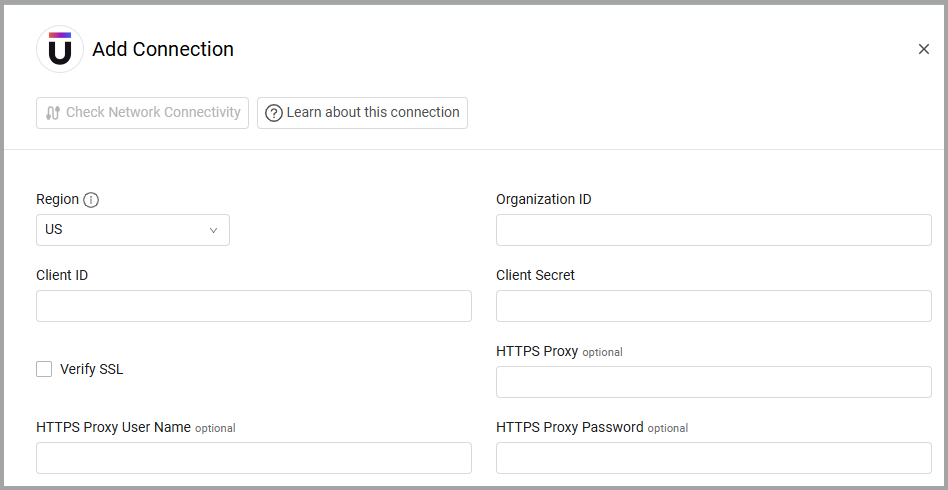
To connect the adapter in Axonius, provide the following parameters:
Required Parameters
- Region (default: US) - Select your upwind.io region, either US, EU, or ME. The API endpoint will be determined by this setting.
- Organization ID - Specify your Upwind organization ID.
- Client ID and Client Secret - The credentials for an account that has the Required Permissions to fetch assets.
Optional Parameters
-
Verify SSL - Select whether to verify the SSL certificate of the server against the CA database inside of Axonius. For more details, see SSL Trust & CA Settings.
-
HTTPS Proxy - Connect the adapter to a proxy instead of directly connecting it to the domain.
-
HTTPS Proxy User Name - The user name to use when connecting to the value supplied in Host Name or IP Address via the value supplied in HTTPS Proxy.
-
HTTPS Proxy Password - The password to use when connecting to the server using the HTTPS Proxy.
To learn more about common adapter connection parameters and buttons, see Adding a New Adapter Connection.
Advanced Settings
Note
Advanced settings can either apply to all connections for this adapter, or to a specific connection. Refer to Advanced Configuration for Adapters.
- Enrich Devices with Vulnerability Findings - Enable this option to enrich Devices with vulnerability data including CVE IDs, CVSS scores, EPSS scores, exploit status, and remediation information. (Vulnerability assets are parsed in Axonius as Security Findings)
Note
To learn more about Adapter Configuration tab advanced settings, see Adapter Advanced Settings.
Updated 14 days ago