
Troverlo
Troverlo is a network intelligence platform that offers asset tracking and monitoring solutions for real-time asset location, current active user tracking, and remote asset action commands.
Use Cases the Adapter Solves
- Real-Time Asset Location Tracking: Track and monitor the last-known and real-time location of assets using GPS coordinates (latitude, longitude, altitude) and location accuracy data to maintain visibility of asset whereabouts
- Asset Inventory Management: Maintain a comprehensive inventory of tracked assets with detailed information including make, model, serial number, operating system, and device identifiers for complete asset visibility
Asset Types Fetched
- Devices
Data Retrieved through the Adapter
The following data can be fetched by the adapter:
Devices: Fields such as: Hostname, Device Name, Device UUID, Device Identifier, Observation data (Time Detected, Latitude, Longitude, Altitude, Accuracy).
Before You Begin
Required Ports
- TCP port 443 (HTTPS)
Authentication Methods
- User Name and Password
- API Token
APIs
Axonius uses the Troverlo API. The following endpoints are called:
Authentication:
POST /AuthToken/Create
Asset Management:
POST /Asset/FindPOST /Observation/Track
Required Permissions
The API user must have the following permissions in the Troverlo platform:
Tenant Access
- Tenant Onboarding - The account used for the adapter must be onboarded as a Tenant in the Troverlo platform
- Tenant Scope - The adapter will only be able to fetch assets and observations associated with the specific Tenant space
Role-Based Access Control (RBAC)
- Viewer Role (minimum) - The user account must have at least the Viewer role, which provides read-only access to:
- View management information related to assets
- View tags, subscriptions, and services
- Access asset tracking and observation data
Note: The exact permission names and role requirements should be confirmed with your Troverlo administrator or Troverlo support, as detailed API permission documentation may not be publicly available.
Supported From Version
Supported from Axonius version 8.0.15.2
Connecting the Adapter in Axonius
Navigate to the Adapters page, search for Troverlo, and click on the adapter tile.
Click Add Connection.
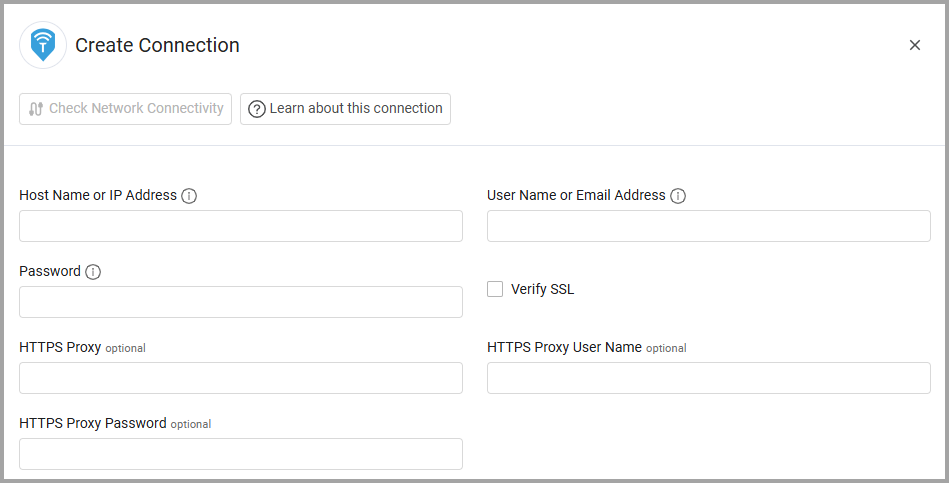
To connect the adapter in Axonius, provide the following parameters:
Required Parameters
- Host Name or IP Address - The base URL of your Troverlo API. Should contain a prefix of
http://orhttps://. - User Name or Email Address - The username or email address for Troverlo authentication. Used to obtain the JWT access token.
- Password - The password for Troverlo authentication. Used to obtain the JWT access token.
Optional Parameters
- Verify SSL - Select whether to verify the SSL certificate of the server against the CA database inside of Axonius. For more details, see SSL Trust & CA Settings.
- HTTPS Proxy - Connect the adapter to a proxy instead of directly connecting it to the domain
- HTTPS Proxy User Name - The user name to use when connecting to the value supplied in Host Name or IP Address via the value supplied in HTTPS Proxy
- HTTPS Proxy Password - The password to use when connecting to the server using the HTTPS Proxy
To learn more about common adapter connection parameters and buttons, see Adding a New Adapter Connection.
Updated 9 days ago