
Netwrix Endpoint Protector
Netwrix Endpoint Protector is an agent-based DLP (Data Loss Prevention) solution that provides device control, content-aware protection, and enforced encryption for endpoint security management.
Use Cases the Adapter Solves
- Endpoint Protection Coverage Visibility: Gain comprehensive visibility into which devices and users are protected by Netwrix Endpoint Protector, enabling you to identify coverage gaps in your DLP strategy.
- Compliance Enforcement Tracking: Monitor and verify that endpoint protection policies are consistently applied across your organization to meet data security and compliance requirements.
Asset Types Fetched
Devices, Users
Data Retrieved through the Adapter
Devices - Fields such as Hostname, Name, Domain
Users - Fields such as Username, Display Name, Email Address
Before You Begin
Required Ports
- TCP port 443 (HTTPS)
Authentication Methods
API Key Authentication
APIs
Axonius uses the Netwrix Endpoint Protector SCIM 2.0 API. The following endpoints are called:
GET /scim/v2/UsersGET /scim/v2/Computers
Required Permissions
The API key used for the adapter must have appropriate permissions to access the SCIM 2.0 API endpoints for reading user and computer information.
Note: The exact permission names and setup instructions should be confirmed with your Netwrix Endpoint Protector administrator or Netwrix support.
Supported From Version
Supported from Axonius version 8.0
Connecting the Adapter in Axonius
Navigate to the Adapters page, search for Netwrix Endpoint Protector, and click on the adapter tile.
Click Add Connection.
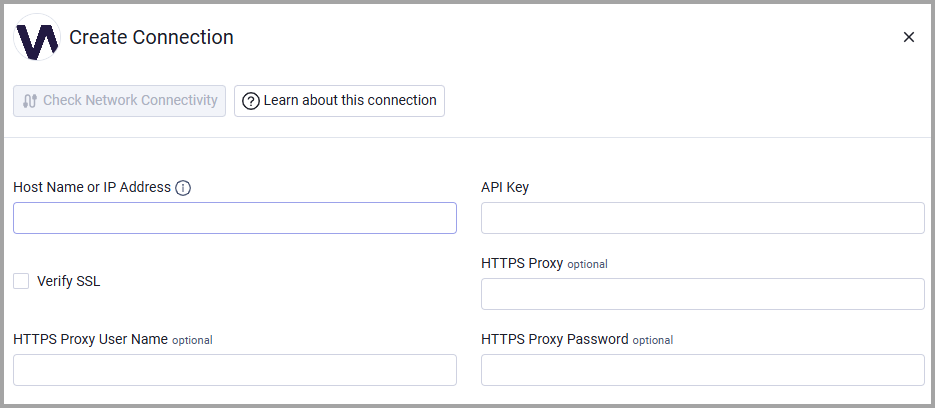
To connect the adapter in Axonius, provide the following parameters:
Required Parameters
- Host Name or IP Address - Base domain for the API, should contain a prefix of
http://orhttps://. Do not add any specific endpoints after the domain. Example:https://endpoint-protector.yourcompany.com - API Key - The API key generated from Netwrix Endpoint Protector that has permissions to access the SCIM 2.0 API.
Optional Parameters
- Verify SSL - Select whether to verify the SSL certificate of the server against the CA database inside of Axonius. For more details, see SSL Trust & CA Settings.
- HTTPS Proxy - Connect the adapter to a proxy instead of directly connecting it to the domain.
- HTTPS Proxy User Name - The user name to use when connecting to the value supplied in Host Name or IP Address via the value supplied in HTTPS Proxy.
- HTTPS Proxy Password - The password to use when connecting to the server using the HTTPS Proxy.
To learn more about common adapter connection parameters and buttons, see Adding a New Adapter Connection.
Updated 6 months ago