
Ivanti Neurons for ITSM
Ivanti Neurons for ITSM is a service management platform with CMDB capabilities for asset lifecycle and configuration management.
Use Cases the Adapter Solves
- Comprehensive Asset Visibility: Gain complete visibility into configuration items (CIs) and employee data managed in Ivanti Neurons for ITSM to identify unmanaged or misconfigured assets.
- CMDB Data Enrichment: Correlate ITSM asset data with other sources to verify configuration accuracy, track asset ownership, and improve asset lifecycle management.
- Compliance and Governance: Monitor device compliance status, encryption status, and patch levels to ensure adherence to security policies and regulatory requirements.
Asset Types Fetched
This adapter fetches the following types of assets:
- Devices
- Users
Data Retrieved through the Adapter
Devices - fields such as: Device Name, Hostname, Serial Number, Manufacturer
Users - fields such as: Display Name, Email Address, Department, Title, Location
Before You Begin
Required Ports
- TCP port 443 (HTTPS)
Authentication Methods
REST API Key Authentication
APIs
Axonius uses the Ivanti Neurons for ITSM OData API. The following endpoints are called:
GET /api/odata/businessobject/CIs- Retrieves configuration items (devices)GET /api/odata/businessobject/FRS_CIComponent__NetworkAdapters- Retrieves network adapter information for NIC enrichment (optional, disabled by default)GET /api/odata/businessobject/Employees- Retrieves employee information (users)GET /api/odata/businessobject/incidents- Retrieves incident information (optional device enrichment)
Required Permissions
The account used for the adapter must have administrative permissions to access the API endpoints.
Note
The exact permission names should be confirmed with your Ivanti Neurons for ITSM administrator or Ivanti support, as the API documentation is not publicly available.
Supported From Version
Supported from Axonius version 8.0.24.
Connecting the Adapter in Axonius
Navigate to the Adapters page, search for Ivanti Neurons for ITSM, and click on the adapter tile.
Click Add Connection.
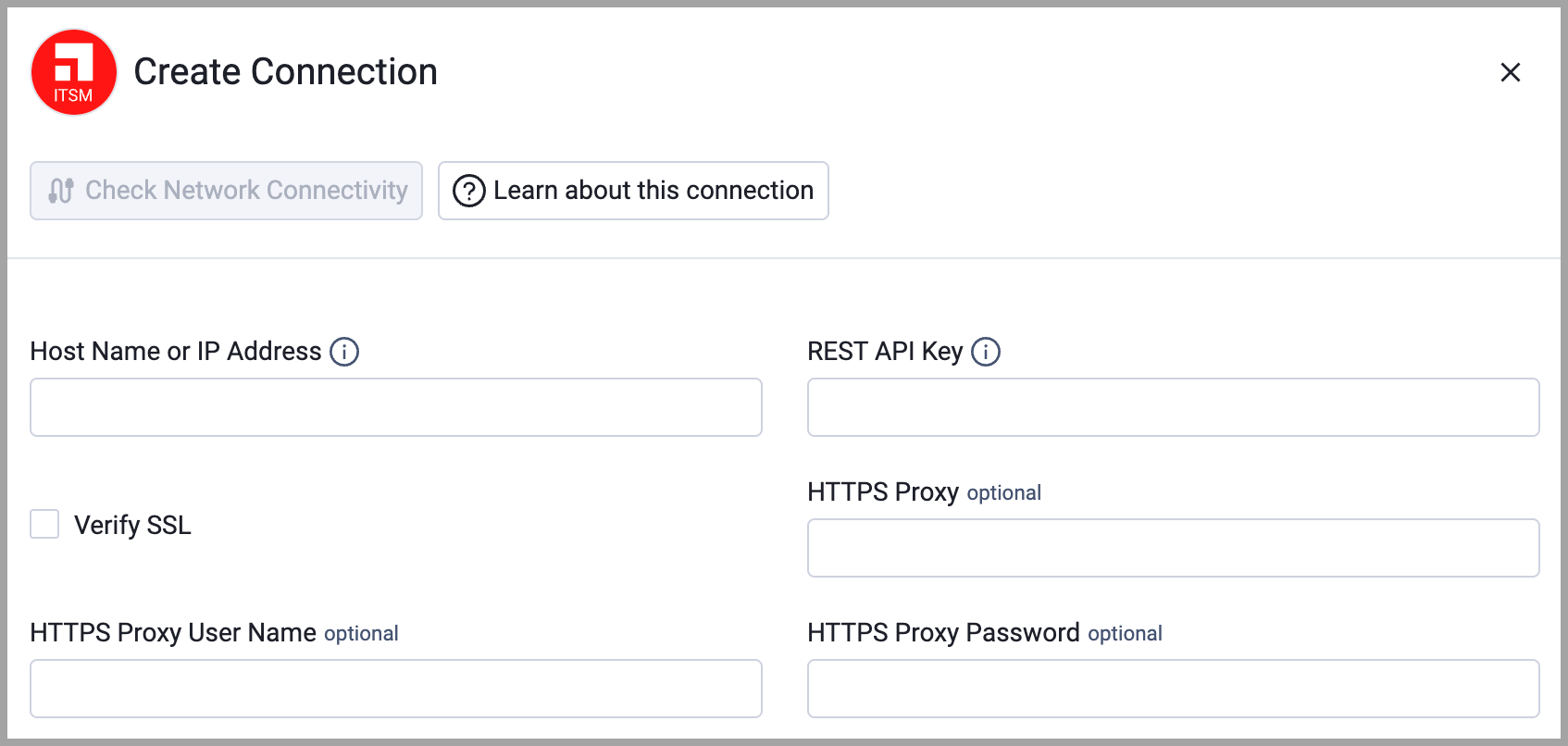
To connect the adapter in Axonius, provide the following parameters:
Required Parameters
- Host Name or IP Address - Base URL for the Ivanti Neurons for ITSM tenant. Must include the protocol prefix (https://). Example:
https://yourtenant.ivanti.com - REST API Key - REST API Key created via Configuration Console > Security Controls > API Keys. This is the Reference ID of the API key.
- Verify SSL - Select whether to verify the SSL certificate of the server against the CA database inside of Axonius. For more details, see SSL Trust & CA Settings.
Optional Parameters
- HTTPS Proxy - Connect the adapter to a proxy instead of directly connecting it to the domain.
- HTTPS Proxy User Name - The user name to use when connecting to the value supplied in Host Name or IP Address via the value supplied in HTTPS Proxy.
- HTTPS Proxy Password - The password to use when connecting to the server using the HTTPS Proxy.
To learn more about common adapter connection parameters and buttons, see Adding a New Adapter Connection.
Advanced Settings
Note:
Advanced settings can either apply to all connections for this adapter, or to a specific connection. Refer to Advanced Configuration for Adapters.
To learn more about Adapter Configuration tab advanced settings, see Adapter Advanced Settings.
- Enrich ConfigurationItems with Network Adapters (optional, disabled by default) - When enabled, Axonius fetches network adapter information from the
FRS_CIComponent__NetworkAdaptersOData endpoint and uses it to enrich thenetwork_interfacesfields (IP addresses, MAC addresses, subnets) on each device. - Enrich ConfigurationItems with Incidents (optional, disabled by default) - When enabled, the adapter includes an opt-in Incidents data source that enriches Devices with incident details.
- Incident Statuses to Fetch (Optional, default: empty) - Select one or more incident statuses to retrieve only incidents whose status matches your selection. Leave this setting empty to retrieve incidents in all statuses.
Related Enforcement Actions
Updated 10 days ago