
DryRun Security
DryRun Security is an AI-native application security platform designed to integrate seamlessly into developers' workflows, providing real-time, contextual analysis of code changes to identify and mitigate potential vulnerabilities before they reach production.
Use Cases the Adapter Solves
- Security Visibility Across Development Repositories: Gain comprehensive visibility into all code repositories connected to DryRun Security, enabling centralized tracking and governance of application security across your development environment.
- Risk Assessment and Compliance Monitoring: Identify repositories with security findings and track their remediation status, supporting compliance initiatives and security posture assessments across the software development lifecycle.
Asset Types Fetched
- Application Resources
Data Retrieved through the Adapter
Application Resources - Fields such as Name, Repository ID, Account ID
Before You Begin
Required Ports
- TCP port 443 (HTTPS)
Authentication Methods
API Key Authentication
APIs
Axonius uses the DryRun Security Simple API. The following endpoints are called:
GET /v1/accounts- Retrieves all accounts accessible by the API keyGET /v1/accounts/{account_id}/repositories- Retrieves all repositories for a specific account
Required Permissions
The API key used for the adapter must have access to the accounts you want to retrieve repository information from.
Note: API keys are scoped to specific accounts within DryRun Security. When creating the API key in the DryRun Security dashboard (Settings > Access Keys), ensure the key is scoped to all accounts you want Axonius to access.
Supported From Version
Supported from Axonius version 8.0.22
Connecting the Adapter in Axonius
Navigate to the Adapters page, search for DryRun Security, and click on the adapter tile.
Click Add Connection.
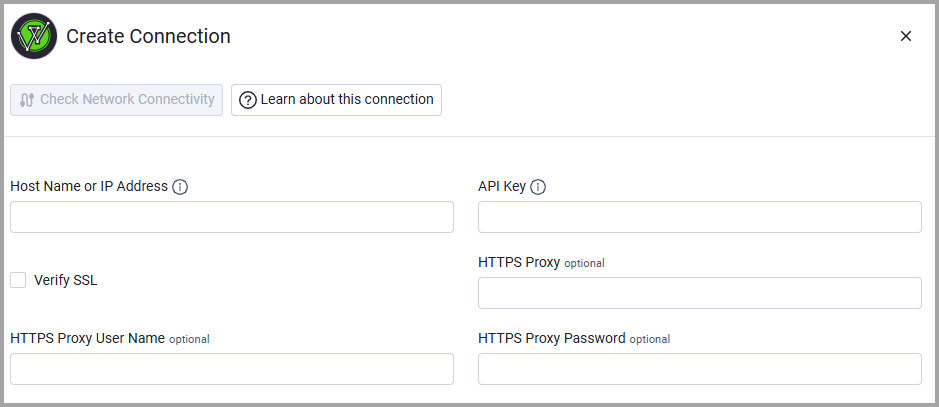
To connect the adapter in Axonius, provide the following parameters:
Required Parameters
- Host Name or IP Address - Base domain for the DryRun Security API. Example:
https://simple-api.dryrun.security - API Key - Bearer token API key from DryRun Security dashboard.
-
Optional Parameters
- Verify SSL - Select whether to verify the SSL certificate of the server against the CA database inside of Axonius. For more details, see SSL Trust & CA Settings.
- HTTPS Proxy - Connect the adapter to a proxy instead of directly connecting it to the domain.
- HTTPS Proxy User Name - The user name to use when connecting to the value supplied in Host Name or IP Address via the value supplied in HTTPS Proxy.
- HTTPS Proxy Password - The password to use when connecting to the server using the HTTPS Proxy.
To learn more about common adapter connection parameters and buttons, see Adding a New Adapter Connection.
Updated 10 days ago