
Viso Trust
VISO Trust is a third‑party risk management platform that provides automated security due diligence and continuous assessment of vendor trust data using AI insights.
The adapter ingests user and organizational unit data from the VISO Trust API for correlation inside Axonius.
Asset Types Fetched
 Users |
  Organizational Units
Before you begin
Ports
- TCP port 80/443
Authentication Method
- API Token (Bearer token) sent in Authorization header.
APIs
- VISO Trust REST API — v1
/api/v1/users
Permissions
The following roles/permissions are required for the account used by the adapter:
- Org Admin
- Org User
Supported From Version
- Supported from Axonius version 8.0.9
Connecting the Adapter in Axonius
Navigate to the Adapters page, search for VISO Trust, and click on the adapter tile.
Click Add Connection.
To connect the adapter in Axonius, provide the following parameters:
Required Parameters
- Host Name or IP Address - Base domain for the API, must include protocol prefix
http://orhttps://. Do not include API path segments. Example:https://api.visotrust.example/. - API Token - Bearer token used for VISO Trust API authentication. Refer to How to Create an API Access Token
- Connection Label - Connection display label in Axonius.
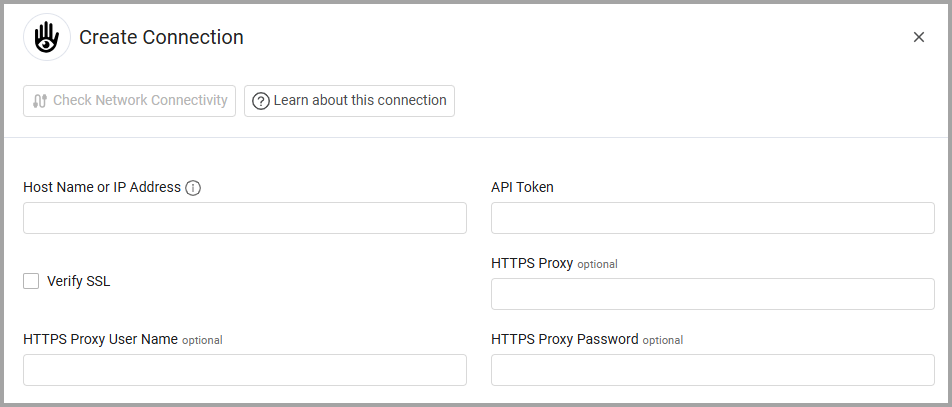

Optional Parameters
- Verify SSL - Select whether to verify the SSL certificate of the server against the CA database inside of Axonius. For more details, see SSL Trust & CA Settings.
- HTTPS Proxy - Connect the adapter to a proxy instead of directly connecting it to the domain.
- HTTPS Proxy User Name - The user name to use when connecting to the value supplied in Host Name or IP Address via the value supplied in HTTPS Proxy.
- HTTPS Proxy Password - The password to use when connecting to the server using the HTTPS Proxy.
To learn more about common adapter connection parameters and buttons, see Adding a New Adapter Connection.
Updated 9 months ago
Did this page help you?